2500_Users_Manual-.pdf - 第213页
Troubleshooting The beam moves quickly. To avoid injury, keep your hands, hair, and loose clothing away from the path of the beam. ProMaster 2500 User Manual 6-7
Troubleshooting
Troubleshooting
Flow
Charts
These
troubleshooting
flow
charts
help
you
do
the
following:
•
Isolate
the
area
where
the
problem
is
occurring.
•
Determine
whether
a
malfunctioning
component
or
assembly
requires
cleaning,
adjusting,
or
replacement.
•
Go
to
the
page
in
the
manual
that
describes
the
appropriate
procedure.
The
following
flow
charts
are
included
on
the
following
pages:
Power-up
Failures
6-8
Beam
Does
Not
Pick
Up
Device
Correctly
6-10
Beam
Does
Not
Insert
Device
Correctly
6-12
Programming
Failures
6-14
Label
Printing
Problems
6-16
Label
Application
Problems
6-18
Beam
Does
Not
Deliver
Device
Correctly
6-22
WARNING:
Do
not
perform
any
procedure
that
requires
you
to
lift
the
main
plate
of
the
2500
unless
you
are
a
service
technician
trained
on
electromechanical
equipment.
6-6
ProMaster
2500
User
Manual
Troubleshooting
The
beam
moves
quickly.
To
avoid
injury,
keep
your
hands,
hair,
and
loose
clothing
away
from
the
path
of
the
beam.
ProMaster
2500
User
Manual
6-7
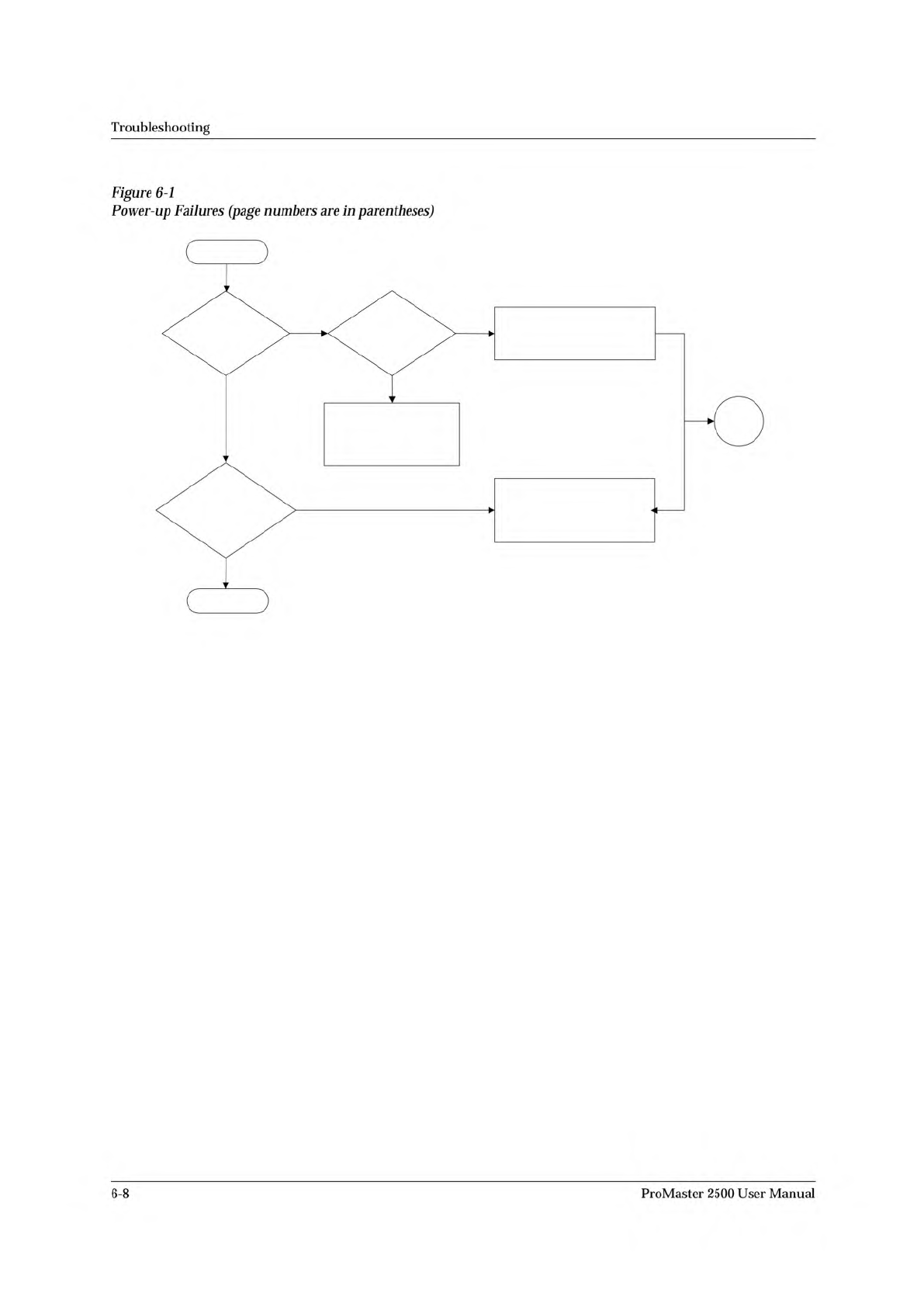
Do es
25 00 po we r u p i n
remo te o r lo ca l
m o d e ?
Do es
25 00 d isp l ay
ha nd ler
me s s a g e ?
Do e s
PE * un i t co m mun ic a t e
wi th Ta sk Li nk?
Ch ec k m a in fu se (7- 2)
Ch eck Tor oi d & c ont ro ll er
bo ar d po we r s up pl ie s ( 5- 13)
Re co rd m es sag e & t ry t o
sol ve p robl e m.
If u ns ucc es sful , ca ll
C ust om er S up po rt .
Ch e ck R S- 2 3 2 C c a b l e
co nne cti on ( 2- 16, 2 -19)
Che c k PE r e fe re n ce v o lta ge s
( 5-5 1)
* PE = P ro g r a mmin g Ele c t ronic s
Y e s
N o
Ye s
N o
Y e s
N o
Start
Go to
St art
E n d
Troubleshooting
Figure
6-1
Power-up
Failures
(page
numbers
are
in
parentheses)
6-8
ProMaster
2500
User
Manual