2500_Users_Manual-.pdf - 第246页
Repair and Replacement Procedures CAUTION: Cover the power supply assemblies in the base of the 2500 with a large sheet of paper to catch any mounting hardware (screws, washers, and nuts) that might otherwise fall onto t…
Repair
and
Replacement
Procedures
Replacing
the
Labeler
Power
Supply
If
the
labeler
power
supply
fails,
follow
the
steps
below
to
replace
it.
Be
sure
to
note
the
direction
of
rotation
before
you
remove
the
fan
so
that
you
can
reinstall
it
correctly.
1.
2.
Turn
off
the
2500
and
remove
the
power
cord.
Disconnect
the
three
AC
input
cables
on
the
right
side
of
the
power
supply
assembly.
3.
Disconnect
the
two
output
cables
on
the
left
side
of
the
power
supply
assembly.
4.
Use
a
3/32-inch
hex
wrench
to
remove
the
two
mounting
screws
from
the
back
panel
of
the
2500.
5.
6.
Carefully
lift
out
the
labeler
power
supply
assembly.
Install
the
new
labeler
power
supply
assembly,
reconnect
the
cables,
and
reinstall
the
mounting
screws.
System
Fan
Replacement
This
procedure
describes
the
steps
required
to
remove
and
replace
the
system
fan.
Replacing
the
System
Fan
If
the
system
fan
fails,
follow
the
steps
below
to
replace
it.
1.
2.
3.
4.
Turn
off
the
2500
and
remove
the
power
cord.
Remove
the
four
7/64-inch
hex
screws.
Carefully
lift
out
the
system
fan.
Install
the
new
system
fan
and
reconnect
the
power
cable.
Controller
Board
Replacement
This
procedure
describes
the
steps
required
to
remove
and
replace
the
controller
board.
Replacing
the
Controller
Board
If
the
controller
board
fails,
follow
the
steps
below
to
replace
it.
Make
sure
you
observe
all
static
safety
precautions.
1.
2.
Turn
off
the
2500
and
remove
the
power
cord.
Note
the
positions
and
polarities
of
all
of
the
cables
connected
to
the
controller
board
before
you
disconnect
any
of
the
cable
connectors.
3.
Disconnect
all
of
the
cable
connectors.
ProMaster
2500
User
Manual
7-21
Repair
and
Replacement
Procedures
CAUTION:
Cover
the
power
supply
assemblies
in
the
base
of
the
2500
with
a
large
sheet
of
paper
to
catch
any
mounting
hardware
(screws,
washers,
and
nuts)
that
might
otherwise
fall
onto
the
power
supply
assemblies
as
you
work
If
a
piece
of
mounting
hardware
is
accounted
fbr
when
you
install
the
new
controller
board,
do
not
turn
on
the
2500
until
you
have
located
Se
missing
piece
of
mounting
hardware.
If
a
screw,
washer,
or
nut
contacts
one
of
the
2500's
base
assemblies,
an
electrical
short
could
occur
when
you
turn
on
the
2500,
resulting
in
severe
damage
to
the
2500.
4.
Use
a
1/
4-inch
hex
nut
driver
to
remove
the
ten
nuts
holding
the
controller
board
to
the
front
inner
wall
of
the
base
of
the
2500.
5.
Lift
the
controller
board
straight
up.
Note:
Eac/i
of
the
mounting
screws
under
the
controller
board
has
a
nylon
spacer
on
比
Do
not
remove
these
spacers
from
the
mounting
studs.
6.
Place
the
controller
board
on
an
antistatic
mat
or
bag.
7.
Transfer
the
firmware
from
U15
and
U43
(unless
new
firmware
is
specifically
issued),
as
well
as
the
U16
EEPROM,
to
the
new
controller
board.
8.
Install
the
new
controller
board.
Note:
Refer
to
the
controller
board
wiring
diagram
in
Appendix
C.
Beam
Assembly
Component
Replacement
These
procedures
describe
the
steps
required
to
remove
and
replace
the
beam
assembly
components.
Replacing
the
Flex
Coupler
If
the
flex
coupler
is
damaged,
follow
the
steps
below
to
replace
it.
1.
Turn
off
the
2500
and
remove
the
power
cord.
2.
Remove
the
beam
traverse
motor
as
described
on
page
7-15,
but
do
not
remove
the
cables.
3.
Use
a
7/
64-inch
hex
wrench
to
remove
the
set
screw
on
the
left
side
of
the
flex
coupler.
(The
flex
coupler
is
attached
to
the
end
of
the
lead
screw.)
4.
Remove
the
flex
coupler.
5.
Attach
the
new
flex
coupler
to
the
beam
traverse
motor
shaft.
Tighten
with
a
torque
wrench
and
a
right-side
screw
using
24
inch-pounds
of
torque.
CAUTION:
Over-
tigh
tening
the
set
screw
can
damage
the
flex
coupler.
7-22
ProMaster
2500
User
Manual
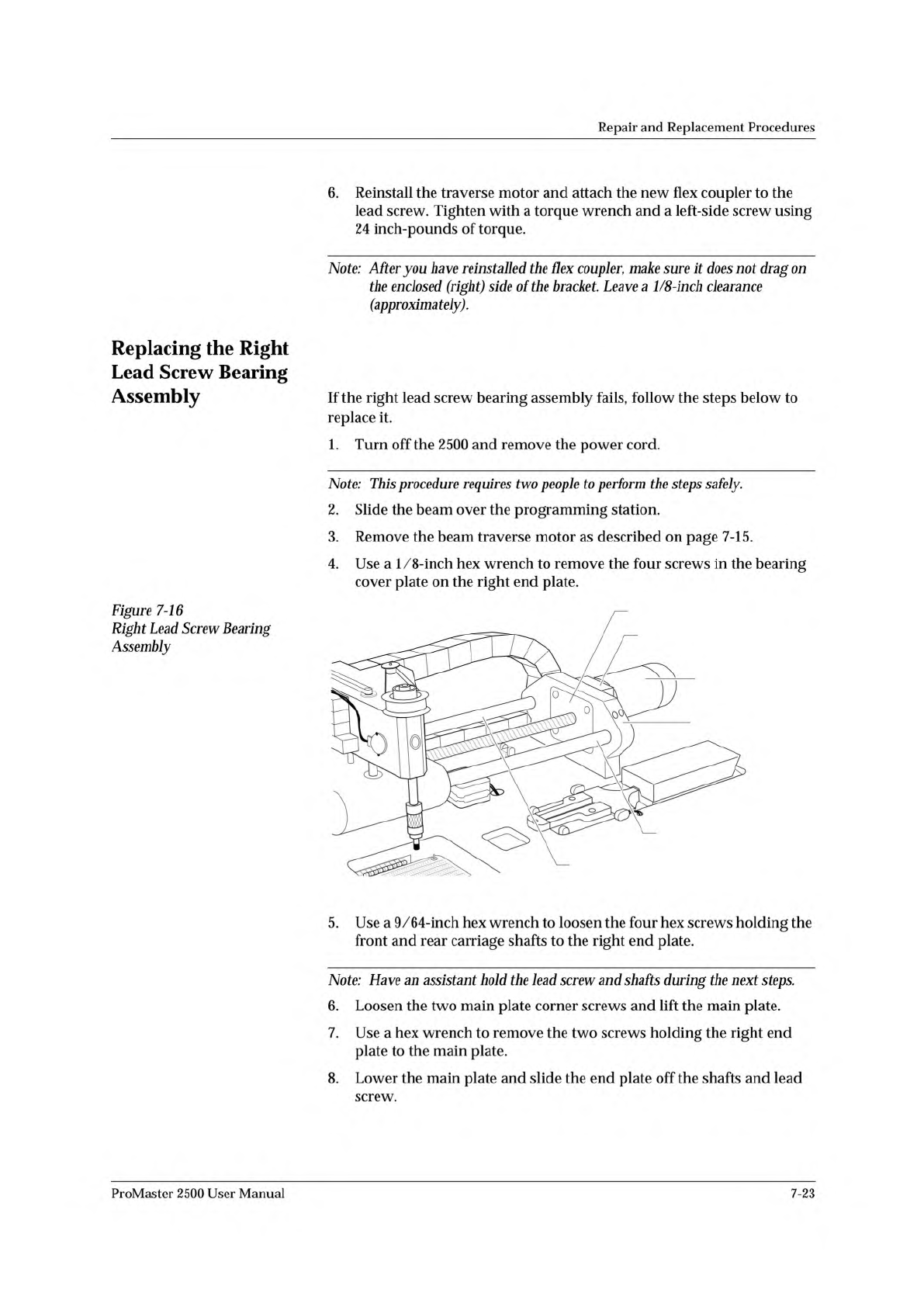
2389-1
BEAM TRAVERSE
MOUNTING BLOCK
RIGHT END PLATE
BEARING COVER PLATE
BEAM TRAVERSE
MOTOR
REAR CARRIAGE SHAFT
FRONT COVER SHAFT
Repair
and
Replacement
Procedures
6.
Reinstall
the
traverse
motor
and
attach
the
new
flex
coupler
to
the
lead
screw.
Tighten
with
a
torque
wrench
and
a
left-side
screw
using
24
inch-pounds
of
torque.
Note:
After
you
have
reinstalled
the
Hex
coupler,
make
sure
it
does
not
drag
on
the
enclosed
(right)
side
of
the
bracket.
Leave
a
1/8-inch
clearance
(approximately).
Replacing
the
Right
Lead
Screw
Bearing
Assembly
Figure
7-16
Right
Lead
Screw
Bearing
Assembly
If
the
right
lead
screw
bearing
assembly
fails,
follow
the
steps
below
to
replace
it.
1.
Turn
off
the
2500
and
remove
the
power
cord.
Note:
This
procedure
requires
two
people
to
perform
the
steps
safely.
2.
Slide
the
beam
over
the
programming
station.
3.
Remove
the
beam
traverse
motor
as
described
on
page
7-15.
4.
Use
a
1/8-inch
hex
wrench
to
remove
the
four
screws
in
the
bearing
cover
plate
on
the
right
end
plate.
5.
Use
a
9/64-inch
hex
wrench
to
loosen
the
four
hex
screws
holding
the
front
and
rear
carriage
shafts
to
the
right
end
plate.
Note:
Have
an
assistant
hold
the
lead
screw
and
shafts
during
the
next
steps.
6.
Loosen
the
two
main
plate
corner
screws
and
lift
the
main
plate.
7.
Use
a
hex
wrench
to
remove
the
two
screws
holding
the
right
end
plate
to
the
main
plate.
8.
Lower
the
main
plate
and
slide
the
end
plate
off
the
shafts
and
lead
screw.
ProMaster
2500
User
Manual
7-23