3OM-1064-001.pdf - 第222页
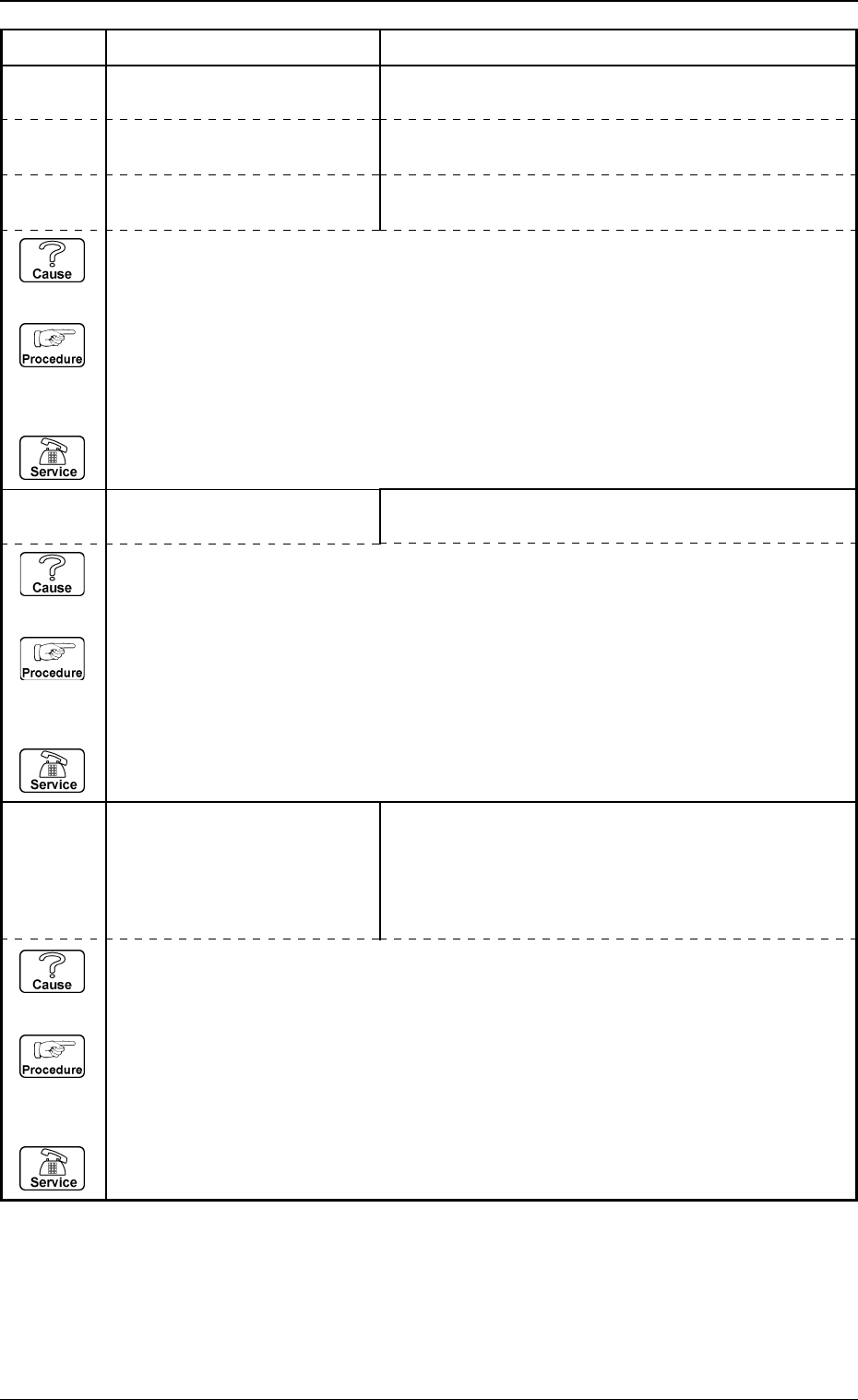
3. Control-to-Control Communication Error Code and List of Error Messages 0005-002 4-26 Tg0248-PM-ER Error Code Display A Display B 1 1350000 TRANSFERRING THE P .E.C. RECOGNITION DA T A UNA V AILABLE FIDUCIAL MARK CODE W…
3. Control-to-Control Communication Error Code and List of Error Messages
0005-002 4-25 Tg0248-PM-ER
Error Code Display A Display B
10560000 INITIALIZING THE INTERNAL
COMPONENT DATA
“MODE” EXCEEDS THE RANGE OF SETTING.
10
XXXXXX
ETC.
except the
above-
described
codes
ETC.
10550001 MACHINE TYPE RECOGNI-
TION
“LANGUAGE” EXCEEDS THE RANGE OF SETTING.
10550002 MACHINE TYPE RECOGNI-
TION
“TRACKBALL PORT” EXCEEDS THE RANGE OF
SETTING.
10550000 MACHINE TYPE RECOGNI-
TION
“MACHINE CODE” OR “TYPE CODE” EXCEEDS THE
RANGE OF SETTING.
(Cause 1) This is the device’s self-diagnostic message.
(Reset Procedure in the case of Cause 1)
Reset Procedure
(1) Press the [CLEAR ALARM] key and the buzzer stops sounding.
(2) Press the [ZERO] button to return all the axes to their original positions.
(3) Re-start.
(4) If the device can’t be re-started, contact our service personnel.
(Cause 1) This is the device’s self-diagnostic message.
(Reset Procedure in the case of Cause 1)
Reset Procedure
(1) Press the [CLEAR ALARM] key and the buzzer stops sounding.
(2) Press the [ZERO] button to return all the axes to their original positions.
(3) Re-start.
(4) If the device can’t be re-started, contact our service personnel.
(Cause 1) This is the device’s self-diagnostic message.
(Reset Procedure in the case of Cause 1)
Reset Procedure
(1) Press the [CLEAR ALARM] key and the buzzer stops sounding.
(2) Press the [ZERO] button to return all the axes to their original positions.
(3) Re-start.
(4) If the device can’t be re-started, contact our service personnel.
3. Control-to-Control Communication Error Code and List of Error Messages
0005-002 4-26 Tg0248-PM-ER
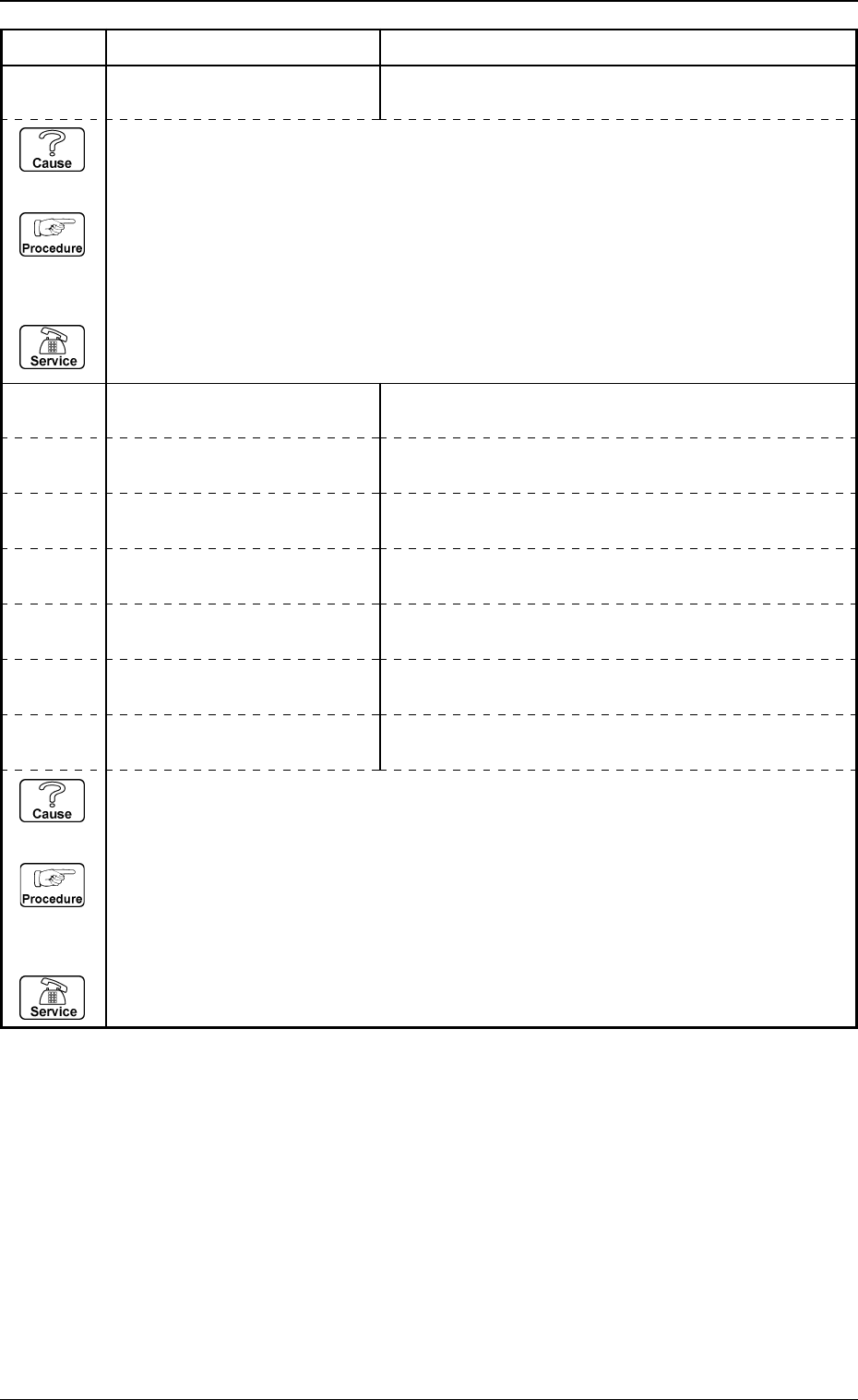
Error Code Display A Display B
11350000 TRANSFERRING THE P.E.C.
RECOGNITION DATA
UNAVAILABLE FIDUCIAL MARK CODE WAS SET.
11350001 TRANSFERRING THE P.E.C.
RECOGNITION DATA
“MARK SIZE D2” IS TOO BIG, COMPARED WITH “D1”.
11350004 TRANSFERRING THE P.E.C.
RECOGNITION DATA
“WINDOW SIZE” IS SMALLER THAN “MARK SIZE”.
11350005 TRANSFERRING THE P.E.C.
RECOGNITION DATA
“MARK SIZE D2” IS NOT SET.
11350006 TRANSFERRING THE P.E.C.
RECOGNITION DATA
“MARK SIZE D3” IS NOT SET.
11350002 TRANSFERRING THE P.E.C.
RECOGNITION DATA
“MARK SIZE D3” IS TOO BIG, COMPARED WITH “D1”.
11350003 TRANSFERRING THE P.E.C.
RECOGNITION DATA
“MARK SIZE D2” IS TOO BIG, COMPARED WITH “D3”.
11300000 TRANSFERRING THE CAM-
ERA MAGNIFICATION DATA
THE TRANSFERRED MAGNIFICATION DOES NOT
MEET THE SPECIFICATIONS OF THE MACHINE.
(Cause 1) This is the device’s self-diagnostic message.
(Reset Procedure in the case of Cause 1)
Reset Procedure
(1) Press the [CLEAR ALARM] key and the buzzer stops sounding.
(2) Press the [ZERO] button to return all the axes to their original positions.
(3) Re-start.
(4) If the device can’t be re-started, contact our service personnel.
(Cause 1) This is the device’s self-diagnostic message.
(Reset Procedure in the case of Cause 1)
Reset Procedure
(1) Press the [CLEAR ALARM] key and the buzzer stops sounding.
(2) Press the [ZERO] button to return all the axes to their original positions.
(3) Re-start.
(4) If the device can’t be re-started, contact our service personnel.
3. Control-to-Control Communication Error Code and List of Error Messages
0009-003 4-27 Tg0248-PM-ER
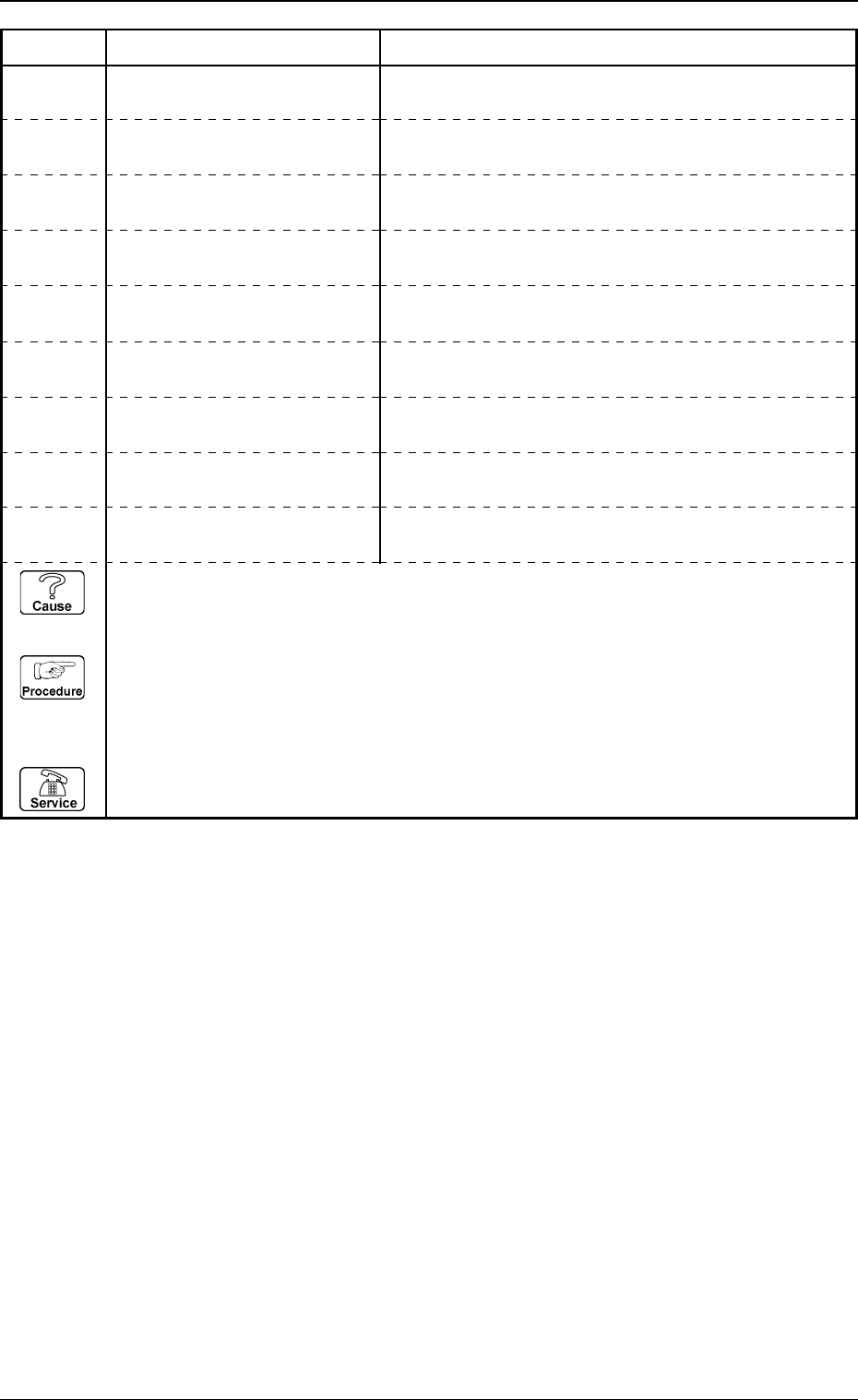
Error Code Display A Display B
11360001 TRANSFERRING THE COM-
PONENT RECOGNITION DATA
UNABAILABLE RECOGNITION IN CAMERA WITH MA-
CHINE BECAUSE “OUTWARD LENGTH” IS BIG.
11360002 TRANSFERRING THE COM-
PONENT RECOGNITION DATA
11360003 TRANSFERRING THE COM-
PONENT RECOGNITION DATA
UNAVAILABLE RECOGNITION IN CAMERA WITH MA-
CHINE BECAUSE “LEAD PITCH” IS SMALL.
11360004 TRANSFERRING THE COM-
PONENT RECOGNITION DATA
UNAVAILABLE RECOGNITION IN CAMERA WITH MA-
CHINE BECAUSE “BALL DIAMETER” IS SMALL.
11360000 TRANSFERRING THE COM-
PONENT RECOGNITION DATA
UNABAILABLE RECOGNITION IN CAMERA WITH MA-
CHINE BECAUSE “OUTWARD LENGTH” IS SMALL.
11360005 TRANSFERRING THE COM-
PONENT RECOGNITION DATA
UNAVAILABLE RECOGNITION IN CAMERA WITH MA-
CHINE BECAUSE “BALL PITCH” IS SMALL.
11360006 TRANSFERRING THE COM-
PONENT RECOGNITION DATA
ALL CAMERAS ARE CANCELED DUE TO THE PARAM-
ETER SET FOR “VIEW RANGE SET”.
UNAVAILABLE RECOGNITION IN CAMERA WITH MA-
CHINE BECAUSE “LEAD WIDTH” IS SMALL.
(Cause 1) This is the device’s self-diagnostic message.
(Reset Procedure in the case of Cause 1)
Reset Procedure
(1) Press the [CLEAR ALARM] key and the buzzer stops sounding.
(2) Press the [ZERO] button to return all the axes to their original positions.
(3) Re-start.
(4) If the device can’t be re-started, contact our service personnel.
11360007 TRANSFERRING THE COM-
PONENT RECOGNITION DATA
POLARITY CANNOT BE DETECTED BECAUSE
“OUTWARD LENGTH” IS BIG.
11360008 TRANSFERRING THE COM-
PONENT RECOGNITION DATA
“FLUX DIP & MOUNT” IS SET AS MOUNT MODE BUT
THERE IS NOT MIN VIEW CAMERA WITH MACHINE.