3OM-1064-001.pdf - 第26页
Check whether a problem has arisen in the of fset of the P .E.C. recognition camera. *5 If the offset has a problem, it will result in overall positional devia- tion of placement. Confirm that there is no problem in the …
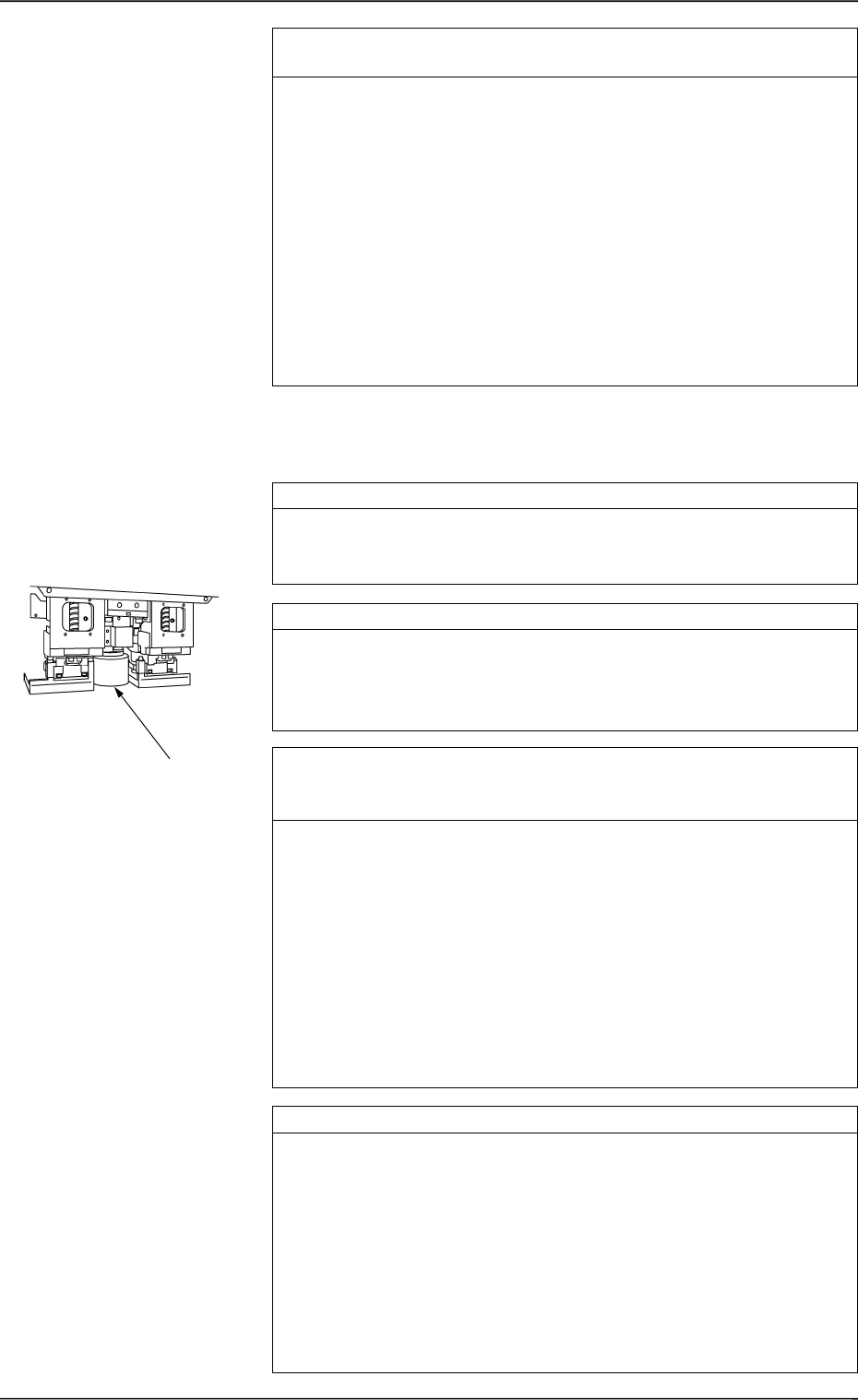
Check whether a problem has arisen in the offset of the compo-
nent recognition camera. *4
If the offset has a problem, the component recognized by the camera
will deviate from the correct position when placed.
Confirm that the offset data of the component recognition camera is
correctly set.
Note: Although the offset data of the component recognition cam-
era can be taught at the “OFFSET TEACH” display, it is
required to re-teach a series of device offset data. (Hierarchi-
cal Sequence: “SPECIAL SEL.” Display → “OFFSET
TEACH” Display)
A special jig is also required for the teaching operations.
Whenever it is necessary to perform the teaching operations,
consult our sales personnel for details.
Check whether fiducial marks are proper in size. *1
If the set mark does not match the actually captured image in size, it
will result in false recognition, positional deviation, etc.
Check whether the set mark is proper in size.
Check for dust and dirt on the lenses. *2
Dirt and dust accumulated on the lenses may cause false recognition
frequently.
Check that dirt and dust are not included in the captured images.
If necessary, clean the lenses with a lens cleaner.
Check whether the gain and level offset data for the P.E.C. cam-
era is proper, using an actual P.C.B. (P.C.B. on which component
are actually placed). *3
It is required to check the gain and level offset data for the P.E.C.
camera every time the current program is changed to another one.
The gain and level may also differ depending on each production lot
of P.C.B.’s.
Make a P.E.C. recognition test and confirm that P.C.B.’s can be rec-
ognized normally.
If the contrast between the mark and the background is not sufficient,
stable recognition cannot be expected.
While changing the gain and level data, check how the recognition is
made and determine appropriate parameters which enable stable rec-
ognition. Then, enter the parameters in the device offset data.
Check whether the lamps for P.E.C. recognition are “ON”. *4
Check whether the power voltage for lighting is proper.
Open the "P.E.C. RECOG LIGHTING" display and turn on the lamps
for P.E.C. recognition. (Hierarchical Sequence: “SPECIAL SEL.”
Display → “UNIT ADJUSTMENT” Display → “RECOGNITION
LIGHTING” Display → “P.E.C. RECOG LIGHTING” Display)
(Perform the checking for both “CAM-A3” and “CAM-B3”.)
• Confirm that the lamps for P.E.C. recognition lighting are “ON”.
• Confirm that the output voltages of power supply “G21” and “G22”
on Beams A and B are 5.0 ± 1.0 V when the lamps for P.E.C.
recognition are “ON”.
*2
1.2.4 Deterioration of Accuracy in P.E.C. Recognition
Camera Section
0005-002 1-17 Tg0248-PM-ER
1. Cause and Remedy of Simple Trouble

Check whether a problem has arisen in the offset of the P.E.C.
recognition camera. *5
If the offset has a problem, it will result in overall positional devia-
tion of placement.
Confirm that there is no problem in the offset of the P.E.C. recogni-
tion camera.
Note: Although the offset data of the P.E.C. recognition camera can
be taught at the “OFFSET TEACH” display, it is required to
re-teach a series of device offset data. (Hierarchical Sequence:
“SPECIAL SEL.” Display → “OFFSET TEACH” Display)
A special jig is also required for the teaching operations.
Whenever it is necessary to perform the teaching operations,
consult our sales personnel for details.
0005-002 1-18 Tg0248-PM-ER
1. Cause and Remedy of Simple Trouble
1.3 Power Supply
1.3.1 Power Supply Check 1
Symptom
The LED of the [POWER ON] button does not illuminate (red or green).
Nothing is displayed on the touch screen.
Nothing is displayed on the recognition monitor.
No sound (operating sound) is produced from the electromagnetic contactor.
........... etc.
0005-002 1-19 Tg0248-PM-ER
1. Cause and Remedy of Simple Trouble
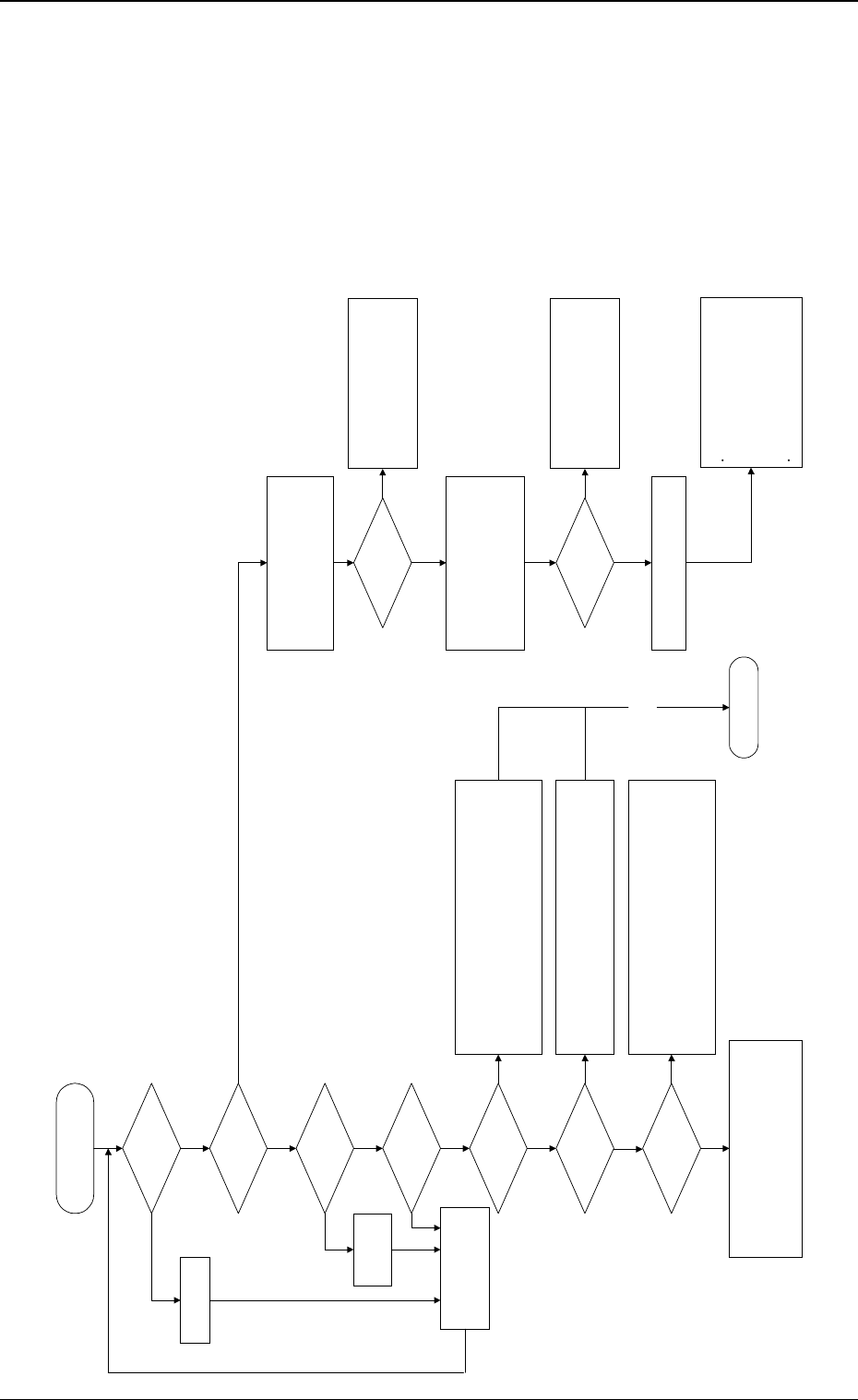
When the [POWER ON]
button is pressed, power is
not supplied.
Is the power breaker
"ON"?
YES
Turn on the power
breaker .
Is the main power lamp
"ON"?
Is the [POWER OFF]
button kept pressed?
YES
Did you press the
[POWER ON] button for
a few seconds?
Is the LCD touch
screen powered?
Is the recognition
monitor powered?
Did the initialization
display appear on the
LCD touch screen?
Perform the operation check on Control DC Power
Supply Units G01, G02, and G03.
The control board may be in abnormal condition.
Check how the connector is connected.
Replace the control board with a new one.
YES
YES
YES
YES
YES
Press the [POWER ON]
button for approximately 2
seconds to re-supply power
to the machine.
[Release the
[POWER OFF]
button.
NO
NO
Check whether the switch on the rear side of the LCD touch
screen is turned "ON".
Check whether the circuit protector of the LCD touch screen is
tripped.
Check whether Fuse F111 or F112 has melted, breaking the
circuit.
Check each component and wiring.
When the power switch of the monitor is "OFF", turn it "ON".
Note:
When "K08" is "ON", the check monitor will not be
powered.
Check whether Fuse F113 has melted, breaking the circuit.
Check each component and wiring.
Confirm that no 3.5-inch floppy disk is inserted in the floppy disk
drive.
Perform the operation check on Control DC Power Supply Units
G01, G02, and G03.
The control board may be in abnormal condition.
Check how the connector is connected.
Replace the control board with a new one.
NO
NO
NO
To "1.3.2 Power Supply
Check 2"
Components and wiring
must be checked.
!!High Voltage!!
Avoid any electric shock.
Electrical knowledge is required. Only a
service personnel or an authorized
personnel should perform this operation.
NO
Is the power (200 V AC,
3-Phase) normal?
Open the power breaker box and check
the inside electrically.
Turn off the power breaker crank.
Remove the screw located on the bottom
of the power breaker box and open the
door of the power breaker box.
Has Fuse F201, 202, or
203 melted, breaking the
circuit?
!!High Voltage!!
Turn on the power breaker.
Check the components and wiring.
Perform operation check on DC
Power Supply (G06) and 24 V DC
(24D).
Open the cover located at the lower
part of the front side and check 24 V
DC (24D) at the terminal.
Check the wiring.
Turn off the power breaker crank,
remove the screw located at the bottom
of power breaker box, and check the
fuses.
When a fuse has melted, replace it with
a new one.
Check whether the factory-equipped
breaker is tripped.
Check whether the local power is
normal.
Check whether the power cable to the
machine is normal.
NO
YES
YES
YES
NO