User-Manual-of-NeoDen4-PNP-machine.pdf - 第30页
25 4.7 .4 Feeder configuration Figure 4 .25 Feeding Rate . For each fe eder, this drop down menu allows the user to se t th e distance in mm that the feeder ad vances. For 0402 a nd 020 1 compone nts, this value is n orm…

24
(3) Place the feeder on the lower rail (feeders can be placed touching each other).
(4) Tighten the Allen screw until snug (do not overtighten).
(5) In the System Setup Interface (on any of the four screens), press the Modify Feed ID button.
Using the menus, change Feeder ID 50 to the desired ID. The interface should report that the ID was
successfully changed.
(6) If the interface reports that the change failed, check for the following:
(7) Feeder is not plugged in correctly.
(8) Feeder ID was not set to 50 when installed. Proceed to the Feeder Configuration page, and test
various feeder IDs to activate the feeder. If the feeder was installed so that it inadvertently shares an
ID with another feeder, both will activate.
(9) If the feeder has a unique ID other than 50, change it to the desired value.
(10) If the feeder shares an ID, unplug one of the feeders. This will enable the change of ID on a
single feeder.
(11) Once satisfied that the new feeder has been assigned the correct ID, go to the Feeder
Configuration page, and press “calibrate feeder”. The feeder should run continuously for several
seconds. Repeat this step to verify smooth operation of the feeder.
4.7.2 Physical installation of peelers:
Using a short 3mm Allen wrench, loosen the bolt in back of the peeler a few turns.
Plug the 2-pin connector into a numbered power port (the side of the connector with visible pin
detents faces up).
Place the peeler on the upper rail (peelers can be placed touching each other).
Line up the peeler so that it is parallel with the tape path in the feeder.
Tighten the Allen screw until snug (do not overtighten).
Go to the Peeler Configuration page, and press “Click to Test”. The peeler gears should turn, and
the peeler motor should be audible.
If both feeder and peeler tests are successful, proceed to the SMD Configuration page.
4.7.3 SMD configuration page
(1) This page contains the master configuration settings for the feeder/peeler combinations. Use this
page for the electric feeders (1- 48). It is not necessary for the special feeders (49-98). Following is
a description of the data displays and functions of the screen:
(2) For each feeder, the X-Y coordinates of the component location are listed. These coordinates
should be set by pressing the “Click to align” button to center the crosshairs in the pocket in the tape,
not necessarily the center of the component. This is because components shift significantly in the
tape, and any errors in component positioning can be corrected by the upward-looking camera
during pick and place operations.
(3) The “Feeder” and “Peeler” columns contain dropdown menus that allow the user to assign any
combination of feeder and peeler to serve as the numbered feeder indicated in the leftmost column.
By default, the Feeder and Peeler numbers are set to the same values.
(4) The “Click to test” button activates both the feeder and peeler assigned to the numbered feeder,
and each will advance according to the parameters defined in the Feeder Configuration and Peeler
Configuration pages.
25
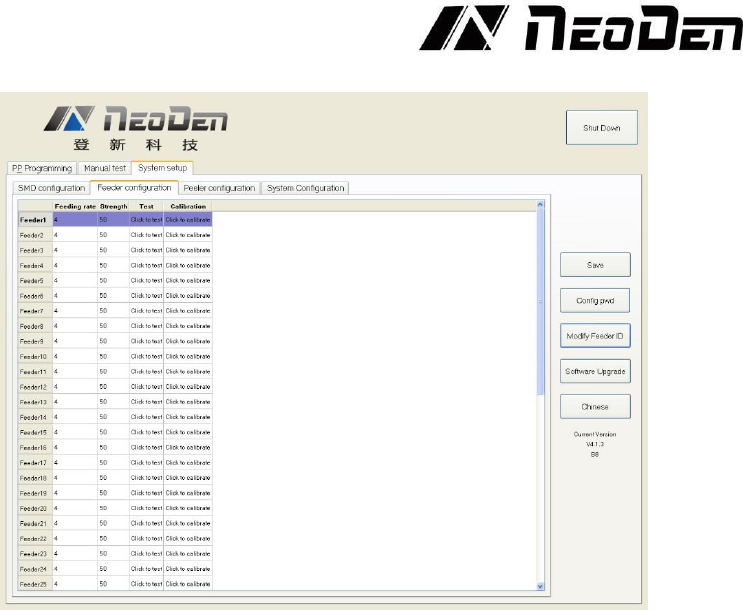
4.7.4 Feeder configuration
Figure 4.25
Feeding Rate. For each feeder, this dropdown menu allows the user to set the distance in mm
that the feeder advances. For 0402 and 0201 components, this value is normally set at 2. For
components including 0603, 0805 and 1206, the value is normally set at 4. Certain larger
components will require larger values. See the Figure 4.25.
Strength. Determines the torque applied to the component tape. Values from 50-80 are common,
but the value should be adjusted so that the tape feeds consistently and smoothly.
Test. Clicking “Test” for any feeder on this screen will advance the feeder (but not the peeler)
by the distance set in the Feeding rate column.
Calibration. “Click to calibrate” advances the feeder continuously for several seconds. This
function verifies the smooth operation of the feeder motor and transmission. Because the feeder
advances quite far, it is best to avoid clicking this button when components are present in the feeder.
The button can be useful if needed to exhaust a long section of leader that contains no components.
26
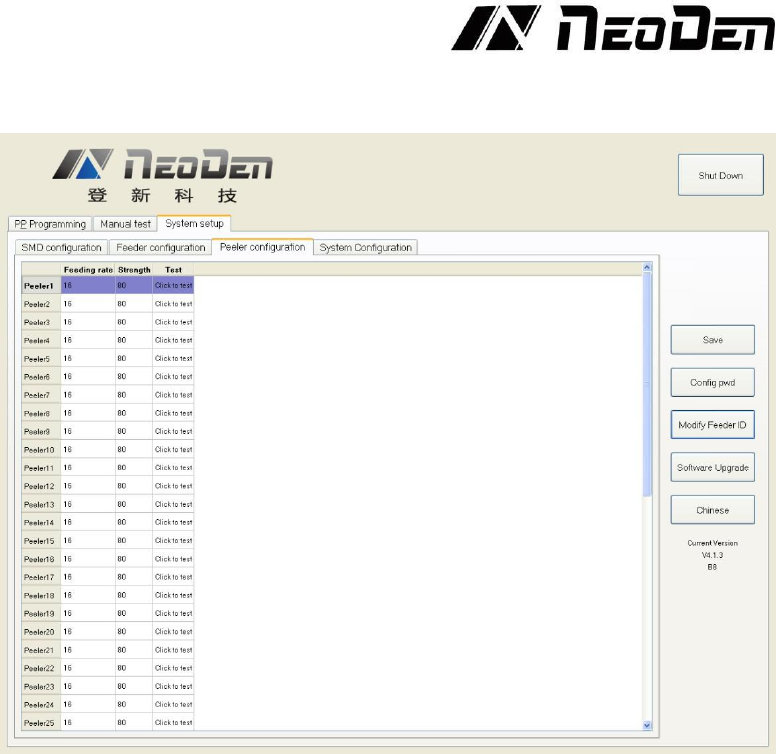
4.7.5 Peeler configuration page
Figure 4.26
Function: Peeler configuration as above figure show, used to set the values for all peel boxes, see
the Figure 4.26.
Feeding rate: Similar meaning in Feeder, mean length of rotation each time. It determines the
approximate distance that the peeler will attempt to peel the cover tape. The default value for this
setting is 16, and there is often no need to reduce it the distance. The cover tape normally can slip
inside the moving gears of the peeler, and a larger peeling distance helps keep the cover tape taut
and out of the way of the components that have advanced into the pick position inside the feeder.
Strength: Torque setting of Peeler (Plastic tape will be difficult strip away in the case of being
affected with damp, can adjust bigger values of torque here). Smaller values (e.g. 50) result in
quieter operation, and are often adequate for smooth peeling.
Test: activates the peeler (but not its associated feeder). This function, when activated, should leave
the cover tape stretched tightly between the feeder and peeler, with no loose tape slop over the
components to be fed. If the cover tape does not advance when the peeler is activated, check the
installation. For proper operation, the tape must lie flat between the peeler gears; it must not be
wrinkled, stretched to deformity or twisted. The tape also must not be installed so that any part lies
outside the width of the gears. Tapes with long leaders make peeler installation much easier.