User-Manual-of-NeoDen4-PNP-machine.pdf - 第31页
26 4.7 .5 Peeler c onfiguration page Figure 4. 26 Function: Peeler con figuration as above figur e sh ow, u sed to se t the values for all pee l boxes, se e the Figure 4.26. Feeding rate: Similar meaning in Feeder, mean …
25
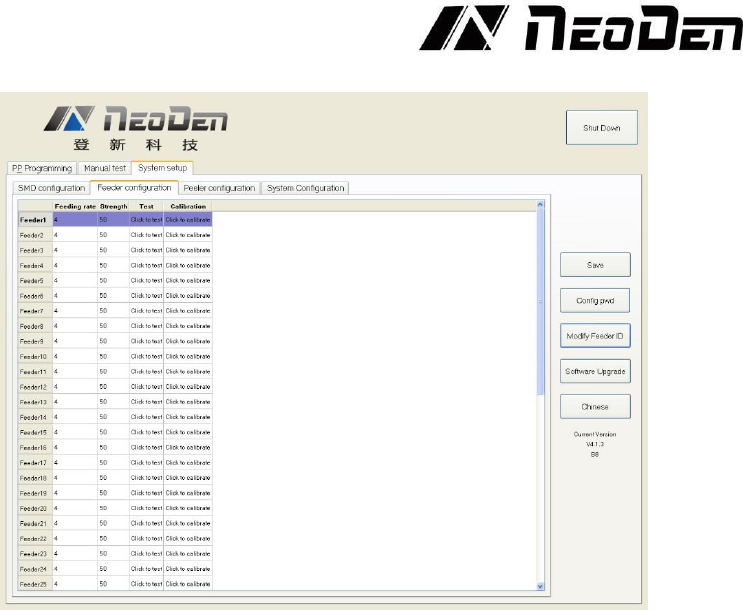
4.7.4 Feeder configuration
Figure 4.25
Feeding Rate. For each feeder, this dropdown menu allows the user to set the distance in mm
that the feeder advances. For 0402 and 0201 components, this value is normally set at 2. For
components including 0603, 0805 and 1206, the value is normally set at 4. Certain larger
components will require larger values. See the Figure 4.25.
Strength. Determines the torque applied to the component tape. Values from 50-80 are common,
but the value should be adjusted so that the tape feeds consistently and smoothly.
Test. Clicking “Test” for any feeder on this screen will advance the feeder (but not the peeler)
by the distance set in the Feeding rate column.
Calibration. “Click to calibrate” advances the feeder continuously for several seconds. This
function verifies the smooth operation of the feeder motor and transmission. Because the feeder
advances quite far, it is best to avoid clicking this button when components are present in the feeder.
The button can be useful if needed to exhaust a long section of leader that contains no components.
26
4.7.5 Peeler configuration page
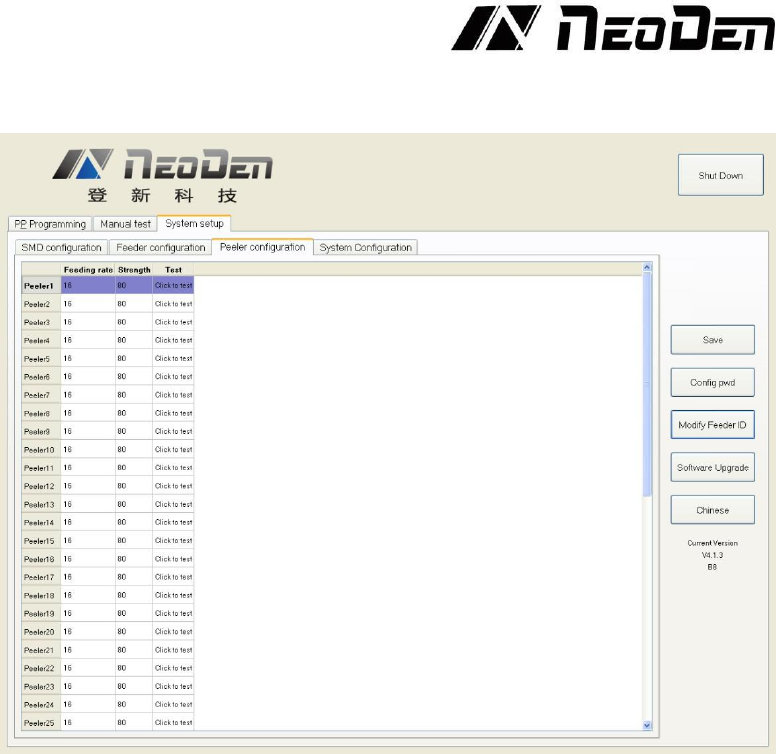
Figure 4.26
Function: Peeler configuration as above figure show, used to set the values for all peel boxes, see
the Figure 4.26.
Feeding rate: Similar meaning in Feeder, mean length of rotation each time. It determines the
approximate distance that the peeler will attempt to peel the cover tape. The default value for this
setting is 16, and there is often no need to reduce it the distance. The cover tape normally can slip
inside the moving gears of the peeler, and a larger peeling distance helps keep the cover tape taut
and out of the way of the components that have advanced into the pick position inside the feeder.
Strength: Torque setting of Peeler (Plastic tape will be difficult strip away in the case of being
affected with damp, can adjust bigger values of torque here). Smaller values (e.g. 50) result in
quieter operation, and are often adequate for smooth peeling.
Test: activates the peeler (but not its associated feeder). This function, when activated, should leave
the cover tape stretched tightly between the feeder and peeler, with no loose tape slop over the
components to be fed. If the cover tape does not advance when the peeler is activated, check the
installation. For proper operation, the tape must lie flat between the peeler gears; it must not be
wrinkled, stretched to deformity or twisted. The tape also must not be installed so that any part lies
outside the width of the gears. Tapes with long leaders make peeler installation much easier.
27
4.7.6 System configuration
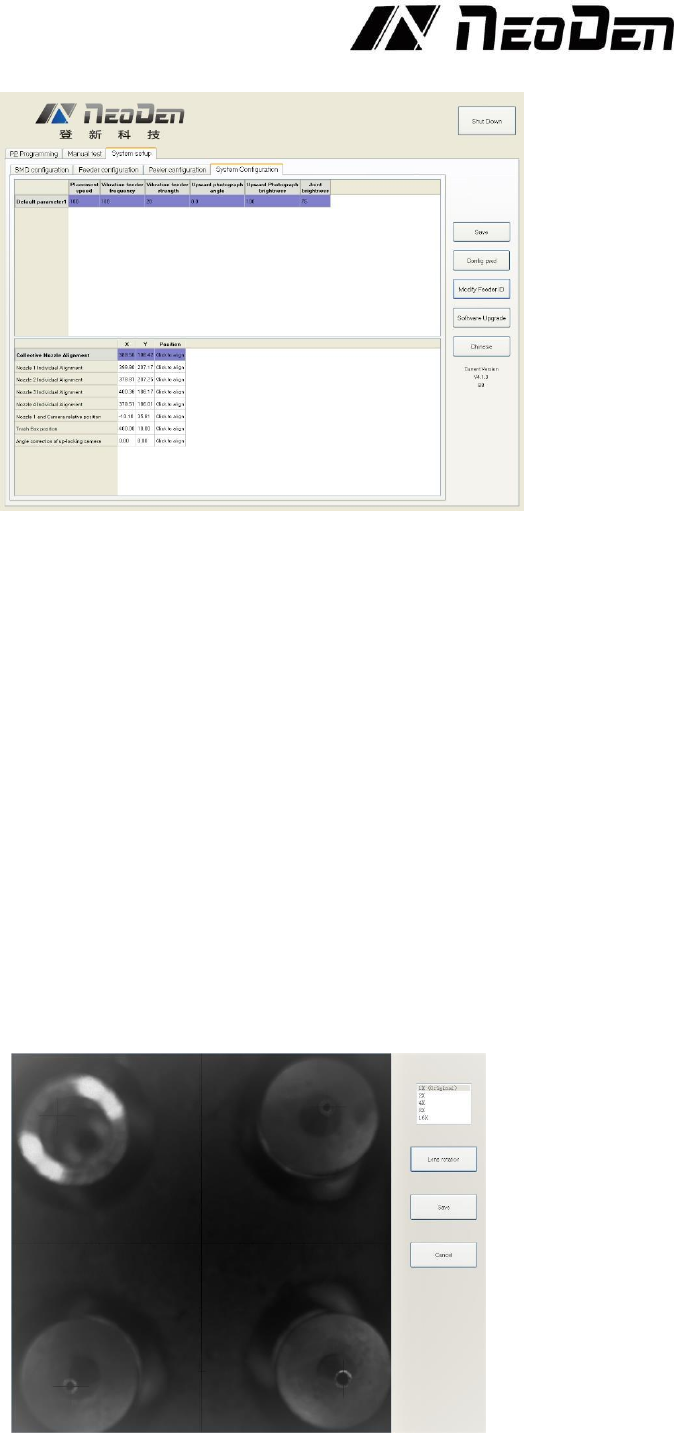
Figure 4.27
When used in combination with the “Config pwd” button, this page allows the user to set the
machine’s default placement speed, the vibration feeder frequency and vibration feeder strength,
and brightness of the camera lighting systems. Default values normally require no change. The
interface also contains sophisticated nozzle alignment routines. Because these are set at the factory,
there is normally no need to access them and any use of these functions should be done in
cooperation with NeoDen tech support. See the Figure 4.27.
Function: it is mainly for correction the position of suction nozzle. (Notice: In case change by
mistake, we’ve locked it. It can be changed by clicking the button of “Config pwd” and then click
“ok” button. Strongly recommend operating it under our engineer’s guidance).
Default parameters 1 setting:
(1) Placement speed: placement head movement speed under overall situation, priority is not as fast
as speed set in stacks.
(2) Vibration feeder frequency: setting the frequency of vibration feeder. Discharge state will be
more stable if frequency high.
(3) Vibration feeder strength: it depends on the component, if component too small and strength set
high it will shake out the component easily, of course if strength small, the discharging speed will
be slower.
Collective nozzle Alignment setting:
Click the “Click to align” and go into interface below, see the Figure 4.28.
Figure 4.28