TR7007M_SII_Hardware_en_v1-0-1.pdf - 第12页
Test Research, Inc. 2 TR7007 M SII User Guide – Hardware Figure 1 : Sy stem Front View & Important Parts The Operating and Storage env ir onm ental parameters f or TR 7007 SII systems are listed in the following tabl…

Test Research, Inc.
TR7007M SII User Guide – Hardware 1
1 INTRODUCTION
Test Research Inc. (TRI) designs, manufactures and markets precision test equipment for
the world’s leading electronics manufacturing service (EMS) companies. Product lines
include Automated Optical Inspection (AOI) and Automated X-Ray Inspection (AXI), In-
Circuit Testers, Board Testers, Solder-Paste Inspection, Manufacturing Defects Analyzers,
and Integrated Circuit Testers.
Quality at the start of the SMT process comes from improving the quality of solder paste
printing. The TR7007 SII three-dimensional solder paste inspection system can quickly
measure the area, volume, and thickness of every solder joint and can detect short
connections. It targets the paste applied prior to component placement, preventing bad
connections as a result from small solder joints and lack of solder, component vibrations and
heat expansion, thus greatly improving the product's quality.
This User Guide describes the hardware of the TR7007 SII system, focusing mainly on the
Human Computer Interface (HCI) commands.
Test Research, Inc.
2 TR7007M SII User Guide – Hardware
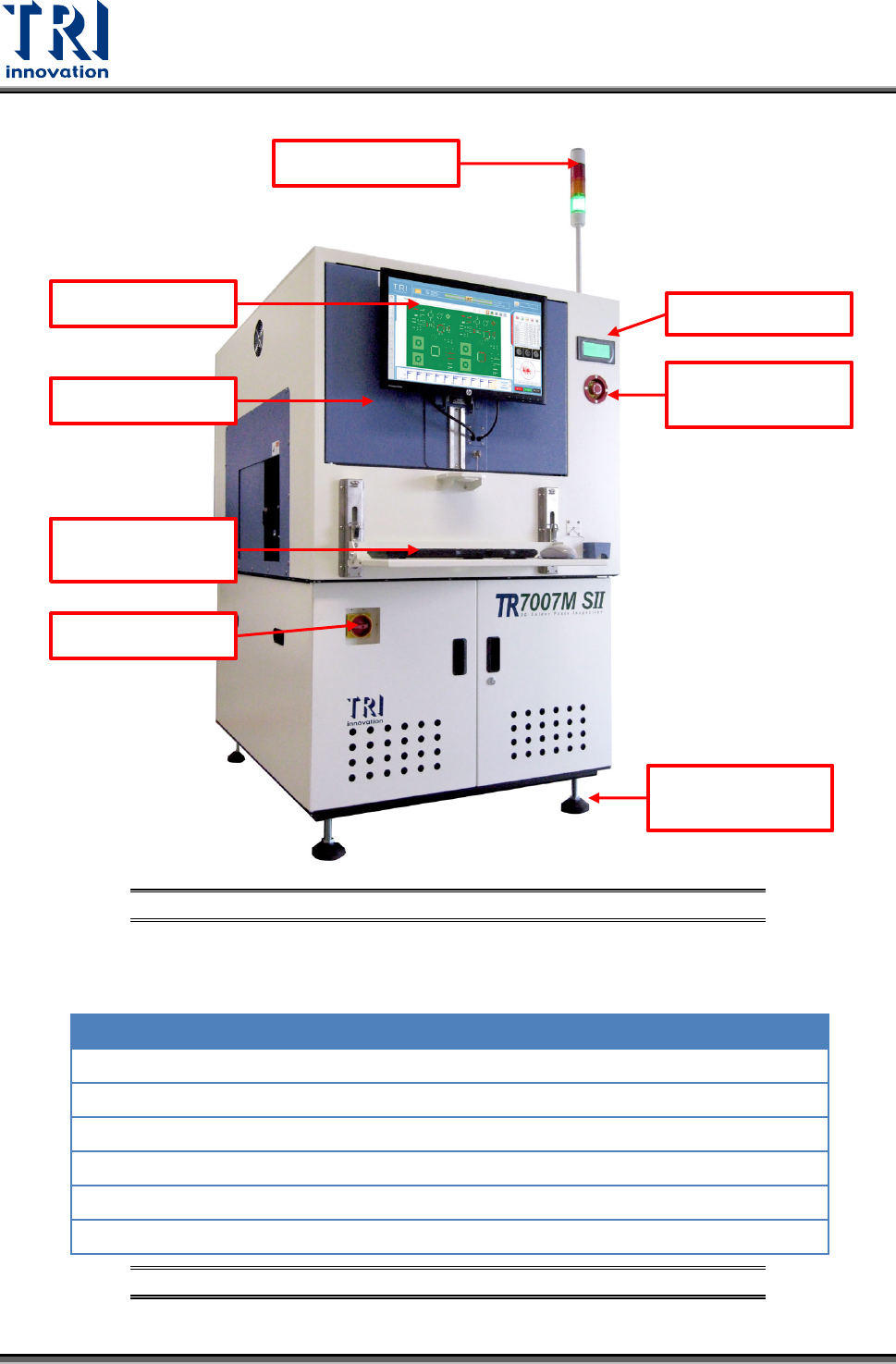
Figure 1: System Front View & Important Parts
The Operating and Storage environmental parameters for TR7007 SII systems are listed in
the following table.
Operating
Storage
Ambient Temperature:
0-40°C (32-104°F)
-40-66°C (-40-151°F)
Max. Temperature Gradient:
10°C/hour (18°F/hour)
10°C/hour (18°F/hour)
Relative Humidity:
20-80% non-condensing
Up to 95% non-condensing
Max. Humidity Gradient:
10%/hour
10%/hour
Max. Wet Bulb Temperature:
25°C (77°F)
46°C (115°F)
Max. Dew Point Temperature:
2°C (36°F)
2°C (36°F)
Figure 2: Operating & Storage Environment for TR7007 SII Systems
Signal Tower
Monitor
Mouse and
Keyboard
Power Switch
Emergency
Stop
HCI
Adjustable
Feet
Front Door

Test Research, Inc.
TR7007M SII User Guide – Hardware 3
2 HCI & PLC
The Human-Computer Interface (HCI) is mainly used to set the required testing modes
(settings such as Stand-Alone or Inline, whether the Loader or Unloader are present, etc.).
The Programmable Logic Controller (PLC) is mainly used to control the PCB I/O Board
Holder as well as exchange sampling or Pass/Fail signals (through the RS-232 cable);
usually when the machine is set to In-Line mode there will be a greater chance of I/O board
issues or loader/unloader error. The function of HCI and PLC will be described in the
following chapters.