00191332-01.pdf - 第132页
3 Calibration Functions User Manual Test Program SITEST 3.8 Calibration of the IC Nozzle Changer (SIPLACE 80F4/80F5) Software Version 405.xx Issue 01/99 3 - 20

User Manual Test Program SITEST 3 Calibration Functions
Software Version 405.xx Issue 01/99 3.8 Calibration of the IC Nozzle Changer (SIPLACE 80F4/80F5)
3 - 19
● Subsequently click on the
Calibrate pick-up height
button.
The pick-up height (z-position) determined is displayed in a dialog box after the calibration.
● Acknowledge the dialog box by clicking on
OK
.
● If you wish to check the results of the calibration, click first on the
Return
button and, after the nozzle
has been picked up, on the
Pick up
button.
● Click on the icon to return to the main view.
● On the menu bar click on
Settings
-->
Save machine data
. The data will now be saved.
3 Calibration Functions User Manual Test Program SITEST
3.8 Calibration of the IC Nozzle Changer (SIPLACE 80F4/80F5) Software Version 405.xx Issue 01/99
3 - 20
User Manual Test Program SITEST 3 Calibration Functions
Software Version 405.xx Issue 01/99 3.9 Calibration of the RV Nozzle Changer
3 - 21
3.9 Calibration of the RV Nozzle Changer
NOTE
Verify that the calibration data for the PCB camera, segment offset
(RV-PCB camera offset) and machine zero
point have already been determined.
3
● In the main view click on the icon or or to switch the screen display to the "RV head"
display (see Fig. 0.3.5) of the desired RV head.
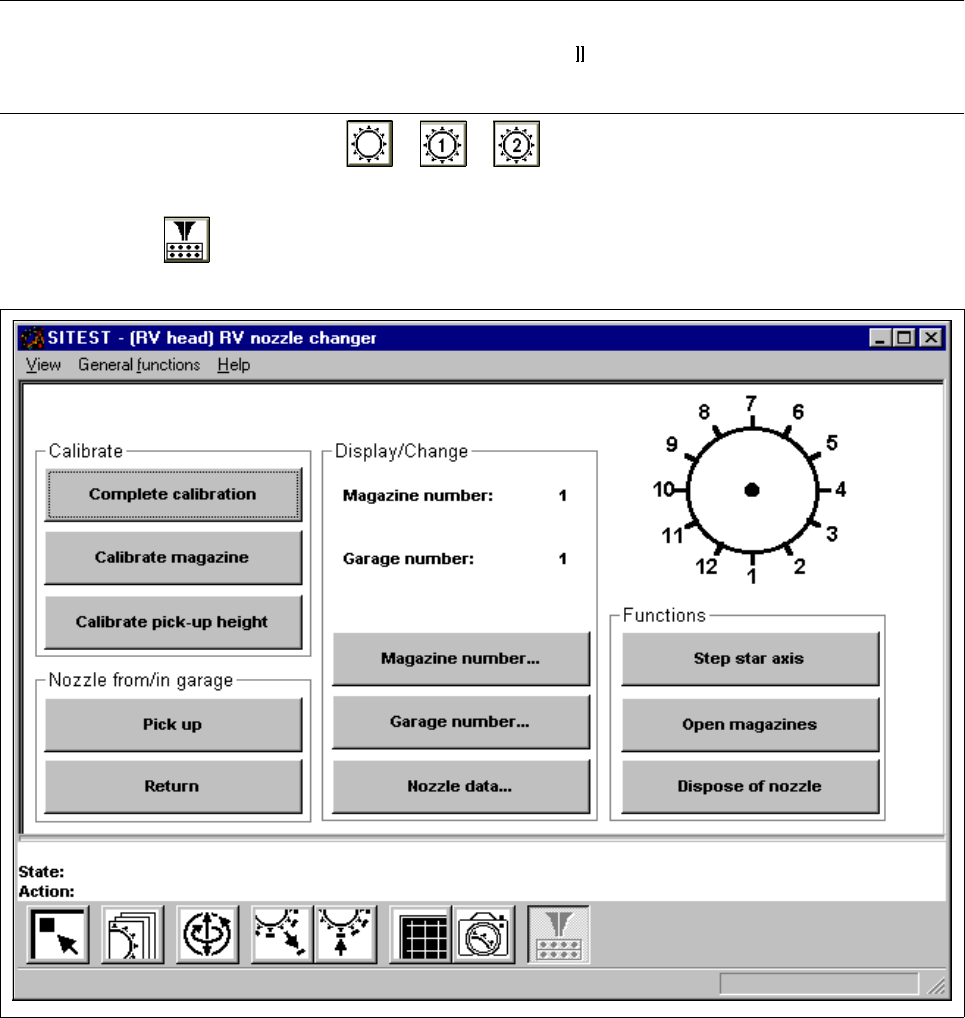
● Click on the icon to switch to the "RV nozzle changer" display.
Fig. 3.9.1 "RV nozzle changer" Display
Overview of the functions:
– Complete calibration to determine the x and y-positions for each magazine
– Calibrate magazine to determine the x and y-positions for the current magazine
– Calibrate pick-up height to determine the pick-up height for the current magazine
– Pick up to remove the nozzle from the selected garage of the current magazine