00198374-04_UG_OSC_Package_R19-2_DE_EN.pdf - 第52页
3 Prerequisites 3.2 Hardware Requirements 52 Bedienungsanleitung OSC Package User Guide OSC-Paket 11/2019 Function Hardware Automatic illumination optimization for Non‑standard and Connector component types Placement hea…

3 Prerequisites
3.1 Software Requirements
Bedienungsanleitung OSC Package User Guide OSC-Paket 11/2019 51
3 Prerequisites
The necessary system requirements for the OSC Package correspond to the system requirements
for SIPLACEPro and are described in the SIPLACEPro Version Description, item no. [00198763-
xx].
3.1 Software Requirements
The following table lists the software requirements that must be met for the released features per
release.
Release Required software
For features of R16-2
●
SIPLACEPro version 14.0 or higher
●
Stationsoftware version 710.0 or higher
●
SIPLACEVision version 5.4.1 or higher
For features of R18-2
●
SIPLACEPro version 16.0 or higher
●
Stationsoftware version 712.0 or higher
●
SIPLACEVision version 5.6.1 or higher
For features of R19-1
●
SIPLACEPro version 16.1 or higher
●
Stationsoftware version 712.1 or higher
●
SIPLACEVision version 5.6.2 or higher
For features of R19-2
●
SIPLACEPro version 17.0 or higher
●
Stationsoftware version 713.0 or higher
●
SIPLACEVision version 5.7.1 or higher
3.2 Hardware Requirements
The following hardware requirements must be met for the released features of R16-2:
Function Hardware
Improved placement of snap-in components Placement heads: TwinVHF
Smart Pin Support is recommended
Stereo Measurement for THT Pins Placement heads: CPP, TH, THHF, TwinVHF
Camera types: SST33, SST25
Customer-specific Pattern Features Placement heads: All
Special position evaluation Placement heads: All
Support for finding the best acceleration Placement heads: All
Increased placement force on TwinVHF
placement head to 100N
Placement head: TwinVHF
Can only be used with function status -03!
Smart Pin Support is recommended
The following hardware requirements must be met for the released features of R18-2:
Function Hardware
Improved placement of components with
centering pins (Pin in Paste height check)
Placement heads: CPP, TH, TwinVHF
Smart Pin Support is recommended
Improved teaching of snap-in components Placement head: TwinVHF
Stereo measurement for Gullwing and Pat-
ternFeatures lead group types
Placement heads: CPP, TH, THHF, TwinVHF
Camera types: SST33, SST25
Measurement parameter 4x image capture
as option in the stereo measurement
Placement heads: CPP, TH, THHF, TwinVHF
Camera types: SST33, SST25

3 Prerequisites
3.2 Hardware Requirements
52 Bedienungsanleitung OSC Package User Guide OSC-Paket 11/2019
Function Hardware
Automatic illumination optimization for
Non‑standard and Connector component
types
Placement heads: All
Placement of an exceptionally high compo-
nent (1 use case)
Placement machine: SIPLACESXV2
Single conveyor
Placement head: only TwinVHF or
combination of TwinVHF and TwinVHF or
combination of TwinVHF and CPP in higher posi-
tion
One component of type SMT;
Height: max. 46mm
or
One component of type THT (e.g. Connector or In-
ductance);
Height: max. 46mm without protruding elements
which disappear into the board after placement
(e.g. centering pins), 50mm with protruding ele-
ments
Increased placement force on TwinHead
placement head to 30N (as for THHF)
Placement head: TH
Smart Pin Support is recommended
The following hardware requirements must be met for the released features of R19-1:
Function Hardware
Improved placement of exceptionally high
components with TwinVHF placement head
See hardware requirements for the released fea-
ture of R18-2 "Placement of an exceptionally high
component"
Improved placement of exceptionally high
components with CPP placement head
Placement head: CPP in high position
Maximum component height: 15.5mm
Component Chipping Inspection Component type: BareDie, BGA, CCGA, Chip,
Moulded, or Nonstandard
The following hardware requirements must be met for the released feature of R19-2:
Function Hardware
Increased component weight that can be
placed with TwinVHF placement
Placement head: TwinVHF Maximum
component weight: 240g Nozzle adapter
for Twin VHF, item no. [03149670‑xx]
4 Working with the OSC Features
4.1 Features Introduced with R16-2
Bedienungsanleitung OSC Package User Guide OSC-Paket 11/2019 53
4 Working with the OSC Features
This chapter describes how to work with the single OSC features. There is a designated chapter for
each release. Each of these designated chapters contains all features and options that have been
introduced with the respective release, as well as improvements and changes to previously re-
leased features.
► Make use of the information provided in the Online Help files for SIPLACE Pro and the station
software. These files contain additional, detailed information about the OSC features.
4.1 Features Introduced with R16-2
In this chapter all features that have been introduced with R16-2 are listed. To see if there are up-
dates for one of the features listed here, please check the segments of later releases.
4.1.1 Placement of Snap-In Components
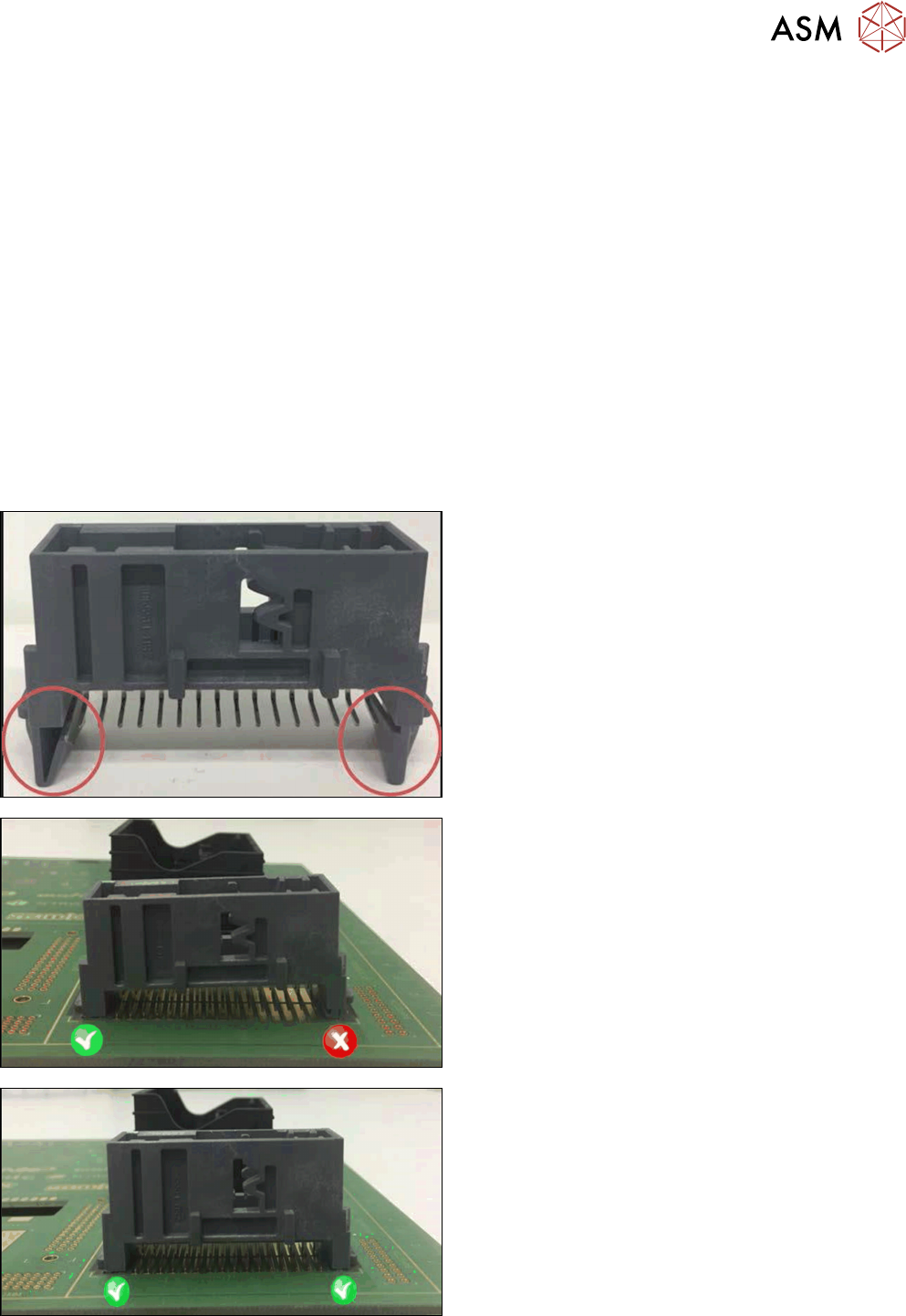
When placing snap-in components, it must be ensured that the components lock correctly into the
board. The system can verify this by an improved method.
Example
Snap-in component
Snap-in component – not placed correctly
Snap-in component – placed correctly
The actual Z-axis position of every snap-in placement will be compared with its corresponding
height reference value during the verification. These values must match each other.