00198374-04_UG_OSC_Package_R19-2_DE_EN.pdf - 第69页
4 Working with the OSC Features 4.1 Features Introduced with R16-2 Bedienungsanleitung OSC Package User Guide OSC-Paket 11/2019 69 Step 6: Station software ► Set the recommended acceleration values from the teach functio…
4 Working with the OSC Features
4.1 Features Introduced with R16-2
68 Bedienungsanleitung OSC Package User Guide OSC-Paket 11/2019
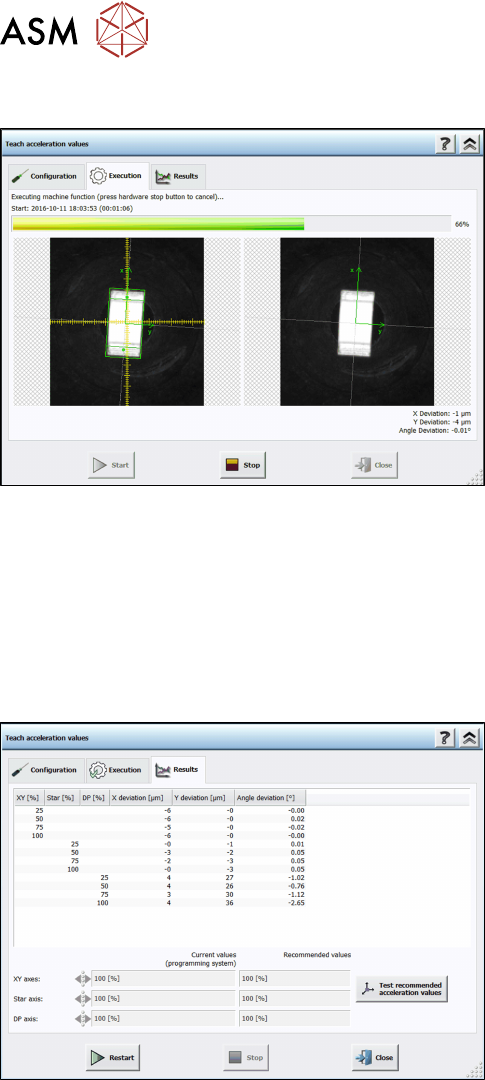
Step 4: Station software
The execution steps are displayed together with the reference Vision image and the last Vision
image done by the camera. Additionally, the current acceleration values of the axes and the
measured deviations are displayed. If you have to remove a component from the placement head
manually or if the component is lost, a hint will be displayed and you must confirm the action to
continue.
If an error occurs during execution, the error causes are displayed on the last page in an error list.
Otherwise, the results are displayed in the Results dialog.
Step 5: Station software
► Check the results. The recommended values can
be compared with the values of the programming
system.
► Click on Test recommended acceleration values
to test the values.
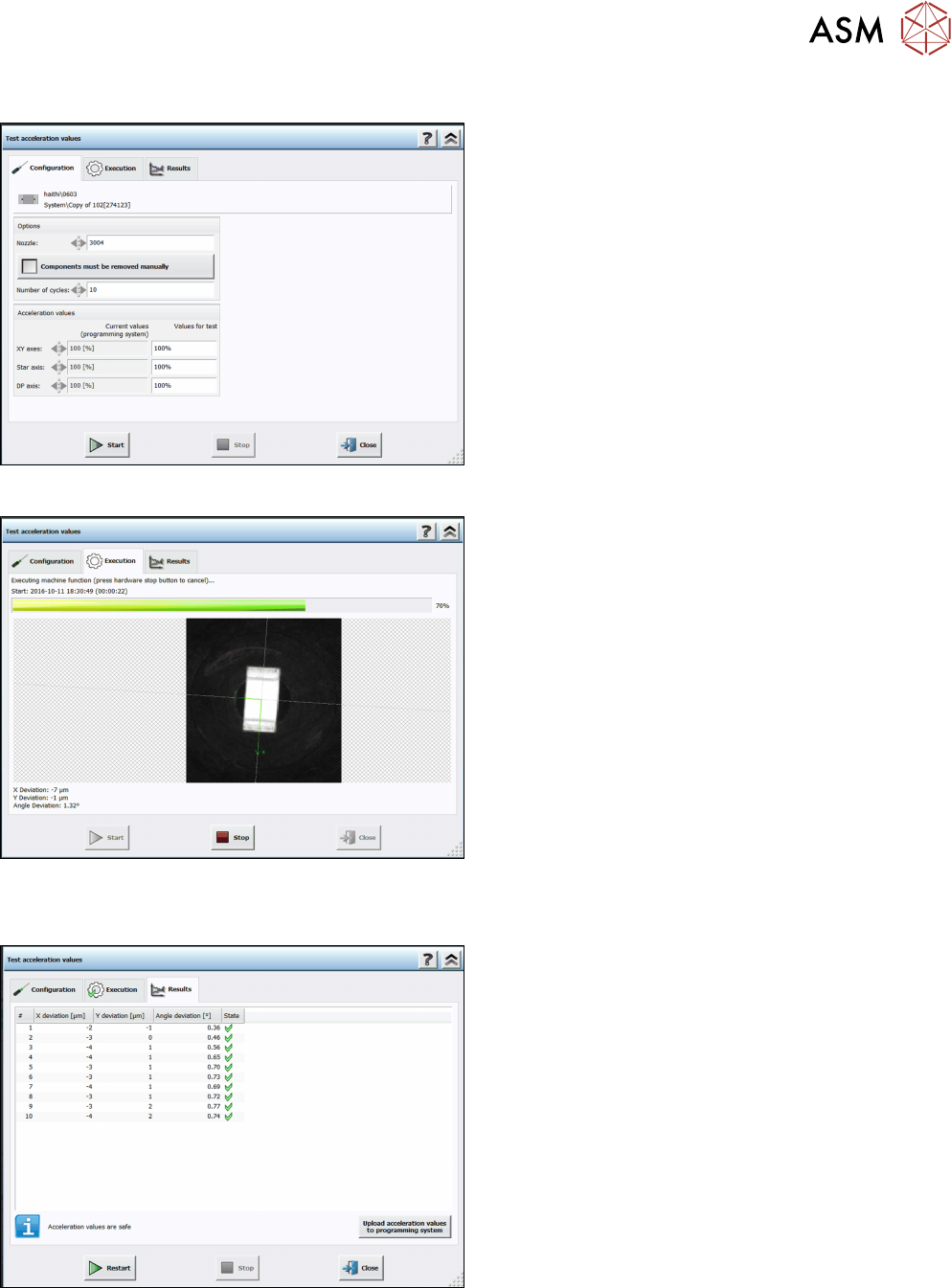
The teach dialog is closed and the Configuration test dialog is opened.
4 Working with the OSC Features
4.1 Features Introduced with R16-2
Bedienungsanleitung OSC Package User Guide OSC-Paket 11/2019 69
Step 6: Station software
► Set the recommended acceleration values from
the teach function.
► Click on Start.
The test is automatically performed and the Execution test dialog displayed.
The results are displayed in the Results test dialog.
Step 7: Station software
► Check the results.
► Click on Upload acceleration values to program-
ming system.
The upload to SIPLACE Pro is not available until the recommended values have been tested.
4 Working with the OSC Features
4.2 New Features and Changes with R18-2
70 Bedienungsanleitung OSC Package User Guide OSC-Paket 11/2019
4.1.6 Increased Placement Force for Twin VHF Placement Head
An increased placement force up to 100 N is supported for the Twin VHF placement head.
Restrictions
●
The increased placement force to 100 N is only possible for the Twin VHF placement head,
item no [03096701-03]. Placements with a force greater than 70 N are not supported on sta-
tions with software versions < 710 and Twin VHF placement heads with a functional status <
[-03]. Such placements will be forced onto stations with station software version ≥ 710 by
SIPLACE Pro.
4.2 New Features and Changes with R18-2
In this chapter all features are listed that have either been newly introduced or have been updated
with R18‑2.
4.2.1 Placement of Snap-in Components – Improved Teaching
With R18-2, there has been an update for the placement of snap-in components introduced in
R16-2 (please refer to 4.1.1 "Placement of Snap-In Components" [}53]).
If the next board is already present in the input section, it will be moved in but not placed until the
settings for the first board have been confirmed.
In case of an error the stored data can be reset via Line Control GUI.
Restrictions
●
The improved teaching procedure for placement of snap-in components is not supported on
the SIPLACE CA4 / CA4 V2 placement machines.
4.2.2 Stereo Measurement for Gullwings and Pattern Features
With R18-2, there has been an update to the stereo measurement feature introduced in R16-2
(please refer to 4.1.2 "Stereo Measurement for THT Pins" [}57]).
From R18-2, the stereo measurement is also supported for the Gullwing and Pattern Features lead
group types. The same procedure is used for the measurement as for the stereo measurement of
THT pins.
NOTICE
Considering the height measuring range
Since Gullwings are often not in the same plane as the THT pin tips, the height measuring
range must be considered:
SST25: +1.94 mm to -3.9 mm around the calibration plane ("+" is in the direction of the
camera!)
SST33: +3.6 mm to -7.2 mm around the calibration plane.
► Follow the work steps that are described in section 4.1.2 "Stereo Measurement for THT
Pins" [}57].
► Please also refer to section 4.1.3 "Customer-specific Pattern Features" [}61].