00198374-04_UG_OSC_Package_R19-2_DE_EN.pdf - 第59页
4 Working with the OSC Features 4.1 Features Introduced with R16-2 Bedienungsanleitung OSC Package User Guide OSC-Paket 11/2019 59 Step 2: Setting creep distance – SIPLACE Pro Setting creep distance = THT pin length ► In…
4 Working with the OSC Features
4.1 Features Introduced with R16-2
58 Bedienungsanleitung OSC Package User Guide OSC-Paket 11/2019
4.1.2.1 Procedure
The following overview lists the single work steps that have to be performed in the specified order
to perform the stereo measurement when THT components are placed.
Performing Stereo Measurement
Step Action SIPLACE program
1) Enabling OSC package SIPLACE Pro
2) Setting component height (overall height and creep distance) –
Observing focus height
SIPLACE Pro
3) If a nozzle gripper is used, setting the nozzle height SIPLACE Pro
4) Enabling stereo measurement for THT pins SIPLACE Vision
5) If necessary, changing the traverse path in the stereo height
view
SIPLACE Vision
4.1.2.2 Application Example
Step 1: SIPLACE Pro
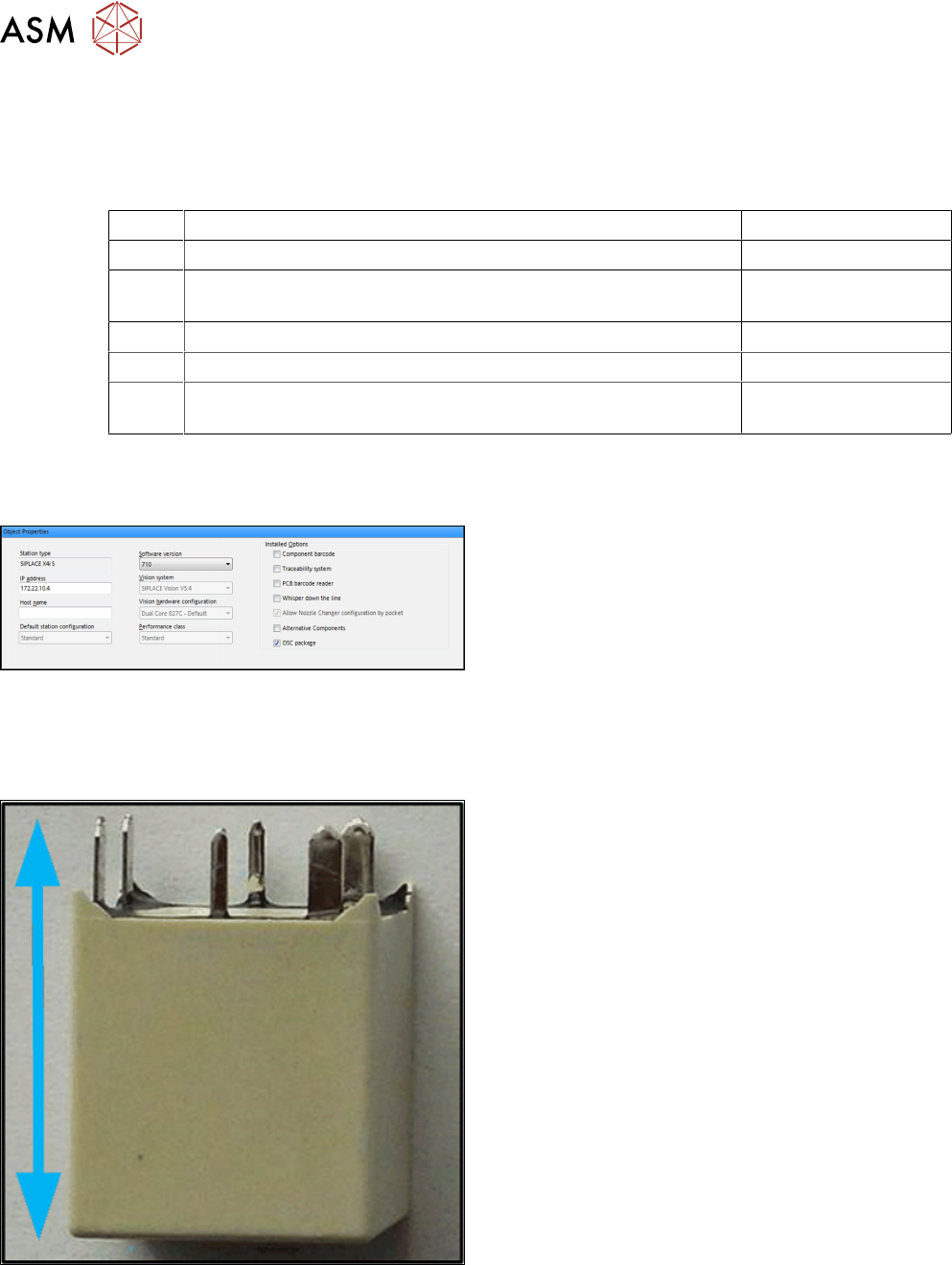
► In the Station Editor under Placement Station,
enable the OSC Package option under Installed
options.
In SIPLACE Pro the component height has to be set so that the THT pin tips are located in the
focal plane of the camera. In the focal plane, the THT pin tips are displayed most sharply, and the
measurement is most accurate. For this, the following settings are required:
Step 2: Setting overall height – SIPLACE Pro
Setting the component overall height (from the pin tips
to the component bottom).
► In the Component Shape Editor, set the compo-
nent overall height under Component Shape –
Form – Overall height (with pins).
4 Working with the OSC Features
4.1 Features Introduced with R16-2
Bedienungsanleitung OSC Package User Guide OSC-Paket 11/2019 59
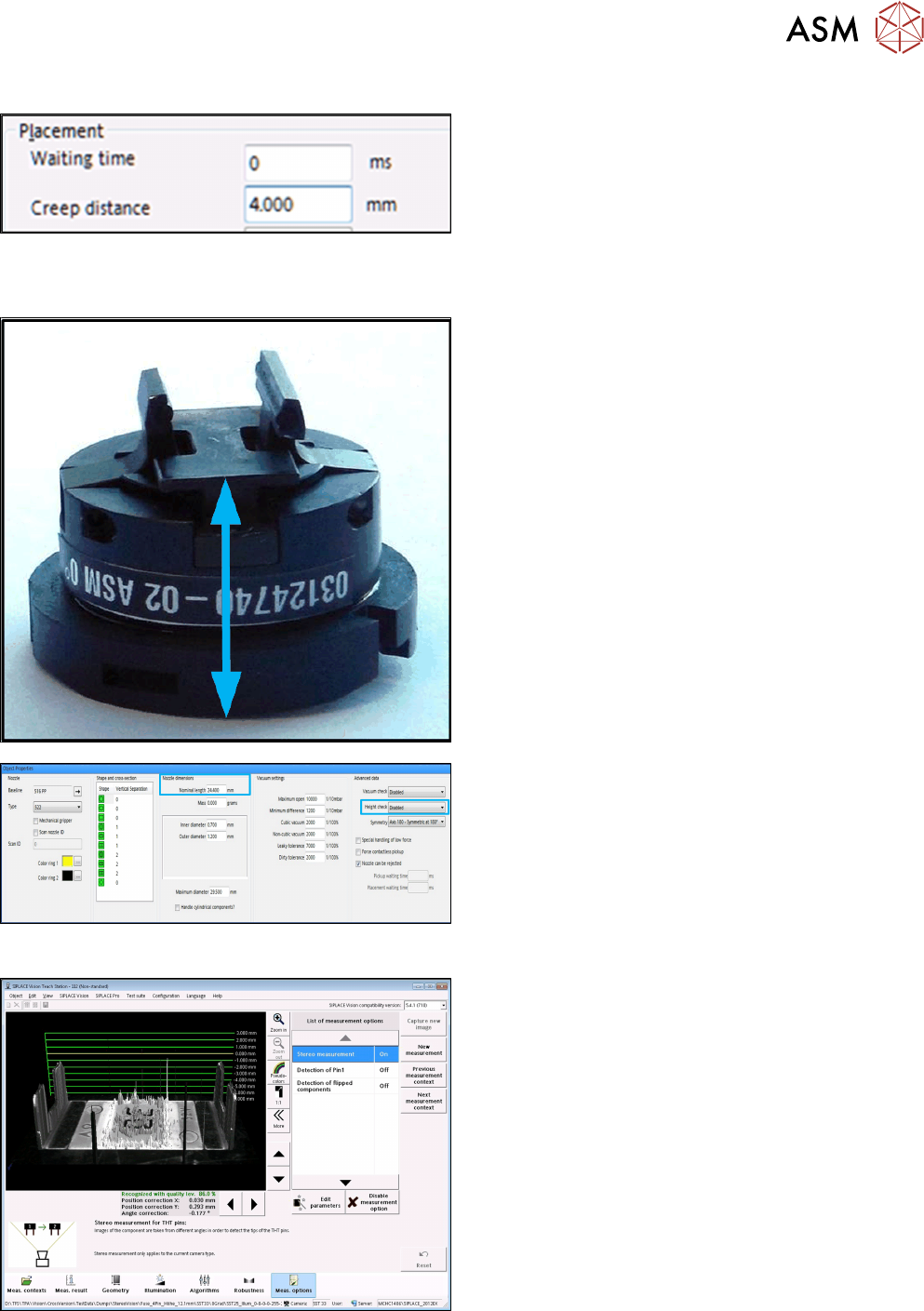
Step 2: Setting creep distance – SIPLACE Pro
Setting creep distance = THT pin length
► In SIPLACE Pro Desk, set the creep distance =
THT pin length under Handling – Placement –
Creep Distance.
If you use a nozzle gripper, the nozzle height also has to be set.
Step 3: SIPLACE Pro
Setting parameters for the nozzle gripper
► In the Nozzle Editor, disable the Height check
height reference run under Custom Nozzle – Ad-
vancedData.
► Set the Nominal length from the nozzle bottom to
the component touchdown point under Nozzledi-
mensions.
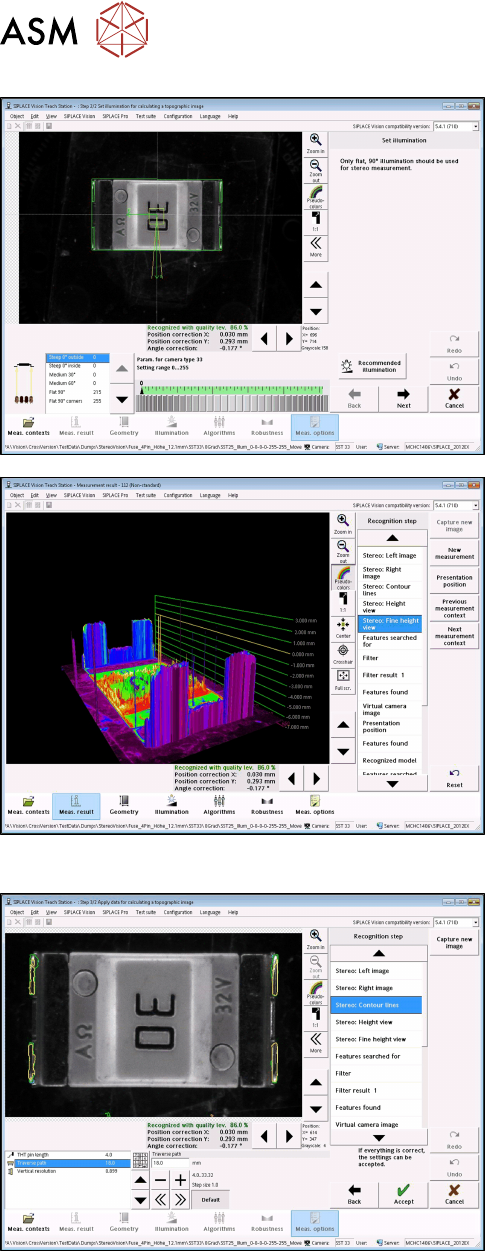
Step 4: SIPLACE Vision
► Enable the Stereo Measurement option in the
Component shape wizard in the Meas. options.
4 Working with the OSC Features
4.1 Features Introduced with R16-2
60 Bedienungsanleitung OSC Package User Guide OSC-Paket 11/2019
► With the Set illumination option you may check
the illumination setting.
Normally, the pre-set values should not be
changed!
► Under Stereo: Fine Height View you may check
the result of the stereo measurement.
Ensure that the THT pins are in the focal plane
(yellow height line).
This is the case, if component height (overall
height) and nozzle height have been defined cor-
rectly.
Step 5: SIPLACE Vision
► If necessary, change the traverse path to modify
the vertical resolution.
► Under Stereo: Contour lines the measured height
lines are displayed in the 2D images.
This allows you to verify that exactly the THT pin
tips have been detected at the focal plane.
4.1.2.3 Tips and Tricks
Minimum THT pin length
With camera type 33, the minimum length for THT pins is 0.36 mm. If the THT pins are a bit
shorter, you may try one of the following two actions. In both cases you must check that the THT
pin tips are still detected exactly.
► Set the nominal length to 3.6 mm in SIPLACE Pro and increase the tolerance.
or
► Enable the Suppress checking of threshold values option in SIPLACE Vision.