00196771-01_IM_SSW_705_03_DE_EN.pdf - 第12页
Installation Manual, Station Software Version 705.03 02/2011 Edition Flowchart: Upgrading from 60x software versions 12 of 58

Installation Manual, Station Software Version 705.03 02/2011 Edition
3.5 Upgrading from 60x software versions (X-series placement machines)
By upgrading from 60x station software versions, a complete reinstallation/recalibration and mostly also a
hardware rebuilding will be necessary. For this, a corresponding upgrade package is available, that can be
installed by the SIPLACE Service if required.
Ser.No. B001 – B325: cannot be upgraded to the 70x software.
Ser.No. B326 – B599: can only be upgraded to the 70x software by a service team from Munich.
Ser.No. B600 – B751: Update of CAN node and upgrade of the C&P20 nozzle changer to the -04 version
required.
As of Ser.No. B752 the software upgrade to the 70x software can be performed without any hardware
rebuildings.
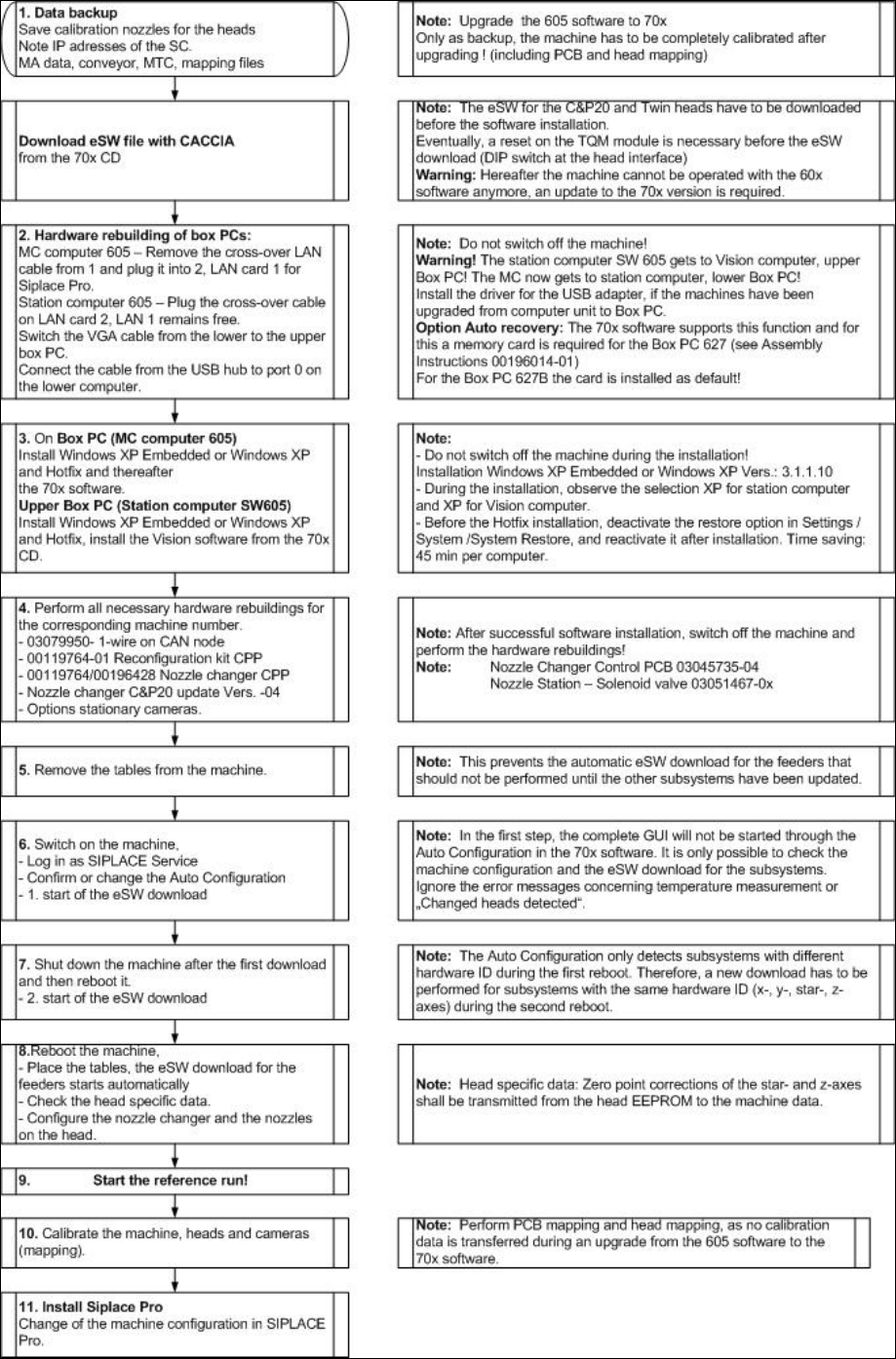
In the following flowchart all steps are described that have to be performed for the upgrade. At a glance,
these are:
- Downloading the eSW file from the installation CD (directory Upgrade_Preparation) and executing an
eSW download for the placement heads (TQM) with CACCIA from a service PC (not for C&P6/12
placement heads)
- Preparing Box PCs and hardware (see flowchart)
- Installing Windows XP Embedded (recommended) or Windows XP on both Box PCs
- Installing the 705.03 machine computer software for two-computer operation, see chapter 5
- Installing the Vision computer software, see chapter 6
- Shutting down the machine
- If necessary, performing hardware rebuildings
- Removing the tables
- Switching on the machine again
- Performing an eSW download (see flowchart)
- Performing complete calibration with PCB and head mapping
Note:
- It is also possible to send the mapping files that you have saved before to the SIPLACE
Service. The files will be converted and resent to you. If you re-import the converted
mapping files, no PCB/head mapping has to be performed.
- Starting the production
11 of 58
Installation Manual, Station Software Version 705.03 02/2011 Edition
Flowchart: Upgrading from 60x software versions
12 of 58

Installation Manual, Station Software Version 705.03 02/2011 Edition
4 Requirements
4.1 SIPLACE X- , SX- and DX-series software components
4.1.1 Station
The station uses one of the following operating system configurations on the machine and Vision
computer(s):
- Microsoft Windows XP Embedded with Service Pack 2
- Microsoft Windows XP Professional (incl. Service Pack 3 and most recent hotfixes)
The machine computer and Vision computer software can optionally be used in one-computer or two-
computer operation.
4.1.2 Machine components
The following versions of other machine components are required for the station software to function
correctly:
SIPLACE station software SIPLACE Vision SIPLACE Pro
Version 705.03 Version 431 Version 9.2
Caution:
The functional statuses of the station computer, Vision computer and SIPLACE Pro software
must be compatible, as specified above. Another configuration is not supported.
13 of 58