00193697-01.pdf - 第100页
8 New functionality in 504.01 SIPLACE Software Guide SR.504.xx 8.17 FiFo option f or each location Issue 01/03 EN 100
SIPLACE Software Guide SR.504.xx 8 New functionality in 504.01
Issue 01/03 EN 8.17 FiFo option for each location
99
NOTE
The selected option will be retained even if the machine is switched on and off.
When the software is first installed, the FiFo option is deactivated. 8
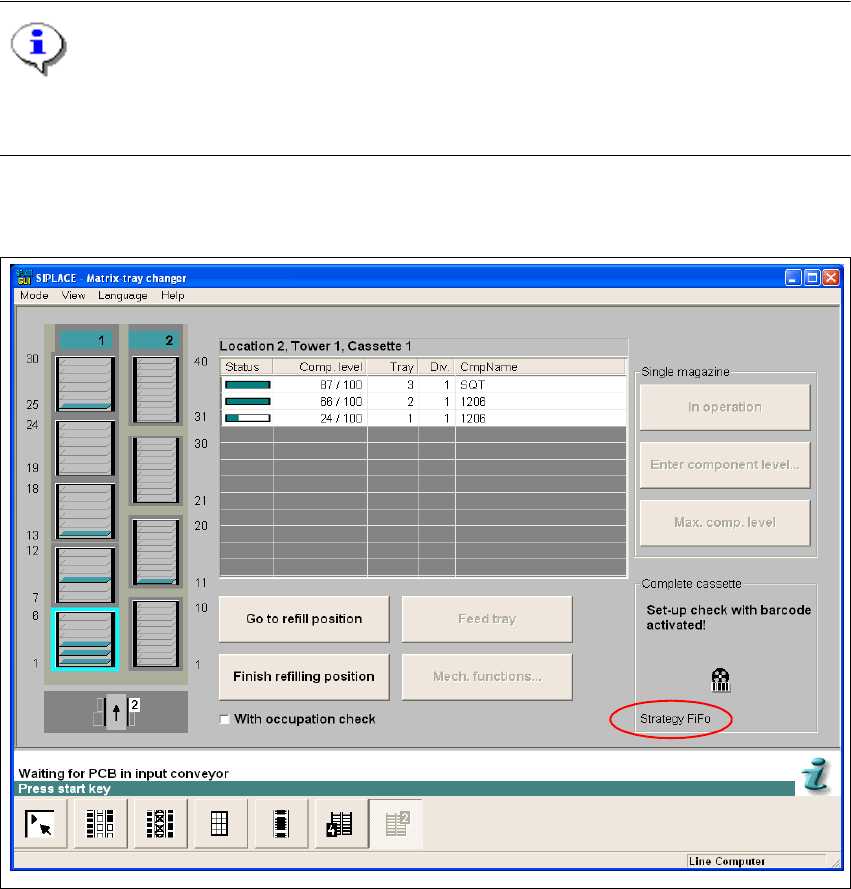
The corresponding option is shown in the "Matrix Tray Changer" view: 8
8
Fig. 8.17 - 2 "Matrix Tray Changer" view
8
8
8 New functionality in 504.01 SIPLACE Software Guide SR.504.xx
8.17 FiFo option for each location Issue 01/03 EN
100

SIPLACE Software Guide SR.504.xx Index
Issue 01/03 EN
101
Index
A
abbreviations
. . . . . . . . . . . . . . . . . . . . . . . . . . . .11
abort processing
. . . . . . . . . . . . . . . . . . . . . . . . .25
aborting PCB processing (S25-HM)
. . . . . . . . . .19
access level
. . . . . . . . . . . . . . . . . . . . . . . . . . . .35
activating and deactivating the live image
. . . . .88
additional help
. . . . . . . . . . . . . . . . . . . . . . . . . . .64
additional languages
. . . . . . . . . . . . . . . . . . . . . .46
automatic introduction of the mapping plate
. . . .91
B
barcode reader
. . . . . . . . . . . . . . . . . . . . . . . . . .96
barcode-supported refilling
. . . . . . . . . . . . . . . . .22
C
calibrate RV camera
. . . . . . . . . . . . . . . . . . . . . .89
calibrating heads and cameras
. . . . . . . . . . . . . .89
calling error information
. . . . . . . . . . . . . . . . . . .55
CAN interface modules
. . . . . . . . . . . . . . . . . . . .96
CAN/axis driver
. . . . . . . . . . . . . . . . . . . . . . . . . .96
chat mode
. . . . . . . . . . . . . . . . . . . . . . . . . . . . . .69
clearing errors
. . . . . . . . . . . . . . . . . . . . . . . . . . .60
close feeder covers
. . . . . . . . . . . . . . . . . . . . . . .50
close protective covers
. . . . . . . . . . . . . . . . . . . .50
cluster name
. . . . . . . . . . . . . . . . . . . . . . . . 38, 39
colors in the error info display
. . . . . . . . . . . . . . .58
component barcode reader
. . . . . . . . . . . . . . . . .96
component level indicator option
. . . . . . . . . . . .72
component rejection
. . . . . . . . . . . . . . . . . . . . . .87
components missing at location
. . . . . . . . . . . . .21
components of the user interface
. . . . . . . . . . . .15
compressed air switch
. . . . . . . . . . . . . . . . . . . .22
Configure Traceability
. . . . . . . . . . . . . . . . . . . . .81
configuring the GUI
. . . . . . . . . . . . . . . . . . . . . . .44
configuring the SIPLACE Pro connection
. . . . . .26
connection to ISDN router
. . . . . . . . . . . . . . 70, 71
connection to line computer
. . . . . . . . . . . . . . . .22
content
. . . . . . . . . . . . . . . . . . . . . . . . . . . . . . . .46
contents of help system
. . . . . . . . . . . . . . . . . . .62
context-sensitive help system
. . . . . . . . . . . . . . .22
continuing processing
. . . . . . . . . . . . . . . . . 18, 25
control modes
. . . . . . . . . . . . . . . . . . . . . . . . . . .37
controls
. . . . . . . . . . . . . . . . . . . . . . . . . . . . . . . .16
Conveyor 1 F8
. . . . . . . . . . . . . . . . . . . . . . . . . . 31
Conveyor 2 F7
. . . . . . . . . . . . . . . . . . . . . . . . . . 30
conveyor adges
. . . . . . . . . . . . . . . . . . . . . . . . . 89
conveyor set to "Transport through"
. . . . . . . . . 21
cycle mode
. . . . . . . . . . . . . . . . . . . . . . . . . . . . 41
D
data security, remote support
. . . . . . . . . . . . . . 67
deleting a comment
. . . . . . . . . . . . . . . . . . . . . . 59
displaying help on the current view
. . . . . . . . . . 64
E
emergency mode
deactivate placement area
. . . . . . . . . . . . . 95
emergency stop without PCB check
. . . . . . . . . 93
end position, z-axis
. . . . . . . . . . . . . . . . . . . . . . 54
equipment, ISDN connection
. . . . . . . . . . . . . . 68
error
. . . . . . . . . . . . . . . . . . . . . . . . . . . . . . . . . . 60
error F3
. . . . . . . . . . . . . . . . . . . . . . . . . . . . . . . 28
error information
. . . . . . . . . . . . . . . . . . . . . . . . 55
F
features, ISDN connection
. . . . . . . . . . . . . . . . 68
feed axes
service position
. . . . . . . . . . . . . . . . . . . . . . 90
Feeder becomes empty
. . . . . . . . . . . . . . . . . . 75
feeder location full
. . . . . . . . . . . . . . . . . . . . . . . 21
feeders F4
. . . . . . . . . . . . . . . . . . . . . . . . . . . . . 28
FiFo option for each location
. . . . . . . . . . . . . . . 98
fine calibration
. . . . . . . . . . . . . . . . . . . . . . . . . . 97
fine calibration mode
. . . . . . . . . . . . . . . . . . . . . 41
firmware download
. . . . . . . . . . . . . . . . . . . . . . 88
flow chart for user interface
. . . . . . . . . . . . . . . . 47
flow chart, switching on SIPLACE line
. . . . . . . 52
functions of the Help menu
. . . . . . . . . . . . . . . . 61
G
Gantry - Axis functions
. . . . . . . . . . . . . . . . . . . 89
Gantry 1 F5
. . . . . . . . . . . . . . . . . . . . . . . . . . . . 30
Gantry 2 F6
. . . . . . . . . . . . . . . . . . . . . . . . . . . . 30
gantry continuous run
. . . . . . . . . . . . . . . . . . . . 89
GEM 504
. . . . . . . . . . . . . . . . . . . . . . . . . . . . . . 91
GEM default settings
. . . . . . . . . . . . . . . . . . . . . 41
GEM F12
. . . . . . . . . . . . . . . . . . . . . . . . . . . . . . 32