00193697-01.pdf - 第92页
8 New functionality in 504.01 SIPLACE Software Guide SR.504.xx 8.9 Slow travel of the main axes and st ar with closed cover Issue 01/03 EN 92 8.9 Slow tra vel of the main axes and st ar with clos ed cover Since the SIPL …

SIPLACE Software Guide SR.504.xx 8 New functionality in 504.01
Issue 01/03 EN 8.8 GEM 504
91
8.7.1 Mapping
The following modifications have been made for version 504 of the software: 8
– Adaptations to the modular conveyor of the SIPLACE HF: Automatic introduction of the
mapping plate.
– Glass mapping plate: The new mapping plate can be used for both the single conveyor and
(by rotating it through 90° and then inserting it) for the dual conveyor on the HF machine. The
previously available mapping plates will continue to be supported.
– Selecting the appropriate camera: In the event of the presence of both an FC and an IC
camera, the calibration service decides automatically which of the cameras is to be used for
the mapping process. If both cameras are available, the FC camera is used.
– Logging: Comprehensive logging procedures.
– Reference to the reference corner: The first mapping point is now relative to the reference
corner. Thus it is impossible for the first mapping position not to be found.
NOTE
A detailed description of the mapping functions can be found in the Software Instructions for
SITEST 504. 8
8.8 GEM 504
All changes to the GEM 504 software since GEM 503 have been made in order to integrate the
new Twin Head and to reflect the change to µm. 8
8 New functionality in 504.01 SIPLACE Software Guide SR.504.xx
8.9 Slow travel of the main axes and star with closed cover Issue 01/03 EN
92
8.9 Slow travel of the main axes and star with closed
cover
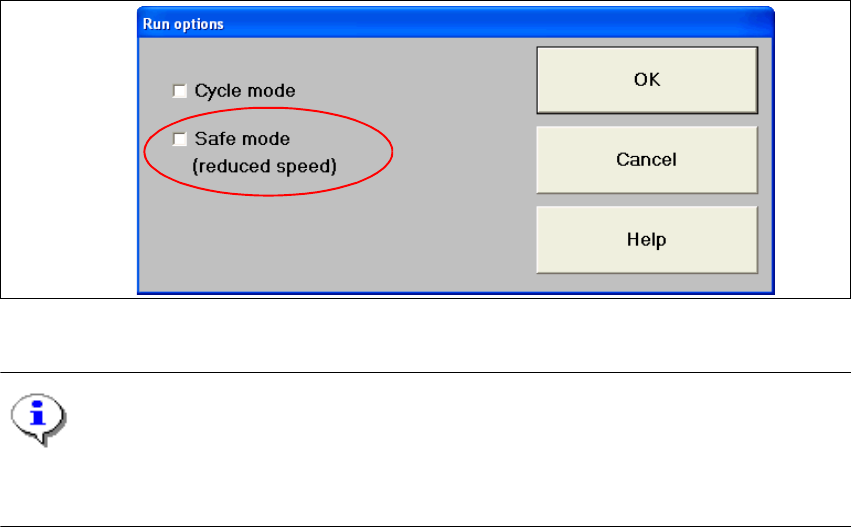
Since the SIPLACE HF no longer has a key switch, there is a new software option which makes
an analogous machine key switch functionality available. 8
This function is called with Options --> Run options... --> and the check box Safe mode
(reduced speed). 8
If the box has been checked, the gantries and star axes travel slowly (at approximately 10% of
the maximum speed). Reduced speed mode is activated. 8
If the check box is deactivated, all axes travel with the maximum possible speed. Reduced speed
mode is deactivated. 8
8
Fig. 8.9 - 1 Run options
NOTE
The "Safe mode (reduced speed)" is only available on the "Line engineer" and "Service engineer"
access levels. 8
SIPLACE Software Guide SR.504.xx 8 New functionality in 504.01
Issue 01/03 EN 8.10 Emergency stop without PCB check
93
8.9.1 Functionality/restrictions when using the "Safe mode" option with an open
cover
– It is possible to carry out vacuum and forced air measurement for the revolver head and Twin
Head
– It is possible to confirm nozzles, magazines and garages for the RV head and Twin Head
– It is possible to activate the locking mechanism (open/shut) for the RV nozzle changer
– All functions that involve the main axes are locked
– All axis functions for the revolver head, for example, stepping the star axis, rotating the DP axis
etc. are locked
– All axis functions for the Twin Head, for example, segment or head reference run, rotating the
DP axis, are locked
8.10 Emergency stop without PCB check
In the past, if an emergency stop occurs during placement (emergency stop button, compressed
air failure, cover is opened) the board in the output conveyor always needed to be checked and
the placement process then continued. 8
As of version 504 of the software, this behavior can be deactivated in the machine options (as of
line engineer access level). In the event of an emergency stop, this is indicated in the dialog box
which opens. 8