00193697-01.pdf - 第30页
3 Graphical user int erface SIPLACE Softw are Guide SR.504.xx 3.3 User interf ace - views and menus Issue 01/03 EN 30 NOTE The foll owing 6 me nu options belon g to the gr oup of si ngle func tions. The sing le function …
SIPLACE Software Guide SR.504.xx 3 Graphical user interface
Issue 01/03 EN 3.3 User interface - views and menus
29
Matrix tray changer 3
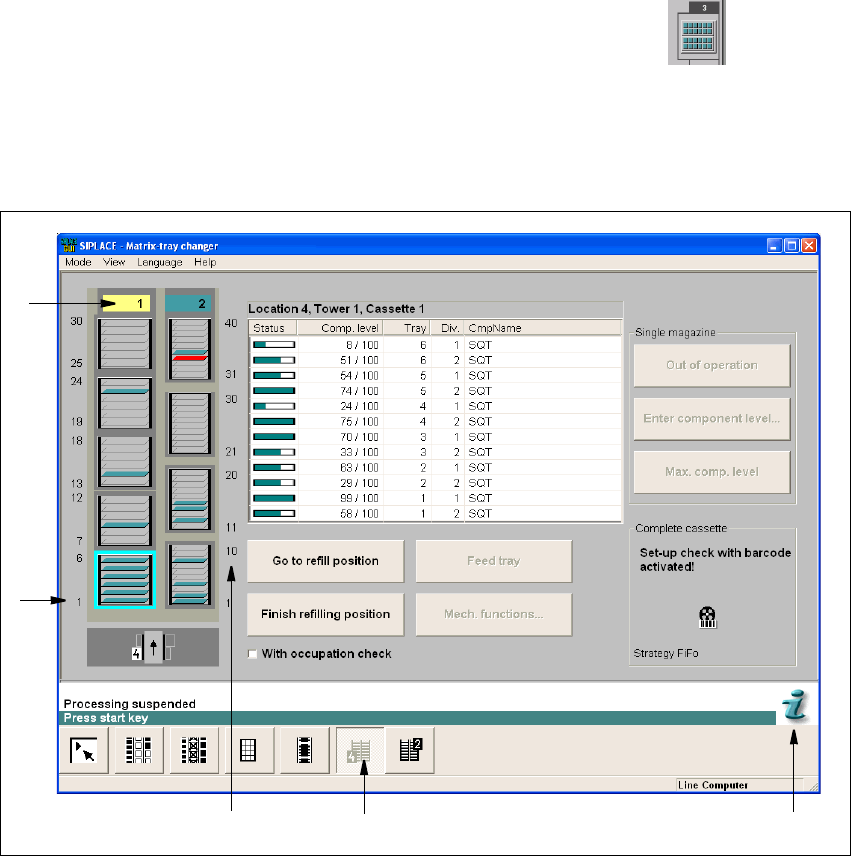
In order to move to the view for the Matrix tray changer you must click the 3
button (for the appopriate location). Or, from the "View" menu, select the "Feeder" function, and
then in this view, click the button for the matrix tray changer. 3
The following window opens: 3
3
Fig. 3.3 - 3 "Matrix tray changer" view (HF)
Key to Fig. 3.3 - 3
(1) Cassette number
(2) Tower number
(3) Level number
(4) Selects the "MTC" view.
(5) Help system for the topic "MTC"
You will find a detailed description of the MTC in the Station Operating Manual. Please refer to the
online Help for parameter descriptions. 3
3
1
3
2
5
4
3 Graphical user interface SIPLACE Software Guide SR.504.xx
3.3 User interface - views and menus Issue 01/03 EN
30
NOTE
The following 6 menu options belong to the group of single functions.
The single functions are used to execute specific actions following fatal errors as well as to set up
and test the machine since they allow you to address the various functional modules in a defined
manner. 3
Gantry 1 F5 3
This is used to call the single functions for gantry 1. These can be used to, for example, test the
functions of the revolver head. 3
NOTE
Each of the max. 2 gantries can be addressed separately.
The functions are identical for all the gantries. 3
Gantry 2 F6 3
Single functions for gantry 2 3
Conveyor 2 F7 3
Single functions for PCB conveyor 2 (= left conveyor track in the case of dual conveyors) 3
NOTE
The single functions for Conveyor 2 can only be called if a dual conveyor has been configured.
The functions are identical to the functions for Conveyor 1. 3
SIPLACE Software Guide SR.504.xx 3 Graphical user interface
Issue 01/03 EN 3.3 User interface - views and menus
31
Conveyor 1 F8 3
This is used to call the single functions for PCB conveyor 1 (= right conveyor track in the case of
dual conveyors). These are used to test and set the functional modules for PCB conveyor as well
as to set the conveyor width. 3
NOTE
The next two menu options belong to the group of vision functions.
These functions are used to teach and test fiducials, measure components and change compo-
nent package form data.
The vision functions cannot be executed at the "Operator" access level. 3
Teach fiducial F9 3
This menu item is used to call the functions for the processing of fiducials for PCB position recog-
nition.
For a more extensive description of the procedure refer to the "Vision functions" section of the op-
erating instructions and in the online Help system. 3
Test component F10 3
This menu item is used to call the functions for the processing of component package forms for
component centering.
For a more extensive description of the procedure refer to the "Vision Functions" section of the
operating instructions. 3
3
Start SITEST F11 3
This automatically starts the SITEST test program for machine set-up and calibration.
The user interface, together with the procedure for the execution of the functions, is described in
the separate User’s Manual for the SITEST test program. 3
NOTE
The SITEST test program cannot be started from the "Operator" access level. 3