4OM-1505-004_w.pdf - 第115页
4OM-1505 0906-001 2-B

4OM-1505
0906-001 2-A
Chapter 2
Troubleshooting
This chapter outlines the troubleshooting.
1. "ERROR" Window
2. Troubleshooting on Each Section

4OM-1505
0906-001 2-B
4OM-1505
2-1
1. "ERROR" Window : Chap.2
1002-002
1. "ERROR" Window
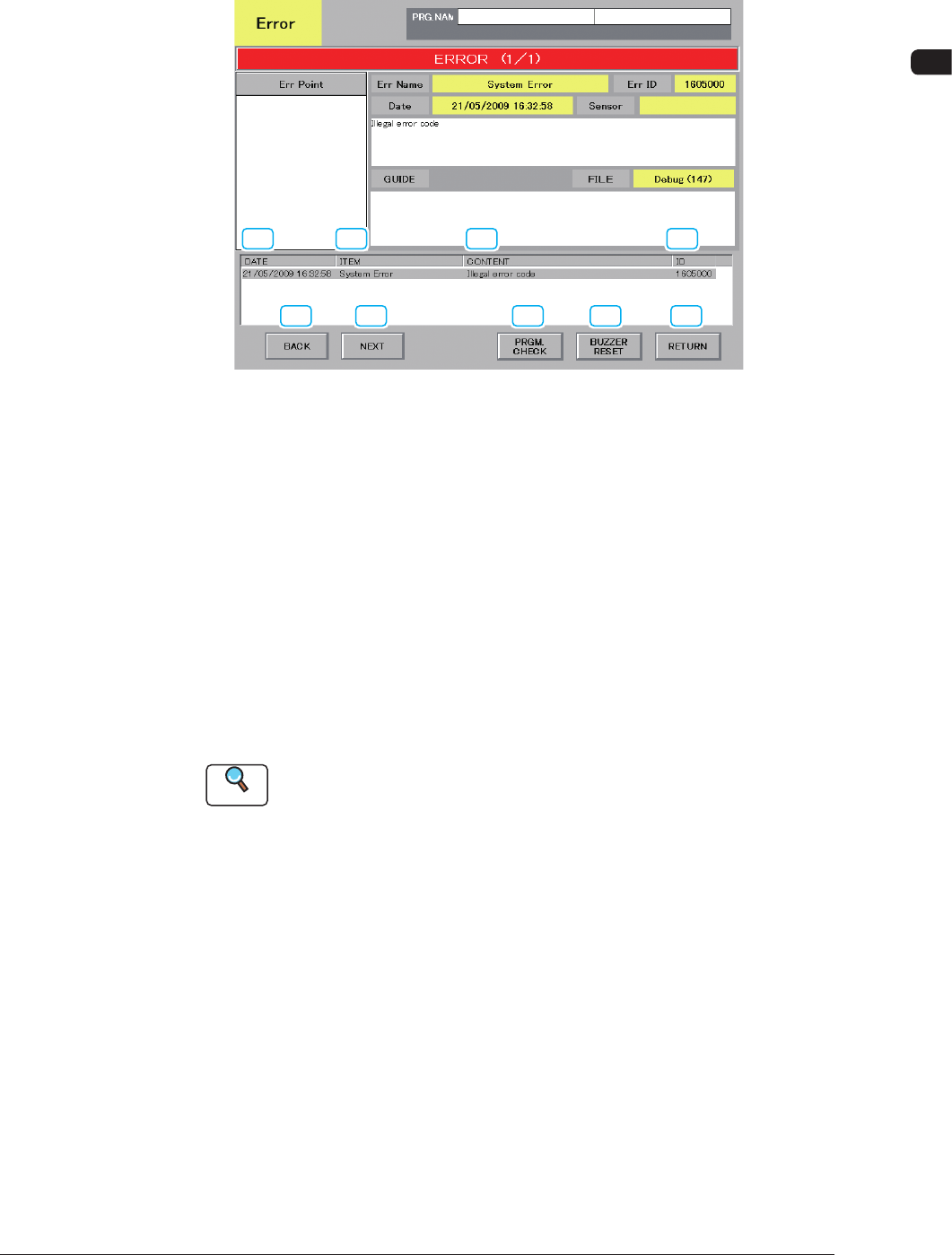
When the machine detects an error, the following window opens.
[1] [2]
[3]
[4]
[5] [6]
[7] [8] [9]
F4B1 "ERROR" Window
[1] DATE
Displayed are the date and time of error occurrence.
[2] ITEM
Displayed is an error item.
[3] CONTENT
Displayed are the contents of an error.
[4] ID
Displayed is a number that identies an error.
Reference
When an error has occurred, use this ID as an index and refer to "2.2
Troubleshooting after Error Display" in "Chapter 2" for details.