00198142-01_AI_Stationary-Camera-25-33_TX_de_en.pdf - 第72页
Installation Converting the Reject Box 72 Stationary Camera Type 25/33 Stationäre Kamera Typ 25/ 33 Fitting the N C holder ► Fit the right NC holder (1) with tw o fastening s crews DIN 79 84-M6 x 12-A2-70 [030818 47-xx] …
Installation
Converting the Reject Box
Stationary Camera Type 25/33 Stationäre Kamera Typ 25/33 71
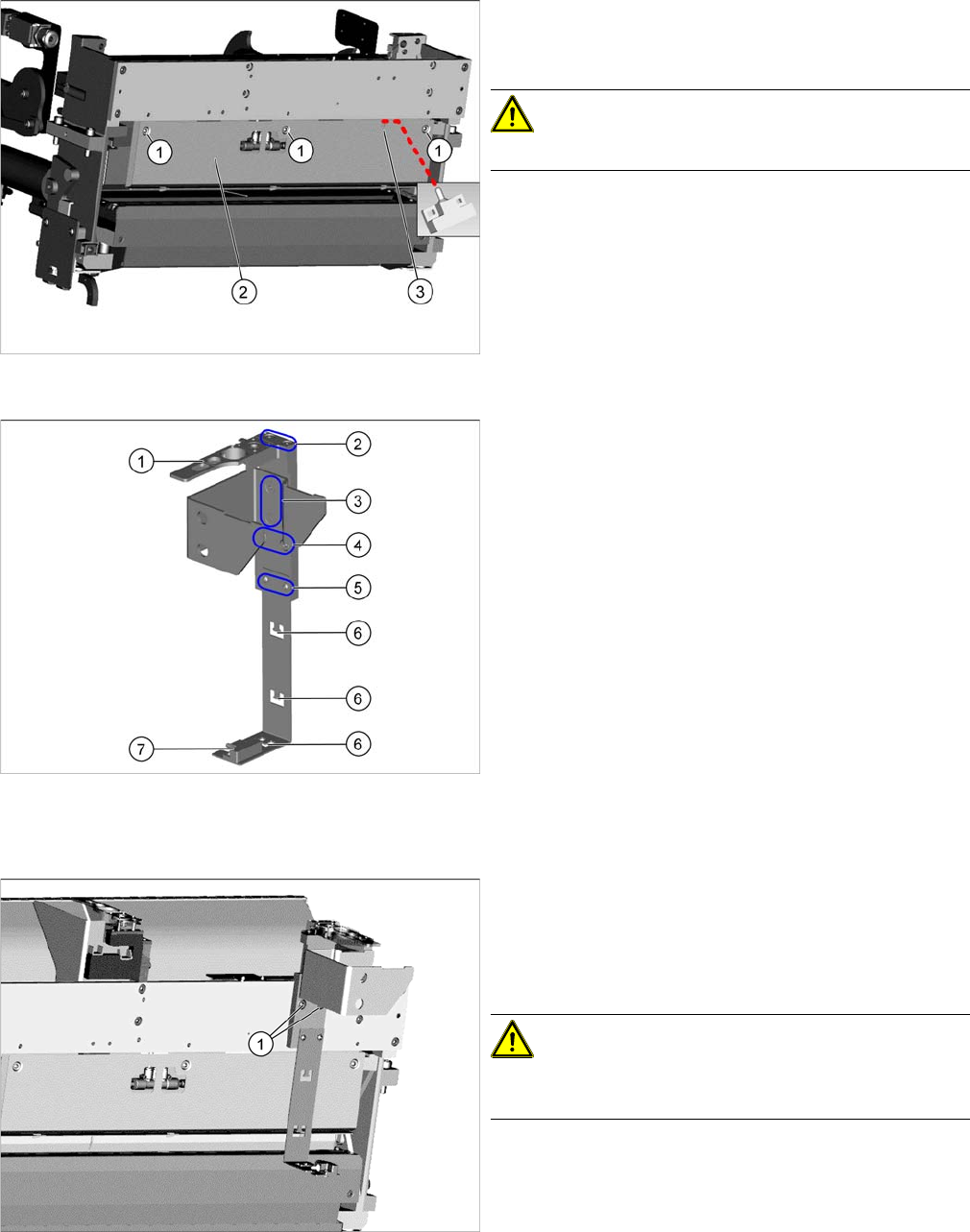
Fitting the rear cover
► Fasten the rear cover (2) with three screws (1).
The sensor cable is run through the opening (3) in the
cover.
CAUTION!
Make sure not clamp any hoses or cables.
Fitting the reject bin holder
1. Nozzle station [03090348
-
xx]
The nozzle station is fitted after measuring the height.
2. Fastening screws of the nozzle station [00333782
-
xx]
3. Fastening screws for retaining bracket ISO10642-
M5x10-A2-70 [03082832
-
xx]
4. Fastening screws of the complete holder on the COT
insert DIN7984-M6x12-A2-70 [03081847
-
xx]
5. Fastening screws ISO 7380-2 M 3 x 6-A2-70
[03099571-xx], only for setting the sensor height
6. Three lugs for cable ties
7. Sensor [03088550
-
xx]
The sensor that is already installed and cabled on the
insert is used.
► Fit the individual parts of the reject bin holder.
► Use the cable ties to fix the sensor to the three lugs.
Fitting the reject bin holder
► Fit the reject bin holder with two fastening screws
DIN7984-M6x12-A2-70 [03081847-xx] (1) on the
COT insert.
Push the sensor cable behind the cover as far as pos
-
sible.
CAUTION!
If too much cable length lies in front of the cover the reject
may damage the cable.
Installation
Converting the Reject Box
72 Stationary Camera Type 25/33 Stationäre Kamera Typ 25/33
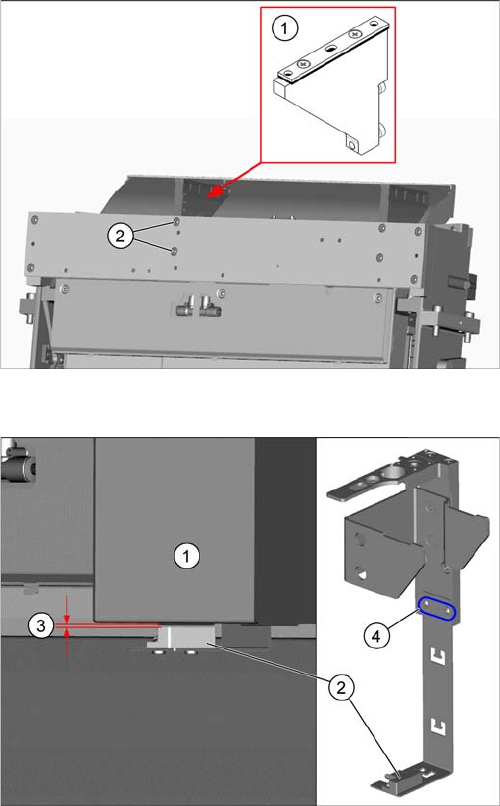
Fitting the NC holder
► Fit the right NC holder (1) with two fastening screws
DIN 7984-M6 x 12-A2-70 [03081847-xx] (2). Replace
the right NC holder by the supplied version without
nozzle station.
Do not fit the NC and the nozzle station yet!
Setting the sensor
1. Reject box
2. Sensor
3. Distance 2.0+/-1.0 mm
4. Fastening screws for setting the senor height
► Insert the reject bin.
► Set the sensor to a distance of 2.0+/-1.0 mm from the
reject bin.
Installation
Fitting the Stationary Camera Type SST25
Stationary Camera Type 25/33 Stationäre Kamera Typ 25/33 73
3.3
3.3 Fitting the Stationary Camera Type SST25
Fitting the Stationary Camera Type SST25
This section describes the installation of a stationary camera of type SST25 GigE.
For installing a stationary camera of type SST33 GigE, refer to section "3.4 Fitting the Stationary Camera
Type SST33" [ ➙ 77].
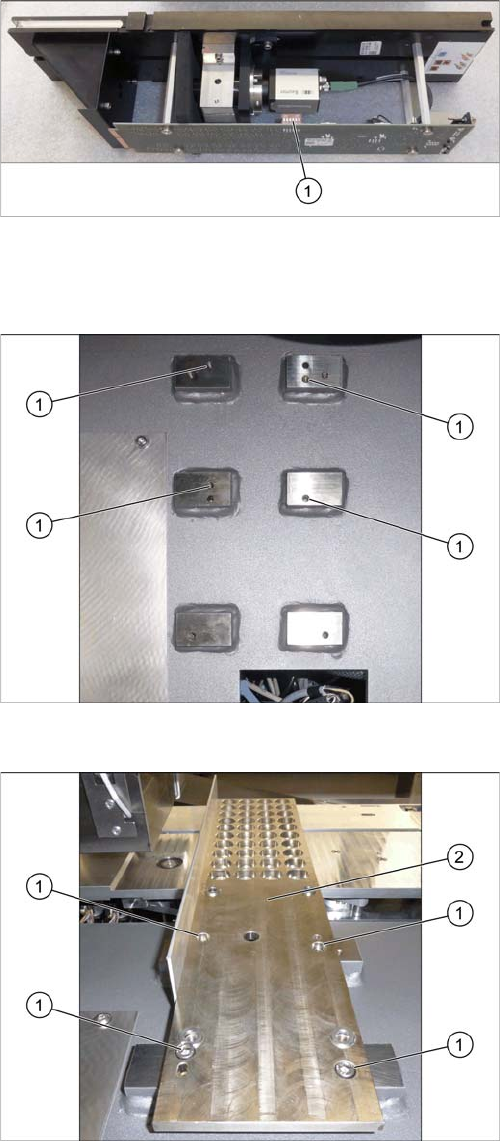
Setting the DIP Switches
Fitting the Support Plate
Setting the DIP Switches
► Set the DIP switches (1):
S1.1 to S1.6: OFF
(See also "4.2.1.1 Vision LED Controller VLC25 GigE
DTC [03117587-xx]" [ ➙ 87]).
Screw points support plate
1. Four screw points on the support plate
Fitting the Support Plate
1. Four fastening screws of the support plate
DIN912-M6x12-A2-70 [03045087
-
xx]
2. Support plate FC [03077911
-
xx]
► Fasten the support plate with four screws.