00198142-01_AI_Stationary-Camera-25-33_TX_de_en.pdf - 第86页
Appendix Excerpts from the Service Manual 4.1.2 Nozzle Changer Setting 86 Stationary Camera Type 25/33 Stationäre Kamera Typ 25/ 33 4.1.2.3 4 . 1 . 2 . 3 J u m p e r s o n t h e N o z z le C h a n g e r Jumpers on the No…
Appendix
4.1.2 Nozzle Changer Setting Excerpts from the Service Manual
Stationary Camera Type 25/33 Stationäre Kamera Typ 25/33 85
4.1.2.2
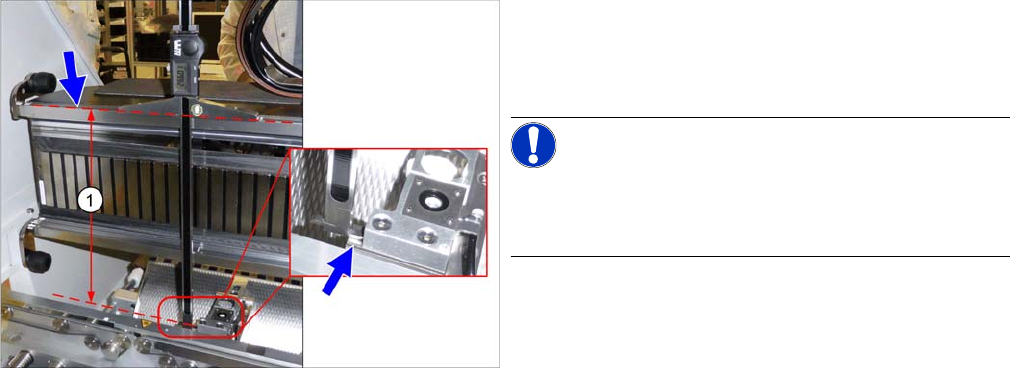
4.1.2.2 Setting the Height of the Nozzle Station
Setting the Height of the Nozzle Station
Parts, Equipment and Tools
▪ Measuring scale
▪ Adjusting plates: support for nozzle reject device [03039514-xx]
Setting
Setting the height of the nozzle station
(taking the standard nozzle station as example)
► The distance (1) between the contact surface of the
nozzle station and the top edge of the upper guide rail
of the gantry needs to be 266.0 +/
-
0.1/-0.3 mm.
You may need to use shim plates to adjust this.
NOTICE!
Alternatively, you can measure from the top edge of the
lower guide rail of the gantry. In this case, the distance is
105.0+/
-
0.1/-0.3 mm.
Appendix
Excerpts from the Service Manual 4.1.2 Nozzle Changer Setting
86 Stationary Camera Type 25/33 Stationäre Kamera Typ 25/33
4.1.2.3
4.1.2.3 Jumpers on the Nozzle Changer
Jumpers on the Nozzle Changer
Overview
Preparation
Setting
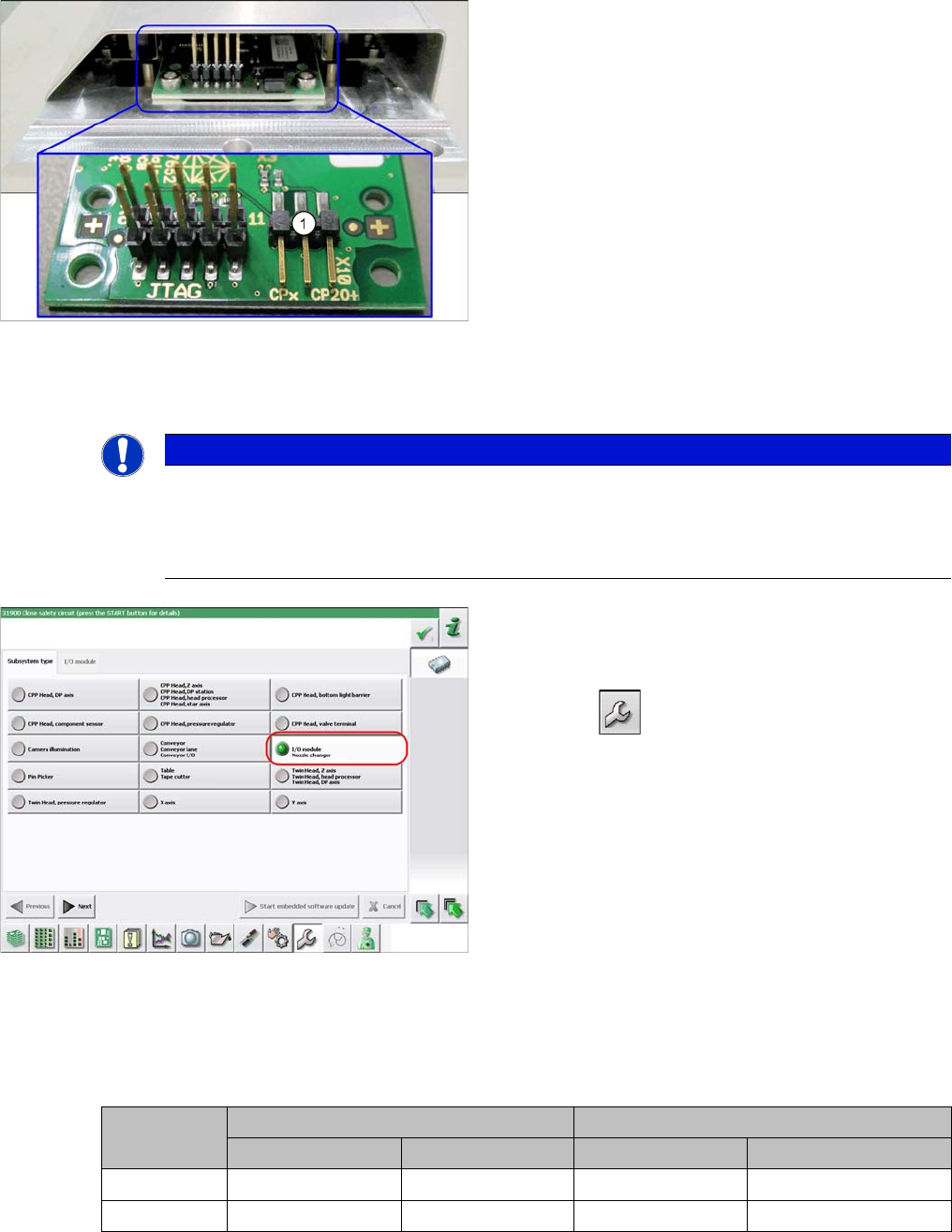
► Set the correct value on the jumper for your head type, software and control method.
Nozzle Changer CP20P - Jumper X10
Jumper X10
Jumpers on the Nozzle Changer
1. Jumper X10
The jumper X10 needs to be set at the following nozzle
changers:
▪ Nozzle changer basic structure CPx/all assembly -
short [03103649-xx]
▪ Nozzle changer basic structure CPx/all assembly -
long [03103514-xx]
NOTICE
Before installation
Due to the design, this setting must be performed before installation in the machine.
► If the new nozzle changer is being fitted as a spare part in a machine with I/O module con
-
trol, you will need to reconnect the jumper to pin 1-2.
Checking the I/A module control
To check whether the machine has I/O module control,
proceed as follows:
► Switch over to the operator level Service.
► Select the button.
► Select the button Embedded Software.
► Select the button Update Subsystem.
► If I/O module control is present, you will see the entry
Nozzle Changer at I/O Module.
Head SW <= 706.x SW >= 707.x
I/O controller XFCU I/O controller XFCU
CPx, DLM 1-2 1-2 1-2 2-3
C&P20 P --- --- --- 2-3 (factory settings)
Appendix
4.2.1 Stationary cameras Description of Boards
Stationary Camera Type 25/33 Stationäre Kamera Typ 25/33 87
4.2
4.2 Description of Boards
Description of Boards
4.2.1
4.2.1 Stationary cameras
Stationary cameras
4.2.1.1
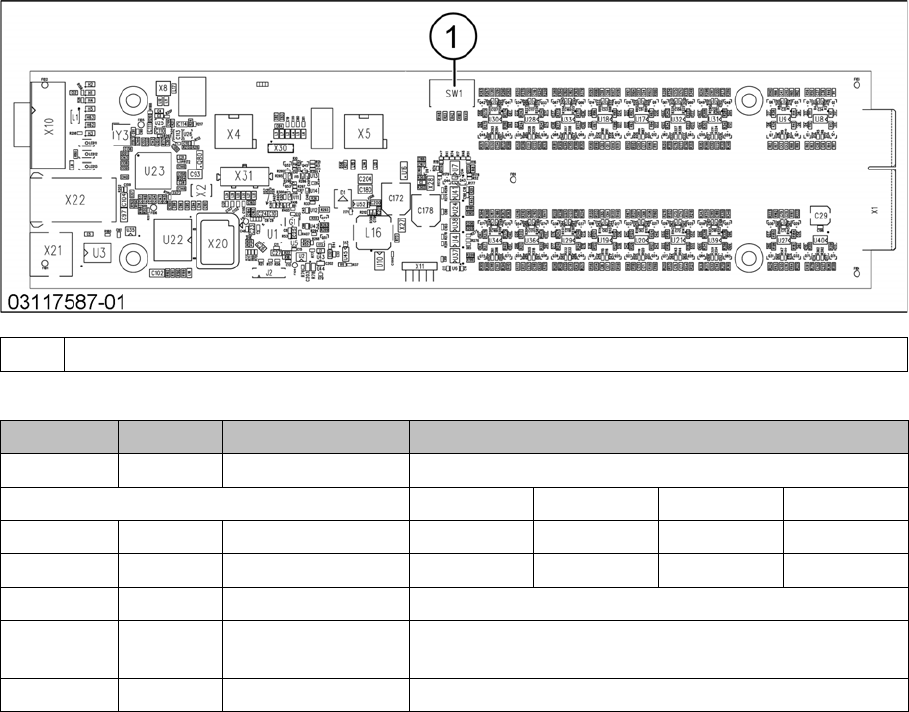
4.2.1.1 Vision LED Controller VLC25 GigE DTC [03117587-xx]
Vision LED Controller VLC25 GigE DTC [03117587-xx]
This board is part of the stationary cameras SST25 GigE.
DIP switch S1 for SST25 [03117981-01]
1 DIP switch SW1
Switch Status Signal name Description
S1.1 OFF VCU_CODE OFF: normal operation, ON: Reset
Gantry 1 Gantry 2 Gantry 3 Gantry 4
S1.2 ON/OFF PORTAL_ID_0 OFF ON OFF ON
S1.3 ON/OFF GANTRY_ID_1 OFF OFF ON ON
S1.4 OFF SMD_LED OFF: standard LED, ON: SMD LED
S1.5 OFF CAN_H OFF: with CAN terminator
ON: without CAN terminator
S1.6 OFF CAN_GROUP OFF: FC camera, ON: IC camera