Manual_BSA_II_英文操作说明书.pdf - 第16页
16 BSA II Operating Instructions Operating Design Symbol Designation Description [Selection] display In the menu: Identifies the selected parameter . If the “Calculation“ or “Density determina tion“ application is active…
BSA II Operating Instructions 15
Operating Design
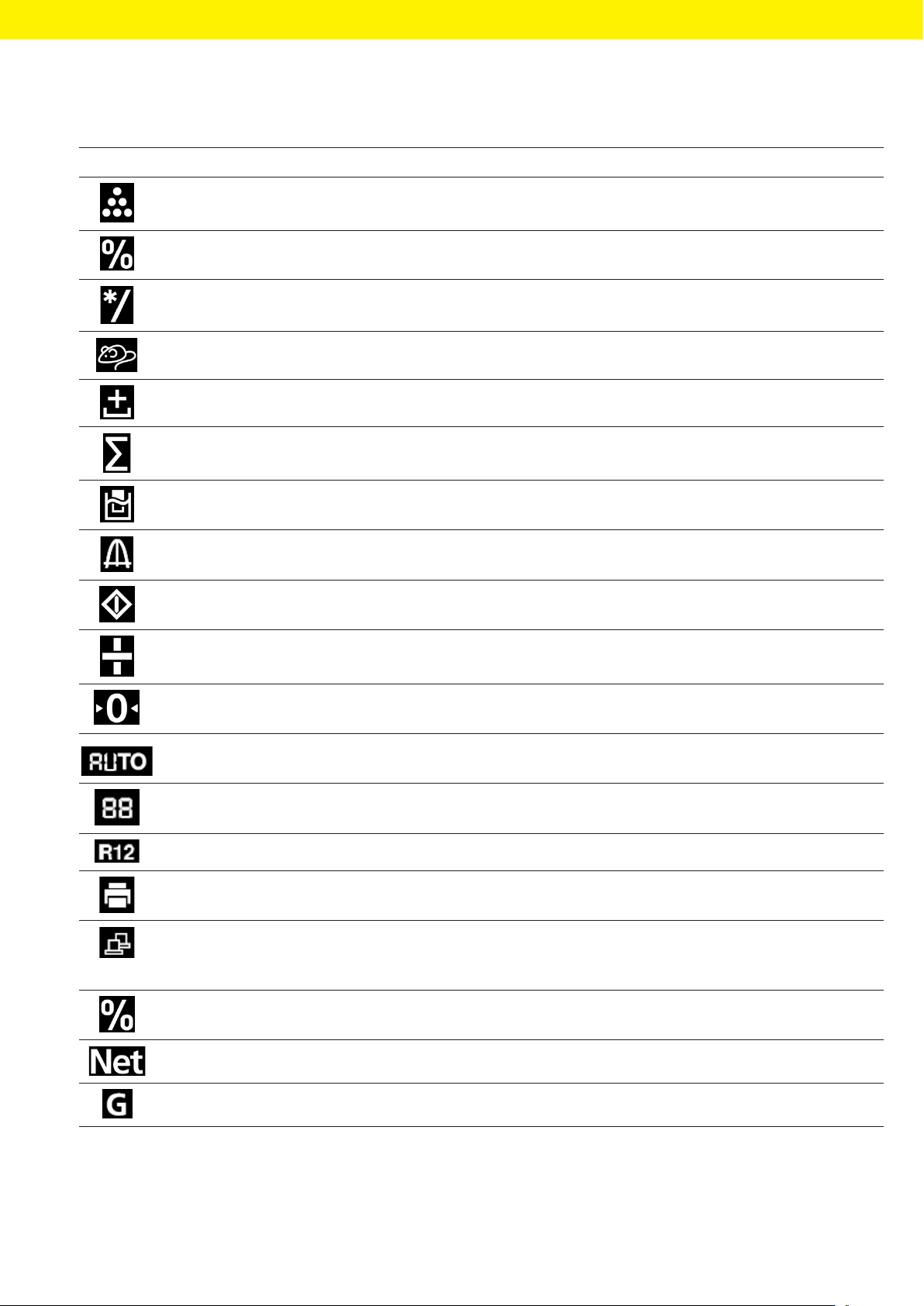
4.3 Displays in the Operating Display
Symbol Designation Description
[Counting] display Indicates that the “Counting” application is selected.
[Percent weighing] dis-
play
Indicates that the “Percent weighing” application is selected.
[Calculation] display Indicates that the “Calculation” application is selected.
[Animal weighing] display Indicates that the “Animal weighing” application is selected.
[Net total] display Indicates that the “Net total” application is selected.
[Totalizing] display Indicates that the “Totalizing” application is selected.
[Density determination]
display
Indicates that the “Density determination” application is selected.
[Statistics] display Indicates that the “Statistics“ application is selected.
[Busy] display Indicates that the device is processing a command.
[Sign] display Indicates whether the value being displayed is positive or negative.
[Zero] display For some conformity-assessed devices: Indicates that the device has
been zeroed.
[AUTO] display Indicates that the “Animal weighing” application starts automatically.
[Application help] display Indicates the number of components for “Totalizing“, “Net total“, and
“Statistics“.
[R12] display Indicates the active range for multi-range balances.
[Printer] display − Indicates that a printer has been detected at the USB port.
− Flashes if the data output is active.
[PC-Connect] display − Indicates that a PC or a second display has been detected at the USB
port.
− Flashes if the data connection is active.
[Percent] display Indicates that a percentage value is being displayed.
[Net] display Indicates that a net value is being displayed.
[Gross] display Indicates that a gross value is being displayed.
16 BSA II Operating Instructions
Operating Design
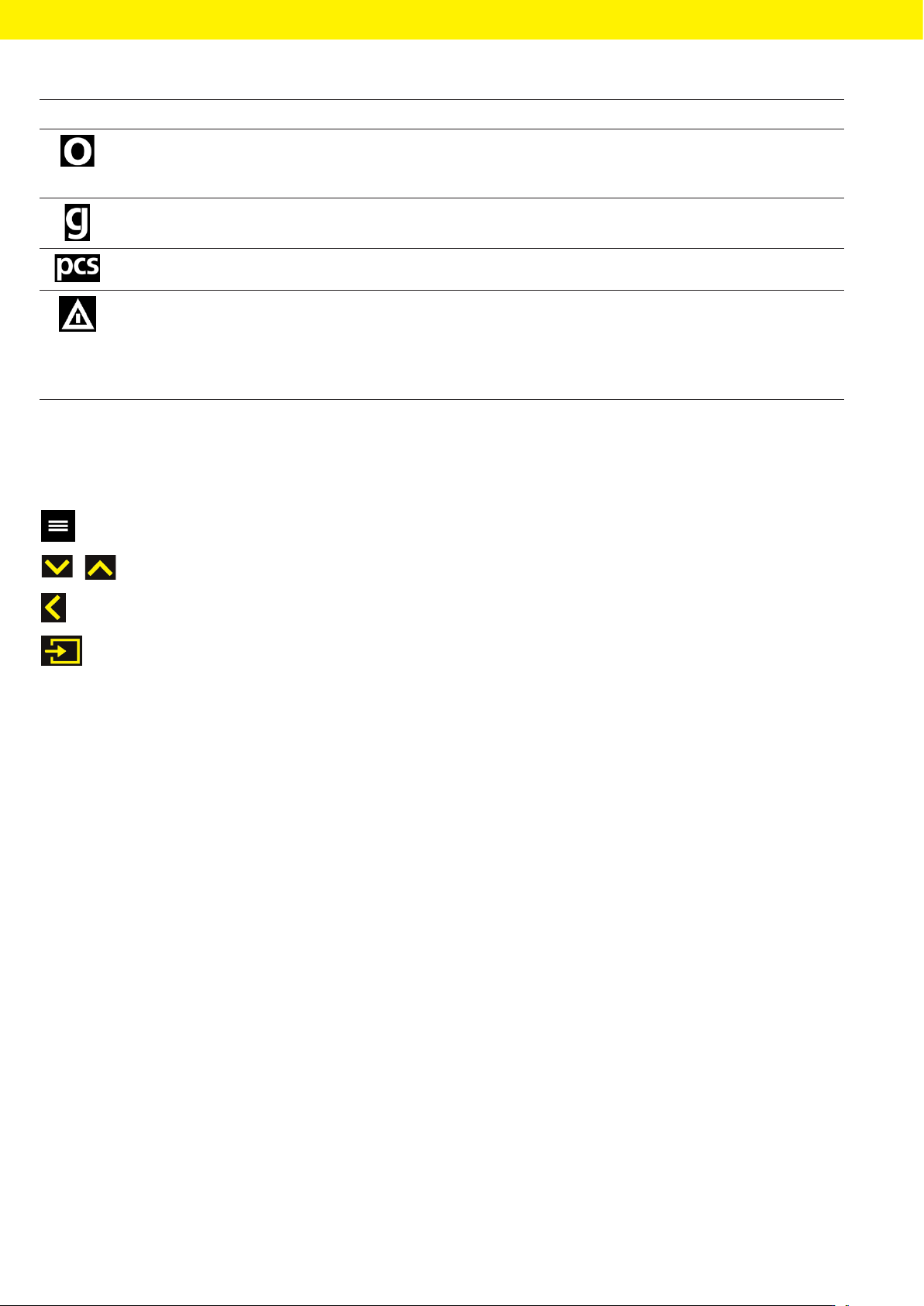
Symbol Designation Description
[Selection] display In the menu: Identifies the selected parameter.
If the “Calculation“ or “Density determination“ application is active: Indi-
cates that a calculated value is being displayed.
[Unit symbol] display Indicates the set weight unit, e.g., [g] for “grams”.
[Quantity] display Indicates that a quantity is being displayed.
[Invalid weight value] dis-
play
− Indicates that the display does not contain a weight value, but is in-
stead the calculated result of an application, e.g., for the “Totalizing”
application.
− For conformity-assessed devices: Indicates a fault. The cause of this
fault is displayed after pressing the [Unit change] key.
4.4 Navigating the Menus
t To call up the main menu: Press the [Menu] button.
t To display menu items or parameters of a level: Press the [Up] or [Down] button.
t To return to the next higher menu level or exit the menu: Press the [Back] button.
t To open a displayed menu level or a displayed parameter: Press the [Confirm] button.

BSA II Operating Instructions 17
Operating Design
4.5 Menu Structure
4.5.1 “Main Menu“ Menu Structure
t Navigating the menus (see Chapter 4.4, page 16).
Level 1: Level 2: Description
SETUP BALANCE Set the functions of the device.
GEN.SERV.
“General services”
Reset the menu to factory settings.
DEVICE RS-232
“RS232, 9-pin”
Define the parameters for the COM interface.
USB
“USB-C”
Define the parameters for the USB interface.
EXTRAS Define the functions of the operating display.
DATA.OUTP.
“Data output”
COM.SBI
“SBI communication”
Configure the automatic data output.
PRNT.PR.
“Printout settings”
Perform the settings for the printout.
APPLIC.
“Applications”
WEIGH − Determine the weight value of a sample.
− Activate the functions for all applications.
COUNT Determine the number of parts that have approximately equal weight.
PERCENT
“Percent weighing”
Determine the percentage share of a
sample based on a reference weight.
NET.TOT.
“Net total”
Carry out the weighing of components for a mixture.
TOTAL
“Totalizing”
Add weight values of independent weighing processes in a memory.
ANIMALW.
“Animal weighing”
Weigh unstable samples, e.g., animals. This program calculates the av-
erage of several measurement cycles.
CALC.
“Calculation”
Calculate the weight value using a multiplier or divisor, e.g., for deter-
mining the weight per unit area of paper.
DENSITY
“Density determination”
Determine the density of solid samples based on the buoyancy meth-
od.
STATIST.
“Statistics”
Save and statistically analyze weight values and calculated values.