Manual_BSA_II_英文操作说明书.pdf - 第9页
BSA II Operating Instructions 9 Safety Instructions 2.5 Conduct in an Emer gency If an emergency occurs, e.g., due to malfunctions of the device or dangerous situations: P ersons may be injured. The devic e must be immed…

8 BSA II Operating Instructions
Safety Instructions
2 Safety Instructions
2.1 Intended Use
The device is a high-resolution balance, which can be
used indoors, e.g. in industrial areas. The device is in-
tended to accurately determine the mass of materials in
liquid, paste, powder, or solid form.
Appropriate containers must be used for loading each
type of material.
The device is intended solely for use in accordance with
these instructions. Any other use is considered improper
and can interfere with the device’s protective functions.
Operating Conditions for the Device
Do not use the device in potentially explosive environ-
ments. Only use the device indoors.
The device may only be used with the equipment and
under the operating conditions described in the Techni-
cal Data section of these instructions.
2.1.1 Modifications to the Device
If the device is modified: There is a risk of injury. De-
vice-specific documents and product approvals may
lose their validity.
Contact Sartorius if you have any questions concerning
modifications.
2.1.2 Maintenance and Repairs on the
Device
Device maintenance and repairs may only be carried out
by persons with specialized knowledge of the device. If
the device is not maintained or repaired by a specialist:
There is a risk of injury. Device-specific documents and
product approvals may lose their validity.
Only the maintenance tasks described in these instruc-
tions should be carried out. For maintenance tasks that
need to be carried out by Sartorius Service, contact Sar-
torius Service.
Sartorius recommends that any repair work, even that
carried out after the end of the warranty period, is car-
ried out by Sartorius Service or after consulting with Sar-
torius Service.
2.2 Qualifications of Personnel
Persons who do not possess adequate knowledge about
how to use the device may injure themselves and other
persons.
If a particular qualification is required for an action: The
target group is specified. If no qualification is specified:
The action can be performed by the “Operator” target
group.
2.3 Functionality of the Device
Parts
Non-functioning device parts, e.g., as a result of damage
or wear, can cause malfunctions. There is a risk of injury
to persons.
t If device parts are not functioning: Do not use the
device.
t Comply with the maintenance intervals (intervals and
maintenance tasks see Chapter “9.5 Maintenance
Schedule”, page 38).
2.4 Electrical Equipment
2.4.1 Damage to the Device’s Electrical
Equipment
Damage to the device’s electrical equipment, e.g., dam-
aged insulation, can be life-threatening. Contact with
live parts represents a danger to life.
t If the electrical equipment of the device is defective,
disconnect the power supply and contact Sartorius
Service.
t Keep live parts away from moisture. Moisture can
cause short circuits.
2.4.2 Power Supply Unit and Power Supply
Cable
The use of an unauthorized power supply unit or power
supply cable may cause life-threatening injuries as a re-
sult of electric shocks, for example.
t Only use the original power supply unit and power
supply cable.
t If the power supply unit or power supply cable needs
to be replaced: Contact Sartorius Service. Do not re-
pair or modify the power supply unit or power supply
cable.

BSA II Operating Instructions 9
Safety Instructions
2.5 Conduct in an Emergency
If an emergency occurs, e.g., due to malfunctions of the
device or dangerous situations: Persons may be injured.
The device must be immediately taken out of operation:
t Disconnect the device from the power supply.
t Prevent the device from recommissioning.
2.6 Accessories
The use of unsuitable accessories can affect the func-
tionality and operating reliability of the device and have
the following consequences:
− Risk of injury to persons
− Damage, malfunctions, or failure of the device
t Only use accessories that have been approved by
Sartorius for this device.
2.7 Risk of Injury When Carrying
the Device
If the device is not carried correctly:
− Fingers could get caught in the draft shield.
− The device could fall and cause an injury, e.g. a foot
injury.
− The device connections could be damaged.
t Use both hands to carry the device. To do this, reach
sideways under the device with both hands.
t Do not carry the device on the draft shield or the
control unit.
t Disconnect the device from all connections at the in-
stallation site.
2.8 Glass Breakage
Glass components can break if they fall or are handled
incorrectly. Glass fragments can cause cuts.
t In the event of damage to the operating display or
draft shield, do not use the device. Contact Sartorius
Service.
t Only operate the operating display with your fingers.
Do not use pointed or sharp objects.
10 BSA II Operating Instructions
Device Description
3 Device Description
3.1 Device Overview
2
3
5
4
1
1
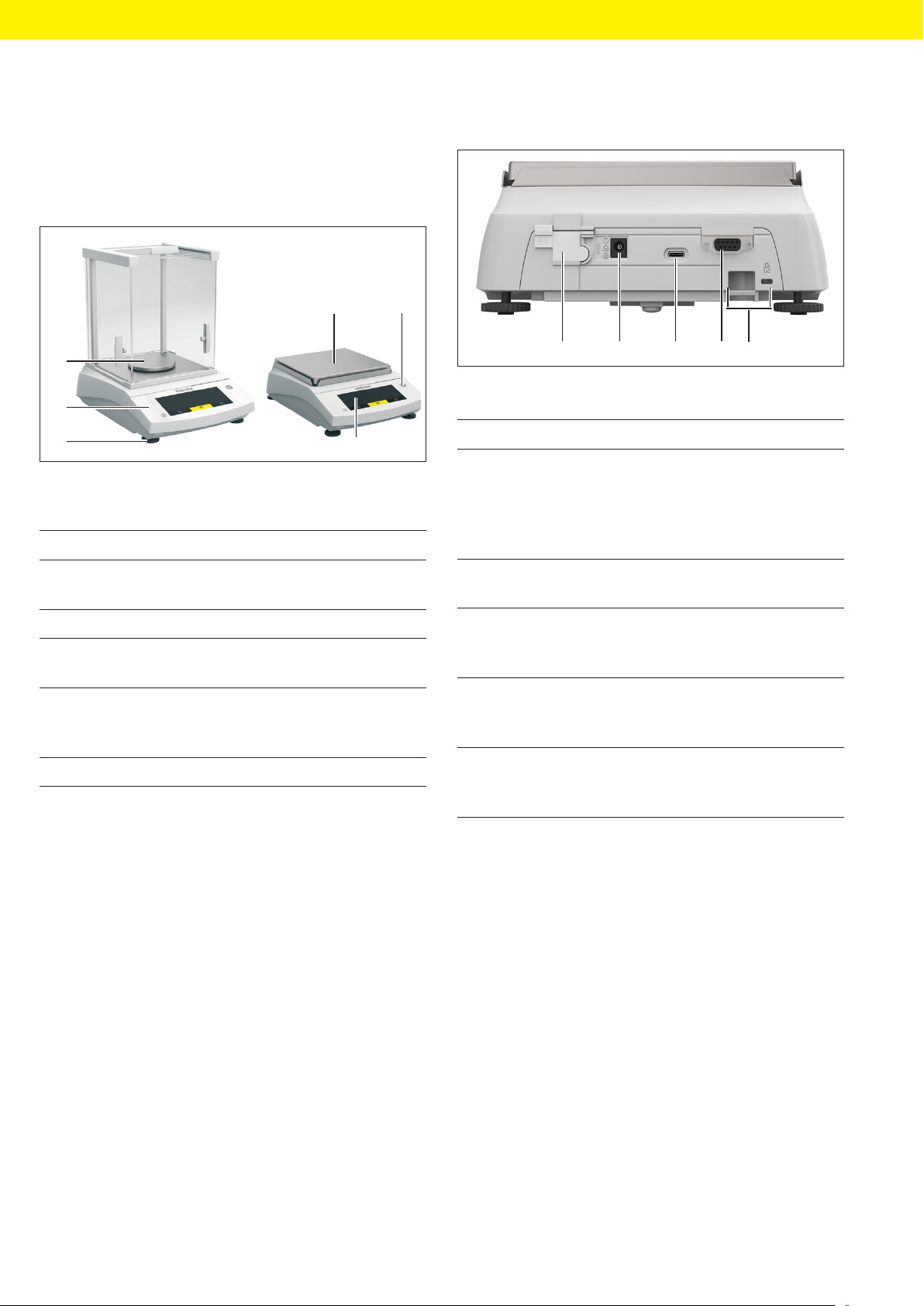
Fig. 1: Device with analytical draft shield and device with frame draft
shield (example)
Pos. Name Description
1 Weighing pan Intended for placing the
sample
2 Level
3 Operating dis-
play
4 Leveling foot Used to level the bal-
ance, manually adjust-
able
5 Control unit
3.2 Device Connections
1 2 3 4 5
Fig. 2: Device with frame draft shield (rear view)
Pos. Name Description
1 Access switch Protects the device from
changes to the device
settings. Is sealed for
conformity-assessed de-
vices.
2 Power supply Connection for power
supply to the device
3 USB-C connec-
tion
For connection to a
printer, PC, or a second
display
4 RS232 connec-
tion
9-pin, for the connection
to a printer, PC, or a sec-
ond display
5 Slot For attaching an an-
ti-theft device or a Kens-
ington lock