Manual_BSA_II_英文操作说明书.pdf - 第28页
28 BSA II Operating Instructions Operating Design 4.6.16 “ APPLIC.“/“ST A TIST .“ Menu P arameters Settings Explanation PRT .COMP . OFF Deactivates the component prin tout. ON* Activates the component print out. TA R . S…

BSA II Operating Instructions 27
Operating Design
Parameters Settings Explanation
START MANUAL The “Animal weighing” application must be manually selected in the start
screen.
AUTO* Sets the trigger to start the “Animal weighing“ application to “automatic“.
* Factory setting
4.6.14 “APPLIC.“/“CALC.“ Menu
Parameters Settings Explanation
METHOD MUL.* Specifies multiplication as the method of calculation for the “Calculation“
application.
DIV. Specifies division as the method of calculation for the “Calculation“ applica-
tion.
DEC.PLCS NONE The result of the “Calculation” application is displayed without decimal plac-
es.
1 DEC.PL.* The result of the “Calculation” application is displayed to 1 decimal place.
2 DEC.PL. The result of the “Calculation” application is displayed to 2 decimal places.
3 DEC.PL. The result of the “Calculation” application is displayed to 3 decimal places.
* Factory setting
4.6.15 “APPLIC.“/“DENSITY“ Menu
Parameters Settings Explanation
DEC.PLCS NONE The result of the “Density determination” application is displayed without
decimal places.
1 DEC.PL.* The result of the “Density determination” application is displayed to 1 deci-
mal place.
2 DEC.PL. The result of the “Density determination” application is displayed to 2 deci-
mal places.
3 DEC.PL. The result of the “Density determination” application is displayed to 3 deci-
mal places.
* Factory setting

28 BSA II Operating Instructions
Operating Design
4.6.16 “APPLIC.“/“STATIST.“ Menu
Parameters Settings Explanation
PRT.COMP. OFF Deactivates the component printout.
ON* Activates the component printout.
TAR.STAT. OFF* Deactivates automatic taring after the components are saved.
ON Activates automatic taring after the components are saved.
* Factory setting
4.6.17 “INPUT“ Menu
Parameters Settings Settings Explanation
DEV. ID Max 14 charac-
ters 09-0, A-Z, - ,
empty
Saves the entered ID number for the device.
DATE Saves the entered date.
TIME Saves the entered time.
SERV. PW. Max 7 charac-
ters 09–0, A–Z,
- , empty
Activates service mode.
INTERV. The SBI output rate can be set from 0 - 9999 seconds.
4.6.18 “LANGUAG.“ Menu
Parameters Settings Explanation
LANGUAG. ENGLISH*,
DEUTSCH,
FRANC.
ITAL.,
ESPANOL,
PORTUG.,
РYССKИИ,
POLSKI
Defines the menu language.
* Factory setting
BSA II Operating Instructions 29
Installation
5 Installation
5.1 Scope of Delivery
Item Quantity
Device 1
Devices with analytical draft shield:
Weighing pan 1
Pan support 1
Base plate 1
Analytical draft shield* 1
Devices with frame draft shield:
Weighing pan 1
Shock absorber 4
Transport lock* 2
Devices with analytical draft shield:
Dust cover
1
Power supply unit YEPS01-15VOW,
with country-specific power plug
adapters YEPS01-PS8, YEPS01-PS9,
YEPS01-PS10
1
Operating Instructions 1
*Mounted on delivery
5.2 Selecting an Installation Site
Procedure
t Ensure that the installation conditions have been
met (see Chapter 15.5, page44).
5.3 Unpacking
Procedure
t Open the package.
t Remove the top layer of foam packaging.
t
CAUTION Risk of injury when carrying the device!
t Grip the device underneath at the sides with both
hands and lift the device out of the bottom layer
of foam packaging.
t Do not grip the device on the draft shield or the
control unit.
t CAUTION Risk of injury from cuts due to broken
glass edges! In the event of damage to the operating
display or draft shield, do not use the device. Contact
Sartorius Service.
t Place the device down on a stable, completely flat
surface at the installation site.
t Remove the weighing pan and associated compo-
nents from the packaging.
t Keep all parts of the original packaging, e.g., to return
the device.
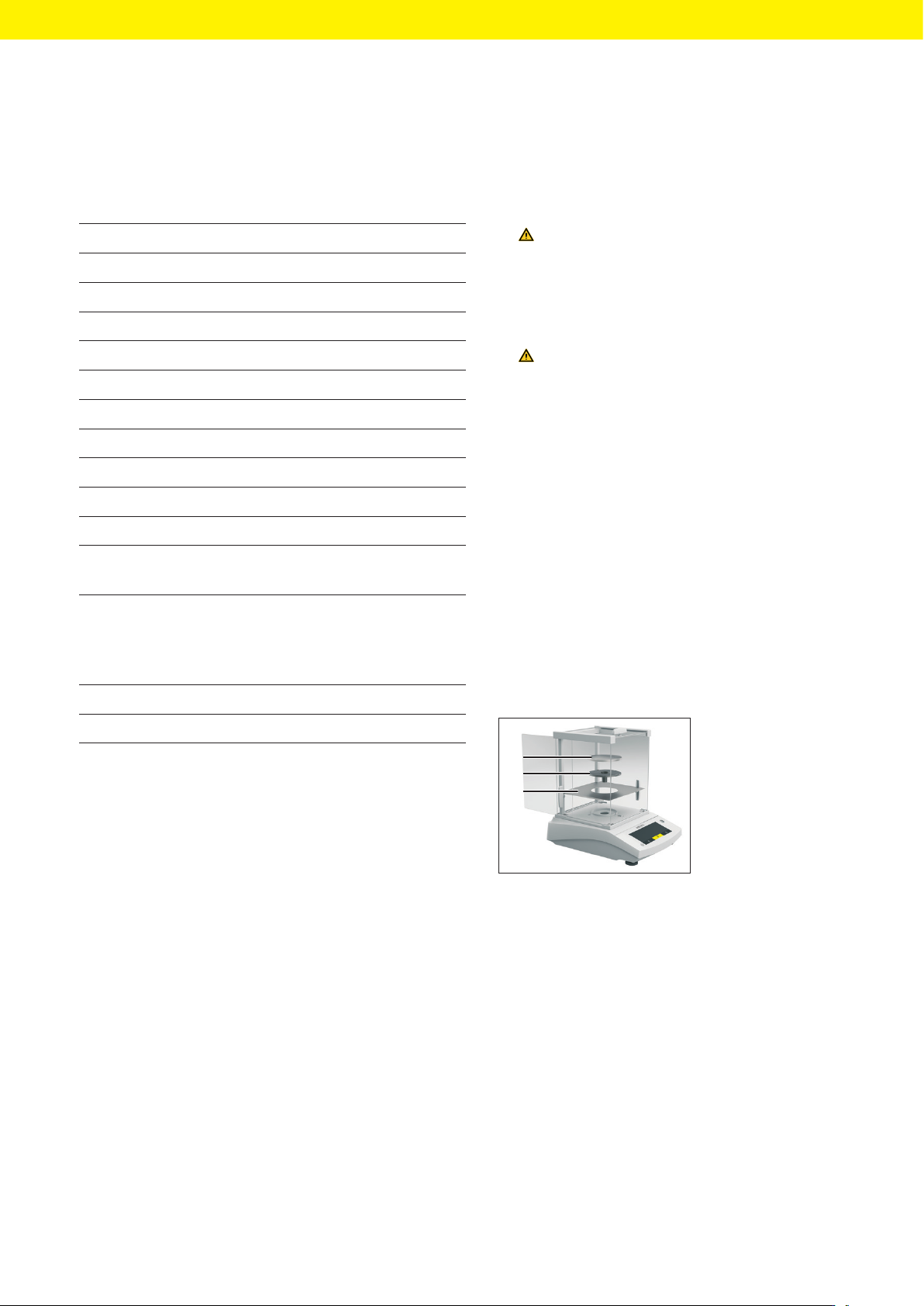
5.4 Installing a Device with an
Analytical Draft Shield
Procedure
1
2
3
t Open one side panel
completely.
t Insert the base
plate(1).
t Fit the pan sup-
port(2) on the pan
retainer.
t Place the weighing
pan(3) on top.