LmrXP142机械手册.pdf - 第95页
Alarm trace back data Alarm traceback can be used to display up to ten previous alarms with time stamps to indicate the total operation time at the moment of alarm occurrence. The time stamp counts the main power supply …
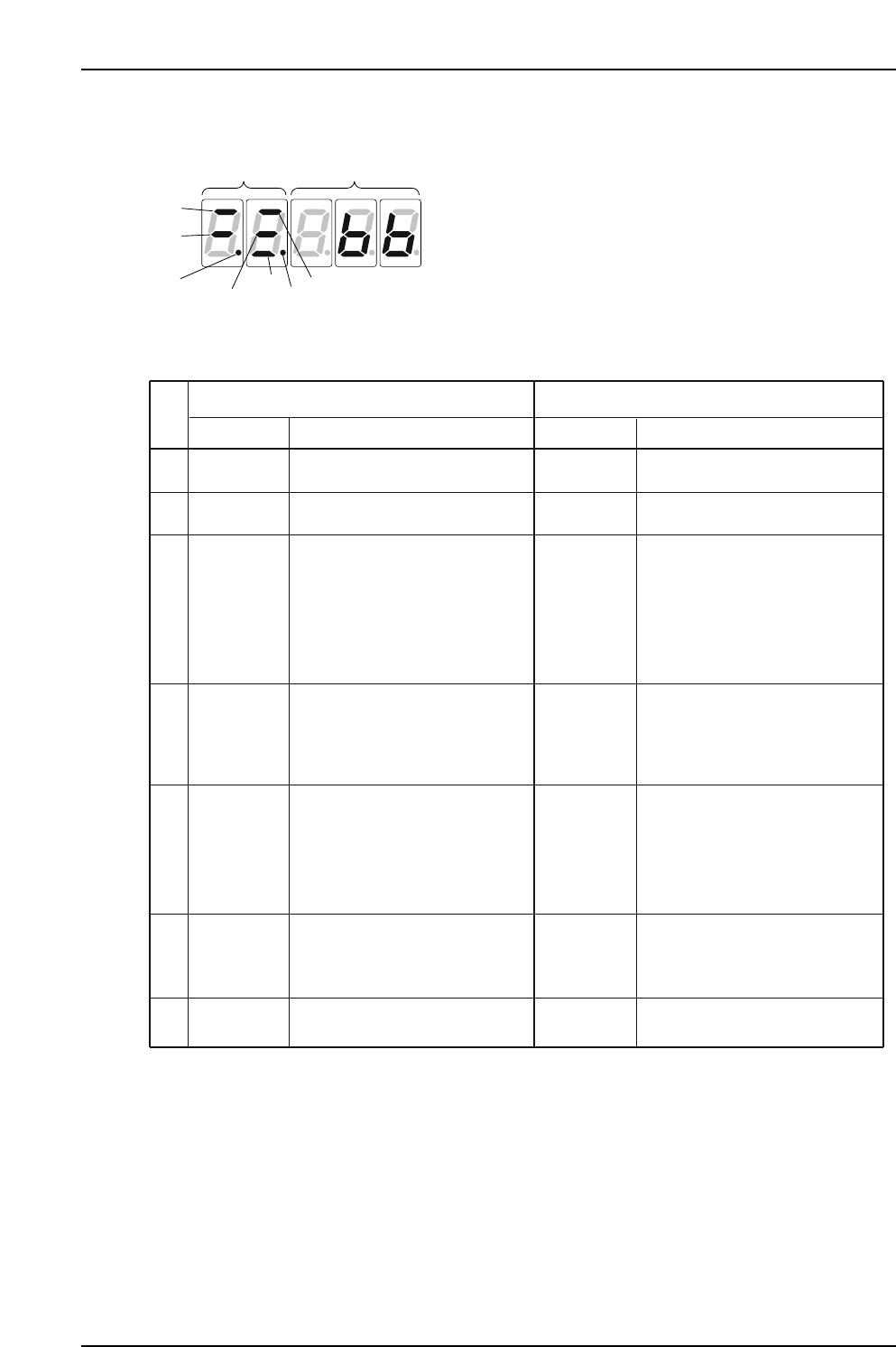
Status display mode
XP1MA029E
1
1
2
2
3
3
4
4
5
5
6
6
7
7
Bit data
Bit data
No.
Bit dataDisplay
In Speed/Torque Control Mode In Position Control Mode
Lit when SERVOPACK control
power is ON.
Display
Lit for base block. Not lit when
servo is ON.
Lit when the difference between
the servo motor speed and
reference speed is below the
value set in Pn503.
Always ON in torque control mode.
Lit if motor speed exceeds preset
value.
Not lit if motor speed is below
the setting. (Std. value: Pn502)
Lit if input speed reference exceeds
preset value.
Not lit if input speed reference is
below preset value.
Preset value: Set in Pn502.
Lit if input torque reference exceeds
preset value. Not lit if input torque
reference is below preset value.
Preset value: 10% rated torque.
Lit when main power supply circuit
is normal. Not lit when power is OFF.
Control Power
ON
Baseblock
Speed
Coincidence
(/V-CMP)
Detected
Rotation
(/TGON)
Speed
Reference
Input
Torque
Reference
Input
Power
Ready
Control
Power ON
Baseblock
Positioning
Completion
(/COIN)
Rotation
Detection
(/TGON)
Reference
Pulse Input
Error Counter
Clear Signal
Input
Power
Ready
Code
(Factory setting is 10min. )
-1
(Factory setting is 20min )
-1
(Factory setting is 20min )
-1
Lit when SERVOPACK control
power is ON.
Lit for base block. Not lit when
servo is ON.
Lit if error between position refer-
ence and actual motor position is
below preset value.
Not lit if error between position ref-
erence and actual motor position
exceeds preset value.
Preset value: Set in Pn522
(Factory setting is 7 pulses).
Lit if motor speed exceeds preset
value. Not lit if motor speed is below
preset value.
Preset value: Set in Pn502.
Lit if referece pulse is input.
Not lit if no reference pulse is input.
Lit when error counter clear signal
is input.
Not lit when error counter clear
signal is not input.
Lit when main power supply circuit
is normal. Not lit when power is OFF
(Standard setting: 20min )
-1
Part 4 Chapter 1 Servo Amplifier Adjustments
Edition 3.0 4-1-10 XP-142E Mechanical Reference
Alarm trace back data
Alarm traceback can be used to display up to ten previous alarms with time stamps to
indicate the total operation time at the moment of alarm occurrence.
The time stamp counts the main power supply ON time in units of 100 ms for 24 hours
per day and 365 days. When the time stamp counts up to [4294967295] after
approximately 13 years’ operation, the time stamp ends counting.
If the same alarm occurs more than once within one hour, only the first alarm is saved in
the traceback.
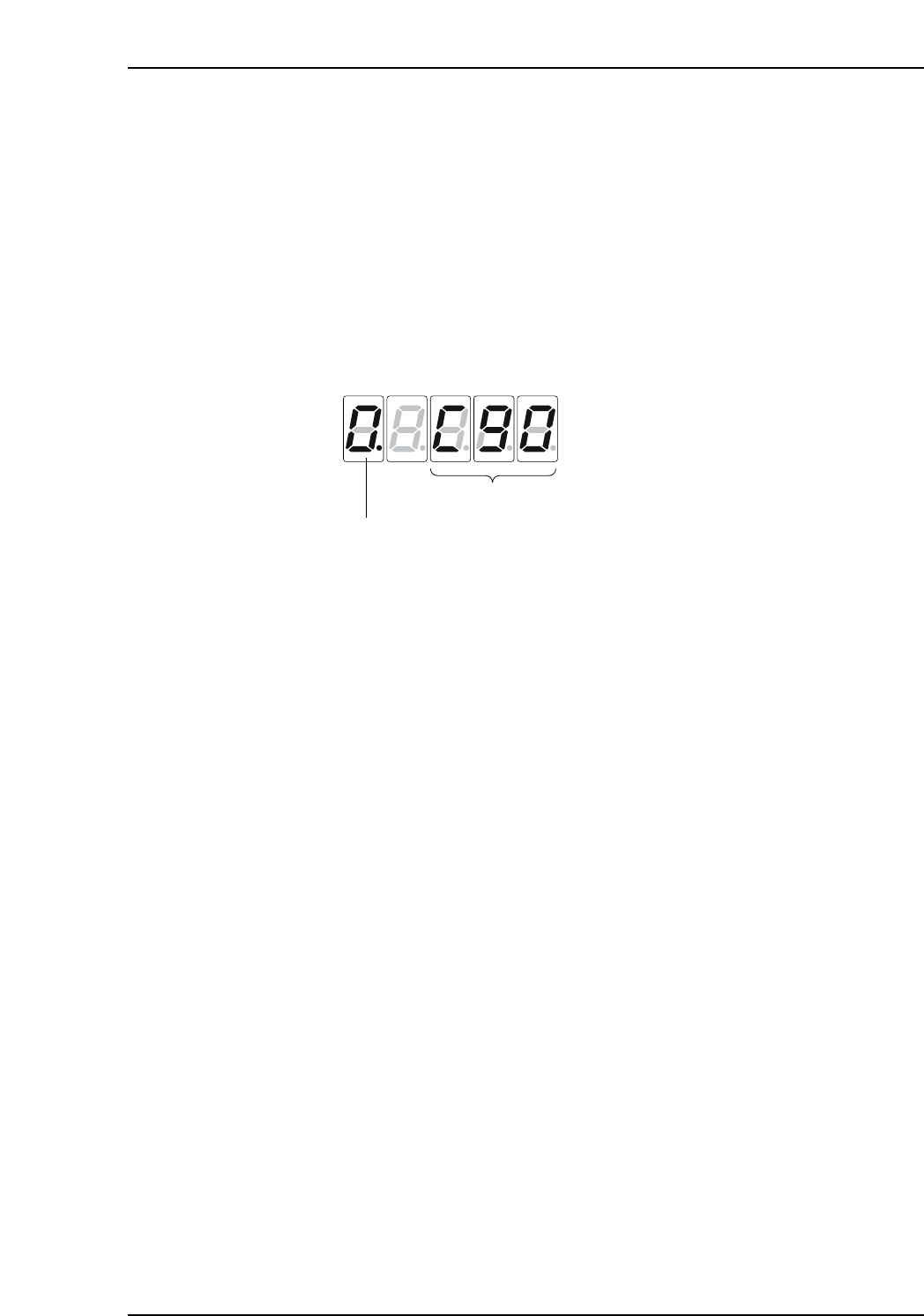
Alarm data stored in the alarm traceback data is shown by Fn000.
The alarm traceback data is not cleared on alarm reset or when the SERVOPACK power
is turned OFF. This does not adversely affect operation.
Notes:
1. Alarm traceback data will not be updated when the same alarm occurs repetitively.
2. The display [O.---] indicates that no alarm occurs.
XP1MA030E
Alarm number
Refer to the alarm list.
Alarm sequential no.
The number increases as the alarm gets older.
Part 4 Chapter 1 Servo Amplifier Adjustments
Edition 3.0 4-1-11 XP-142E Mechanical Reference
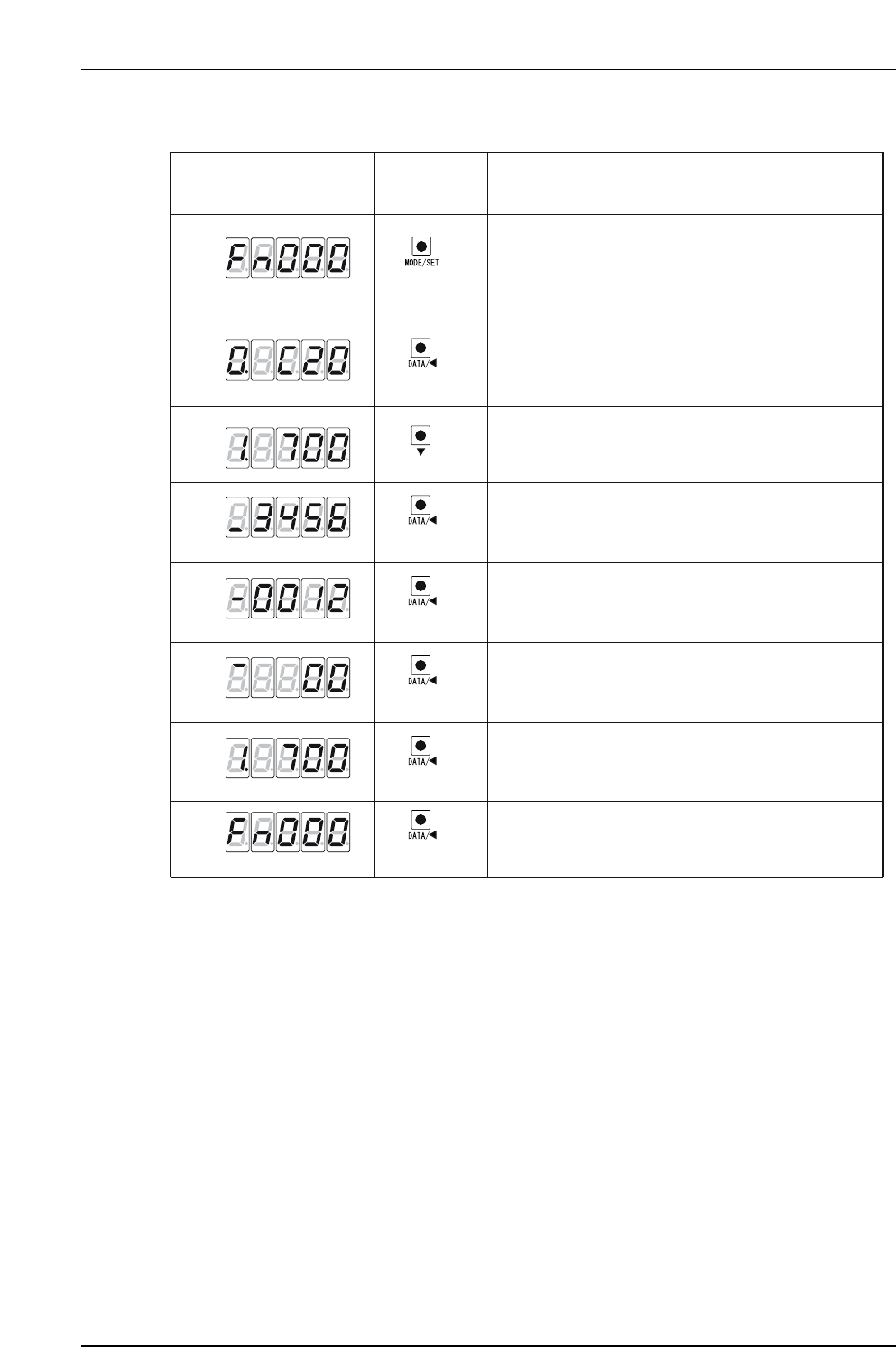
1. Check the alarm log with the following procedure.
XP1MA031E
Push the MODE/SET key to select "Alarm Traceback
Data Display (Fn000)." If a number other than Fn000
is displayed, then press the UP key or Down key to set
Fn000.
*The enabled digit blinks.
(DOWN key)
(DATA/SHIFT)
(1 sec. or more)
(DATA/SHIFT)
(Less than 1 sec.)
(MODE/SET key)
Display after
Operation
Description
Panel
Operator
1
2
3
4
5
6
8
7
Push the DATA/SHIFT key for more than one second.
The latest alarm data is displayed.
Press the DATA/SHIFT key for less than one second.
The lower four digits of the time stamp are
displayed.
(DATA/SHIFT)
Press the DATA/SHIFT key for more than one second.
Fn000 is displayed again.
Press the DOWN key to display one older alarm data.
(Press UP to display the more recent alarm.)
*The higher the leftmost digit, the older the alarm.
(DATA/SHIFT)
Press the DATA/SHIFT key for less than one second.
The middle four digits of the time stamp are
displayed.
(DATA/SHIFT)
Press the DATA/SHIFT key for less than one second.
The higher two digits of the time stamp are displayed.
(DATA/SHIFT)
Press the DATA/SHIFT key for less than one second.
The alarm traceback data is displayed again.
(1 sec. or more)
(Less than 1 sec.)
(Less than 1 sec.)
(Less than 1 sec.)
Part 4 Chapter 1 Servo Amplifier Adjustments
Edition 3.0 4-1-12 XP-142E Mechanical Reference