00197382-02_IM_SetupCenter6.3_EN.pdf - 第12页
System Components and Configurations System Configuration 3.2.6 Recommended Installation Scenarios 12 Installation Manual SIPLACE Setup Center 6.3 This scen ario can also be used , if a step-by-step introduction is helpf…
System Components and Configurations
3.2.3 Setup Center GUI System Configuration
Installation Manual SIPLACE Setup Center 6.3 11
▪ Central database
This scenario does track the numbers of components on each packaging unit. The current number
of components are "remembered" when the packaging unit is torn down or moved to another line.
The SIPLACE Setup Center database can be installed to any available Microsoft SQL Server. In this
case, the customer is responsible to set up a backup & recovery strategy and must provide an op
-
erating Microsoft SQL Server.
▪ Database Version
The database is upgraded by the installation. All data will be kept in the database.
Database Backup & Recovery Strategy
The setup automatically creates two database jobs, which backup the SIPLACE Setup Center database.
The first job Full backup executes a backup of the database and several maintenance tasks. The job
starts every week Sunday at 00.00. The second job Delta backup executes only a backup of the data
-
base and starts every day, except Sunday at 00:00. During the backup SIPLACE Setup Center database
is locked and the Setup Center GUI have to wait until unlock. This backup settings are set by default
during the installation and can be locally adapted.
3.2.3
3.2.3 Setup Center GUI
Setup Center GUI
It is recommended to install SIPLACE Setup Center GUI once for each line and pre-setup area. With the
"central database" scenario these can use the same database at the same time.
It is recommended to use two barcode scanners per line and SIPLACE Setup Center GUI installation.
3.2.4
3.2.4 Forced Setup Verification
Forced Setup Verification
Activate the forced setup verification at the placement station if it is necessary.
3.2.5
3.2.5 Docking Stations
Docking Stations
The installation of the docking station is required, if equipment of the X-Series or SX is used and a pre
setup area or kitting area exists.
3.2.6
3.2.6 Recommended Installation Scenarios
Recommended Installation Scenarios
3.2.6.1
3.2.6.1 Local Database
Local Database
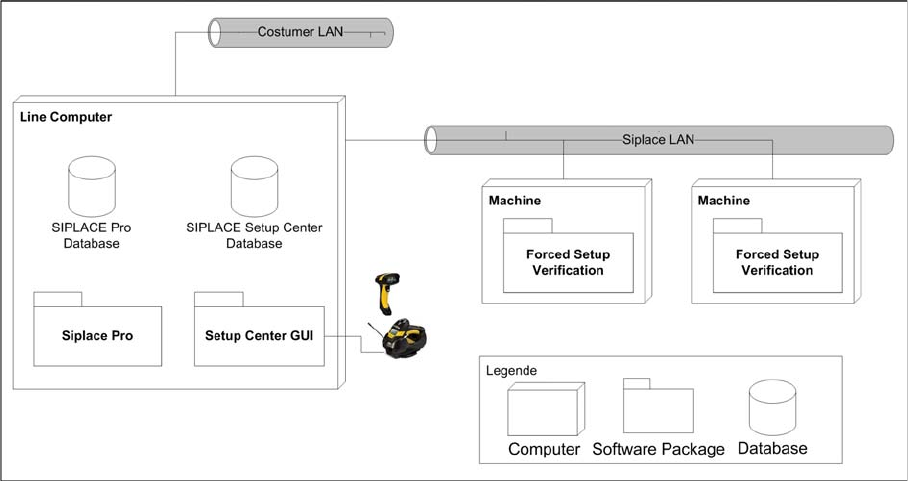
Usually the system configuration "Local Database" is for a small manufacturing facility with one ore two
production lines. An assumption for the configuration is that the SIPLACE Pro database is also installed
locally. The Setup Center GUI is directly connected to the local SIPLACE Pro and local Setup Center
Database and manages the setup verification for the stations connected via the SIPLACE LAN.
System Components and Configurations
System Configuration 3.2.6 Recommended Installation Scenarios
12 Installation Manual SIPLACE Setup Center 6.3
This scenario can also be used, if a step-by-step introduction is helpful. Then it may also helpful to omit
the "Forced Setup Verification" activation and to start with the unforced setup verification. After a definite
time the forced setup verification can be activated at station and Setup Center.
3.2.6.2
3.2.6.2 Central Database
Central Database
System configuration Central Database
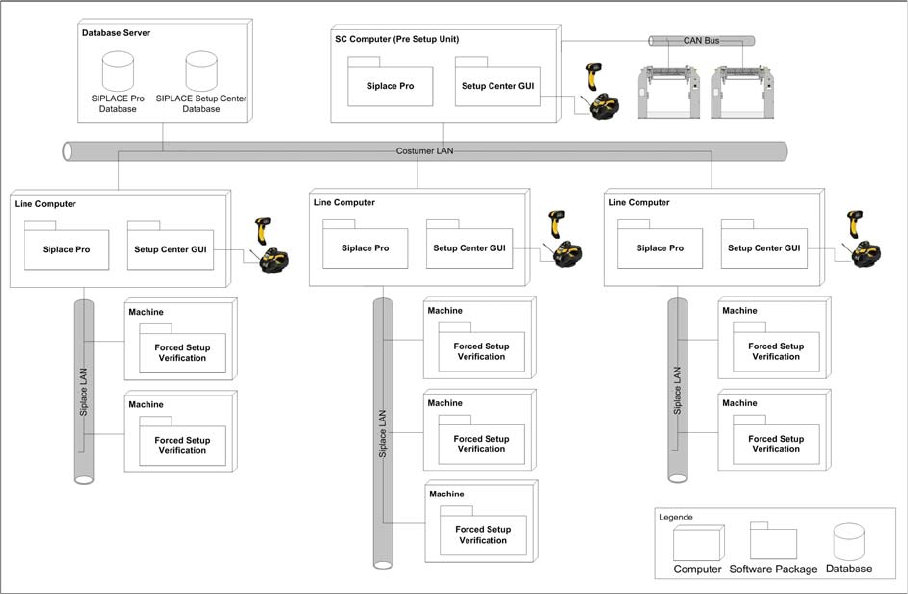
Usually the system configuration "Central Database" is for manufacturing facility with more than one pro
-
duction line. Prerequisites for the configuration is
▪ the SIPLACE Pro database is also installed centrally, or
▪ the SIPALCE EDM product is deployed, or
▪ a pre setup area with Setup Center is planned, or
▪ packaging units often moves between different placement lines.
The Setup Center GUIs are connected to the local SIPLACE Pro and to the central Setup Center Data
-
base. The docking stations are connected via CAN-Bus to the SC Computer. The pre setup unit is the
reason, why a central Setup Center Database is necessary.
Installation
4.1.1 Operation System Installation Important Preparations
Installation Manual SIPLACE Setup Center 6.3 13
4
4 Installation
Installation
4.1
4.1 Important Preparations
Important Preparations
All computers must have been set up and prepared appropriately in advance of the complete installation
of SIPLACE Setup Center to function correctly.
These preparatory measures demand knowledge about the administrative functions of Windows and
SQL Server. Please contact your system administrator for assistance if required.
4.1.1
4.1.1 Operation System Installation
Operation System Installation
The following steps are essential before conducting the installation of SIPLACE Setup Center:
▪ Installation of operation system Windows
▪ Furthermore, you require Windows administrative rights and write rights for all computers on which
you are installing SIPLACE Setup Center.
4.1.2
4.1.2 Database Installation
Database Installation
If the database decision of SIPLACE Setup Center Database is made to use SQL Express installation,
this must be done prior installing SIPLACE Setup Center.
The prerequisite product SQL Express is available on the Support Media DVD.
4.2
4.2 Hardware Installation
Hardware Installation
We recommend performing the installation in the specified order:
1. Installation of hardware
2. Installation of software
This chapter describes the hardware installation procedure.
4.2.1
4.2.1 Safety Instructions
Safety Instructions
The Datalogic barcode scanners conforms to laser class 2.
NOTICE
Always exit the running Setup Center before the installation or uninstallation of Setup Center.
NOTICE
Execute the Prerequisit Analyzer from the Support Media, including the respective profiles, on
all computers where you want to install Setup Center
DANGER
LASER RADIATION!
Do not look into beam.
Laser class 2