00197382-02_IM_SetupCenter6.3_EN.pdf - 第96页
Installation Troubleshooting 4.5.5 Conflicting Applications 96 Installation Manual SIPLACE Setup Center 6.3
Installation
4.5.4 Remote Installation with Windows XP Clients Troubleshooting
Installation Manual SIPLACE Setup Center 6.3 95
4.5.4
4.5.4 Remote Installation with Windows XP Clients
Remote Installation with Windows XP Clients
Error description:
If you are logged on to the server via remote desktop connection and start the installation following mes
-
sage will be shown.
1607: Installation of Install Shield Scripting not possible
Solution:
Copy the complete content from the Setup CD to the server to be able to start the installation.
4.5.5
4.5.5 Conflicting Applications
Conflicting Applications
Conflicts with applications are detected and displayed during the installation.
Installation
Troubleshooting 4.5.5 Conflicting Applications
96 Installation Manual SIPLACE Setup Center 6.3
Modify
Modify Setup Center
Installation Manual SIPLACE Setup Center 6.3 97
5
5 Modify
Modify
5.1
5.1 Modify Setup Center
Modify Setup Center
It is possible to modify the installation by starting the Installer on a computer where the Setup Center is
installed. The Installer detects the installation automatically and offers the modify option.
Select the packages you want to remove or to add. Refer to the procedures described above for more
details.
5.2
5.2 Modify Forced Setup Center
Modify Forced Setup Center
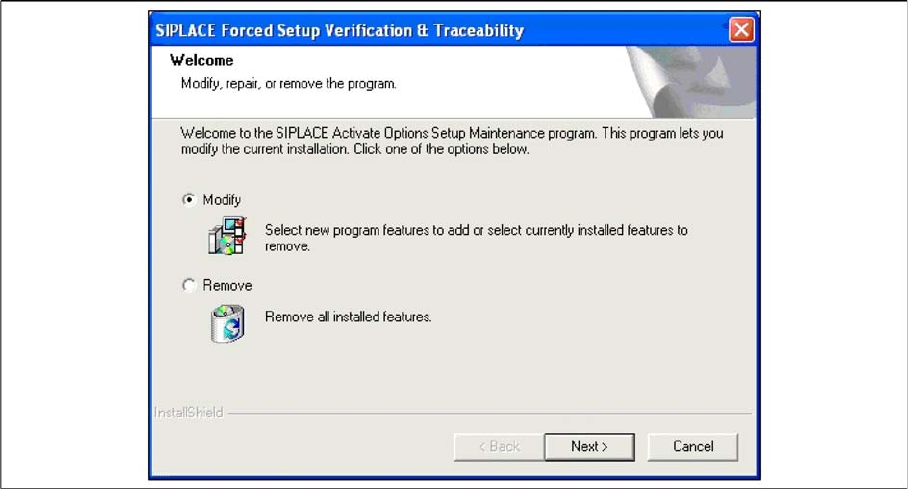
If the Setup at the software CD "SIPLACE Setup Center 6.0" is called up again, the following dialog ap
-
pears.
▪ You can change the current installation by selecting the checkbox Modify.
▪ The following masks appears:
– Setup verification system
– Configuration of the Splice detection (If not X-machine)
– Fill Level Control
– Activation of locked tracks
– Traceability
– Overview of the settings
– Finishing the installation
See above for more infomation.