00197382-02_IM_SetupCenter6.3_EN.pdf - 第7页
Navigation Guide for Installation SIPLACE Setup Center Installation Manual SIPLACE Setup Center 6.3 7 2 2 N a v ig a t io n G u id e f o r I n s t a lla t io n Navigation Guide for Installation 2.1 2 . 1 S I P L A C E S …
Introduction
Explanation of symbols
6 Installation Manual SIPLACE Setup Center 6.3
Navigation Guide for Installation
SIPLACE Setup Center
Installation Manual SIPLACE Setup Center 6.3 7
2
2 Navigation Guide for Installation
Navigation Guide for Installation
2.1
2.1 SIPLACE Setup Center
SIPLACE Setup Center
The installation procedure is divided into several parts (see the following Figure):
1. Installation of hardware
▪ Barcode scanner
▪ Optional: Docking Station
2. Installation of software
▪ Setup Center, with setup type
– SIPLACE Setup Center Complete
– SIPLACE Setup Center GUI
– SIPLACE Setup Center GUI Server
–Custom
▪ Setup Center "Forced Setup Verification"
3. Settings
▪ Station software, see SIPLACE Setup Center User Guide
▪ Barcode Scanner (see the chapter "Scanner Configuration")
▪ Setup Center, see SIPLACE Setup Center User Guide
▪ SIPLACE Pro, see SIPLACE Setup Center User Guide
▪ Barcode Label Wizard, see SIPLACE Setup Center User Guide
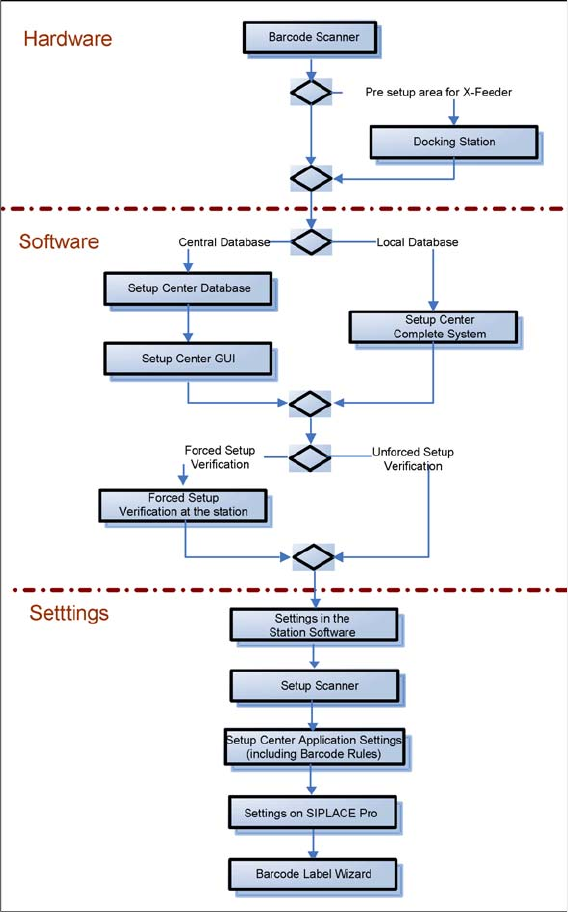
Navigation Guide for Installation
SIPLACE Setup Center
8 Installation Manual SIPLACE Setup Center 6.3