CP43维护手册.pdf.pdf - 第124页
Chapter 13 Changeover (4) Press [LIFTER ▼ ]. The XY table is lower ed to the height for placing. Note: Be sure to check the position of the back-up pins after a width change. The back rails may collide with the pins resu…

13 – 1
Version 7.0
Chapter 13 Changeover
13.Changeover
This chapter describes changeover procedures for the CP IV-2. These include
the following:
• program changeover
• XY table guide rail width changeover
• in and out conveyor width changeover
• tape feeder changeover
• back-up pin position changeover
• board pin pitch changeover
• pin changeover (when changing pin diameter)
13.1Program Changeover
When the next production program already exists in the machine, press
[PROGRAM], [CHANGE], [# of the program] and [CR]. This will move
the program from the background to the foreground.
When the next program does not exist in the machine, transmit it from
MCS to the background of the machine. Once it is in the machine's
background, press [PROGRAM], [CHANGE], [# of the program], and
[CR] to move it from the background to the foreground.
13.2Conveyor Width Changeover
Width changeover for the XY table guide rail, in conveyor and out
conveyor is performed in one operation. This operation is performed
according to the following procedure:
(1) Press [LOADER], [LOADING PSTN] and [START].
The XY table will line up with the in and out conveyors.
(2) Press [LIFTER ▲]. The XY table is raised to the same height as the
OUT conveyor.
(3) Turn the conveyor width changeover handle on the out conveyor to
align the conveyor width to that of the board. Leave 0.5 ~ 1.0 mm so
that the board is not squeezed in too tightly.
CP IV-3 Maintenance
Chapter 13 Changeover
(4) Press [LIFTER ▼]. The XY table is lowered to the height for placing.
Note: Be sure to check the position of the back-up pins after a width change.
The back rails may collide with the pins resulting in damage when the
lifter table is lowered.
13.3Tape Feeder Changeover
Place the tape feeders on the device table as indicated by the program.
13.4Back-up Pin Position Changeover
(1) Press [LOADER], [LOADING PSTN] and [START].
The Y table will line up with the in and out conveyors..
(2) Press [LIFTER ▲]. The XY table is raised to the same height as the
OUT conveyor.
(3) Change the position of the back-up pins.
(4) Confirm that the the back-up pins will not collide with the guide rail
when the XY table is lowered. If collision is possible, move the back-
up pins.
(5) Press [LIFTER ▼]. The XY table is lowered to the height for placing.
13.5Board Pin Pitch Changeover
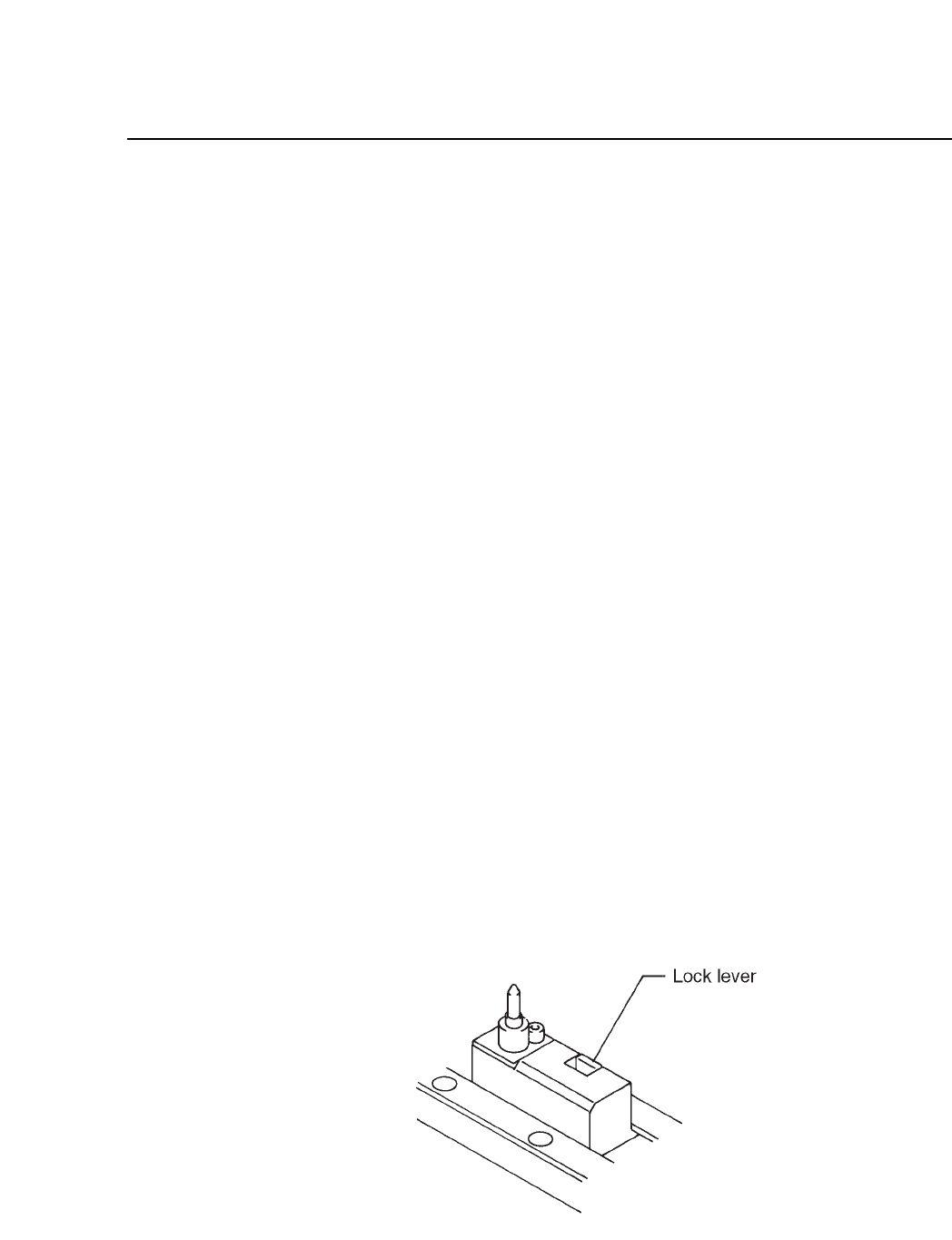
Push back the lock lever and adjust the position of the pin pitch holder to
the pin pitch of the board.
Fig. 13-1 XY Table
13 – 2
Version 7.0
CP IV-3 Maintenance
13 – 3
Version 7.0
Chapter 13 Changeover
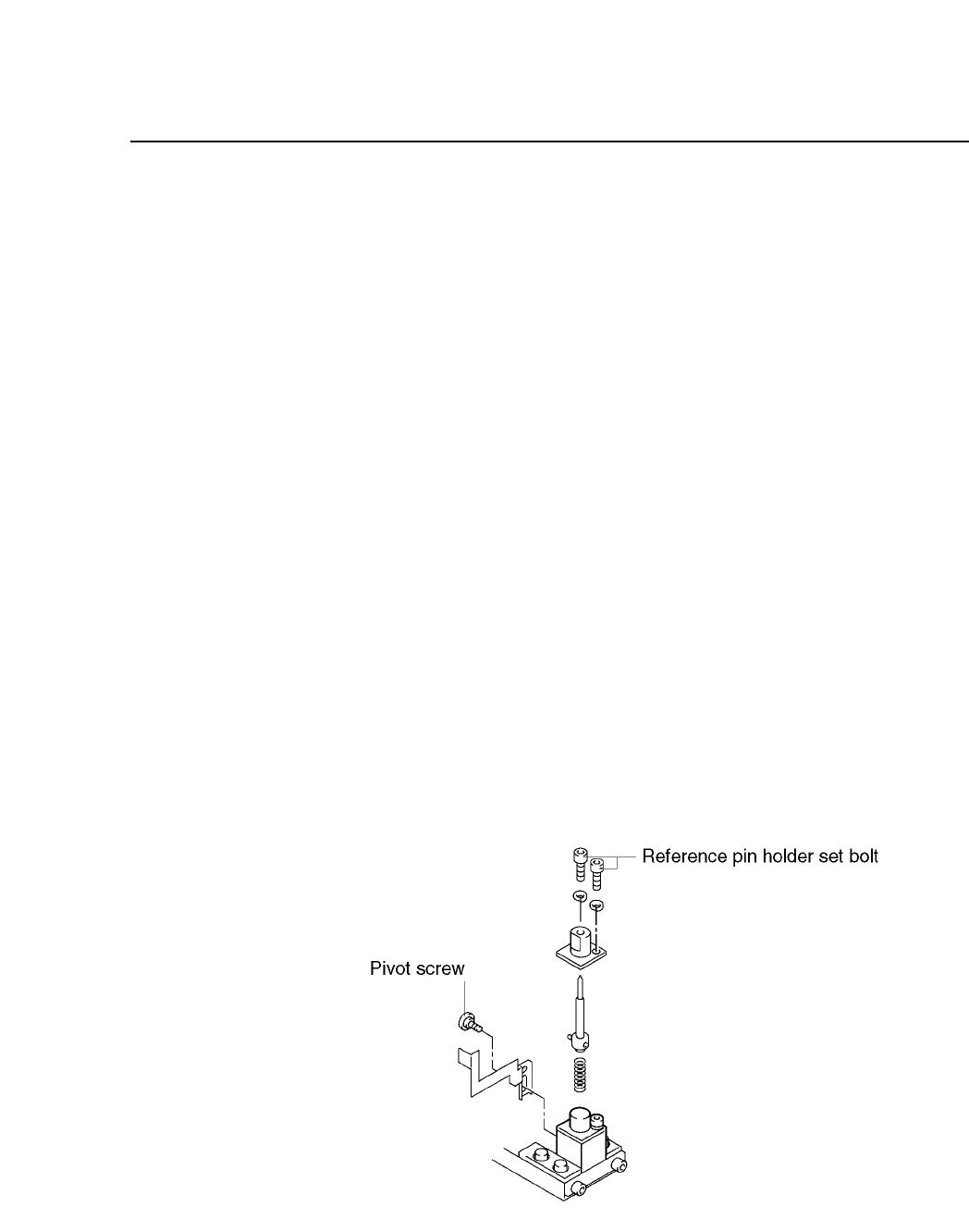
13.6Reference Pin Changeover (When Changing Pin Diameter)
When replacing pins, never loosen the securing bolt on the pin block. If
this block is loosened, the XO/YO Proper values will change and part
placement will be misaligned. Follow the procedure below to change
pins.
(1) Press [LOADER], [LOADING PSTN] and [START].
The XY table will line up with the in and out conveyors.
(2) Press [LIFTER ▲]. The XY table is raised to the same height as the
OUT conveyor.
(3) Unscrew the pivot pin.
(4) Unscrew the pin holder set bolt.
(5) Remove the pin and holder from the block. Be careful that the spring
loaded beneath the pin does not shoot out.
(6) Change the pins.
(7) After changing the pins, check to see if the spring pin which is
attached to the bottom of the reference pin is inserted in the (A) hole
of the dog. Repeat the steps given thus far in reverse order to reattach
the pin.
(8) Press [LIFTER ▼]. The XY table is lowered to the height for placing.
Fig. 13-2 Reference Pin Unit
CP IV-3 Maintenance