XP-142E Operator's Guide-TUT-XP142-1.1E.pdf.pdf - 第37页
Changing the Position of the Back-up Pins Procedure 1. Lower the panel lifter if it is raised. 2. Adjust the conveyor width to the maximum width. 3. Remove the MFU from the machine. 4. Pull the backup plate sideways slig…

Changing the Conveyor Width
The machine has a function that adjusts the conveyor width by motor drive
in accordance with the program data being used.
Procedure
1. At the [Main] screen, press [Manual Operation], then
[Conveyor Width].
2. The conveyor width registered in the recipe automatically
displays in the [Program Value] field. Press [Move] and the
conveyor width will automatically adjust.
3. Press [OK] when adjustment is complete.
Note: When making manual adjustments to the conveyor width, press the
[Program Value] field and input the desired value.
Settings for Automatic Changing of Conveyor Width during
Production
During automatic production, when the program is changed the conveyor
width can be automatically adjusted to the width in the program data.
Follow the steps below to turn this function on.
Procedure
1. At the [Main] screen, press [Maintenance C], then [Proper Data
Editor]. Select [_AutoConvWidth], and change the setting to
[1].
Note: The default is [0].
2. Press [Close] to return to the [Main] screen.
Chapter 3: Preparing for Production
TUT-XP142-1.1E
3-13XP-142E Operator’s Guide
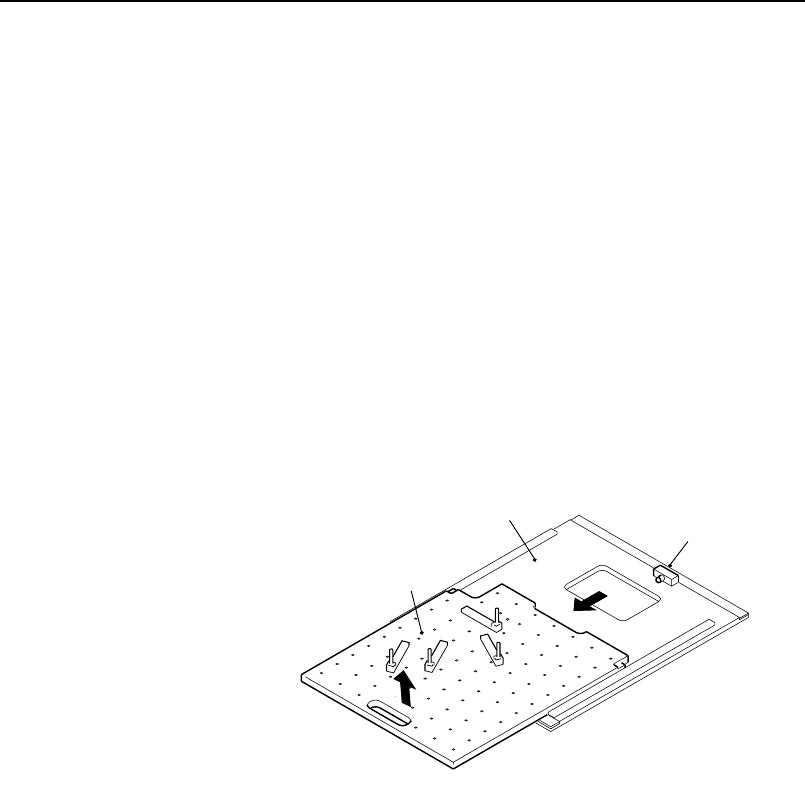
Changing the Position of the Back-up Pins
Procedure
1. Lower the panel lifter if it is raised.
2. Adjust the conveyor width to the maximum width.
3. Remove the MFU from the machine.
4. Pull the backup plate sideways slightly, then lift it up to remove
it.
Precautions when mounting/demounting the backup plate:
• Use care to avoid interference between the plate and the sensor. Such
interference could break the sensor.
• Because the procedure is performed from the MFU side, use care to
avoid interference between the camera and nozzles.
5. Detach the back-up pins by loosening their fastening bolt, and
reposition them as necessary.
XP1MC004E
Back-up plate
Panel lifter
Block
(1)
(2)
Chapter 3: Preparing for Production
TUT-XP142-1.1E
3-14 XP-142E Operator’s Guide

Chapter 4
Starting Production
4.1 Measurements and Checks Prior to Production
4.2 Starting Production
TUT-XP142-1.1E
4-1XP-142E Operator’s Guide