XP-142E Operator's Guide-TUT-XP142-1.1E.pdf.pdf - 第42页
Chapter 5 Stopping the Machine 5.1 Stopping the Machine T emporarily 5.2 Resetting the Machine from the Cycle Stop Status 5.3 Stopping the Machine in an Emergency 5.4 Resetting the Machine from the Emergency Stop Status …
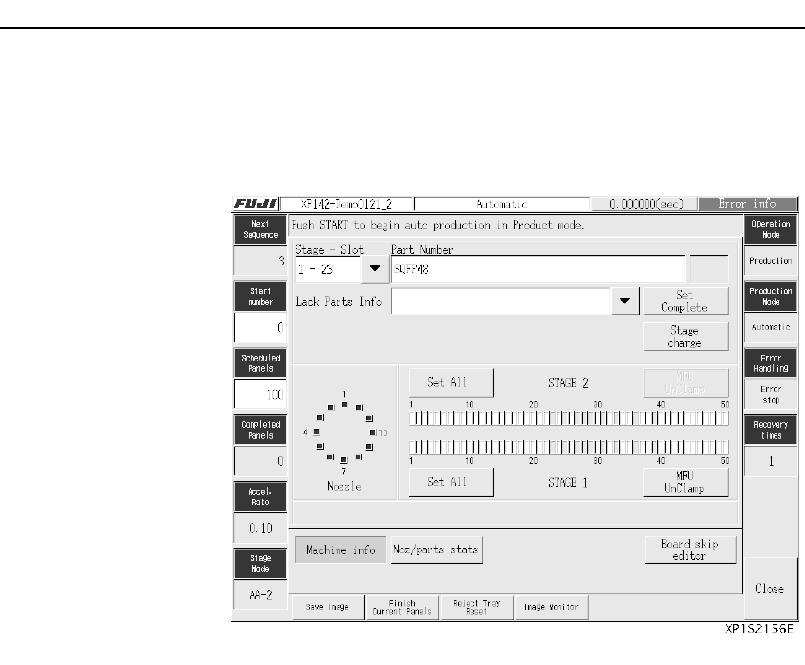
4. At the [Main] screen, press [Production] and select [Automatic]
to enable the START button. Pushing START begins produc-
tion and displays the [Automatic] screen.
Note: The machine information (production quantity, production mode, parts,
nozzle, stage, etc.) explained in Chapter 3 “Preparing for Production”
can be checked and edited at the [Automatic] screen. The display can
be changed to the vision monitor if necessary. The log of recoveries
from emergency stop errors, such as parts out, and statistical informa-
tion for problem nozzles or slots, can also be viewed from the
[Automatic] screen.
Chapter 4: Starting Production
TUT-XP142-1.1E
4-4 XP-142E Operator’s Guide

Chapter 5
Stopping the Machine
5.1 Stopping the Machine Temporarily
5.2 Resetting the Machine from the Cycle Stop Status
5.3 Stopping the Machine in an Emergency
5.4 Resetting the Machine from the Emergency Stop Status
TUT-XP142-1.1E
5-1XP-142E Operator’s Guide

Carry out cycle stop to temporarily stop the machine during the course of
automatic production for checking recipe and so on.
Procedure
1. Press the CYCLE STOP button.
The machine will come to a halt once the cycle in progress has finished.
The START button is enabled when the machine enters the cycle stop status.
Procedure
1. Press the START button.
Production will resume from the next cycle after the cycle in which produc-
tion on the machine was halted.
When an emergency situation occurs during operation perform an emergency
stop to halt the machine immediately.
Procedure
1. Press the EMERGENCY STOP button.
The EMERGENCY STOP buttons on both sides of the machine are enabled
at all times. Press this button as soon as an emergency situation occurs.
This will cut the servo power and stop the machine at once.
5.3
Stopping the Machine in an Emergency
5.2
Resetting the Machine from the Cycle
Stop Status
5.1 Stopping the Machine Temporarily
Chapter 5: Stopping the Machine
TUT-XP142-1.1E
5-2 XP-142E Operator’s Guide