00197624-02_IM_708.1_DE_EN.pdf - 第21页
Station Software 708.1 / Installation Manual Ausgabe 05/2015 E dition 21 4.3 Network C onfi guration Machine computer Coplan computer Private network between machine computer and Coplan computer SIPLACE LAN SIPLACE Pro F…

Station Software 708.1 / Installation Manual Ausgabe 05/2015 Edition
20
Name SIMATIC MicroBox 427D
CPU / clock frequency Intel® Core
(TM)
/ 1,6 GHz
RAM 4 GB
Harddisk Yes (80 GB SSD)
External DVD drive Yes
Internal DVD drive No
Serial interfaces 1
USB interfaces and external USB hub Yes
Network 2x 1000 Mbit
Table 4-8: Machine computer hardware SIPLACE X-Series S
4.2.1.1 Machine Computer/Coplan Computer with 3D Coplan Sensor
The coplanarity module with the 3D coplan sensor (type 37) can be optionally installed in the
SIPLACE X2, X3, X4 and SX1/SX2 (V2) placement machines (item no. [00119919-xx] for X-series,
item no. [00519919-xx] for SX-series).
Station Software 708.1 / Installation Manual Ausgabe 05/2015 Edition
21
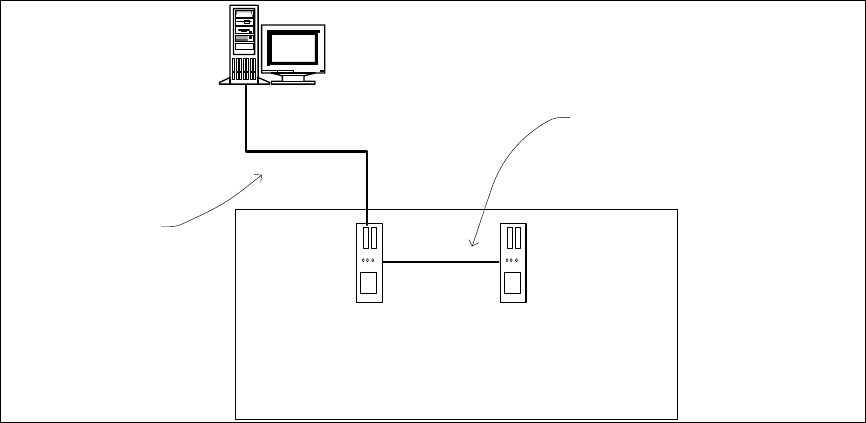
4.3 Network Configuration
Machine
computer
Coplan computer
Private network between
machine computer and Coplan
computer
SIPLACE LAN
SIPLACE Pro
Figure 4-1: Network connections between the machine and SIPLACE Pro
In two-computer operation a separate private network is set up between the machine computer and
the Coplan computer via a subnet mask.
Fixed IP addresses for the machine computer and the Coplan computer can thus be assigned for
all SIPLACE machines. These IP addresses are not known outside the private network, for
instance in the SIPLACE LAN.
These IP addresses need not be further configured by the operator while the station software is
being installed.

Station Software 708.1 / Installation Manual Ausgabe 05/2015 Edition
22
5 Installing the Machine Computer
5.1 Installation Sequence
Back up the machine data
BIOS update on the machine computer
Perform BIOS update
Install Windows Emb. Standard 7 operating
system for the machine computer
(including installation of the touch screen)
Install SIPLACE software
(station software incl. additional programs)
BIOS settings on the machine computer
Perform BIOS settings
Finish the installation
See section 5.2.
See section 5.2.
See separate Installation Manual for details on
installing the Windows 7 operating system,
item no. [00197737-xx].
For details on calibrating the touchscreen, see
section 5.3.2.
See section 5.4.
See section 5.4.6.
Figure 5-1: Installation sequence