00197624-02_IM_708.1_DE_EN.pdf - 第8页
Station Software 708.1 / Installation Manual Ausgabe 05/2015 E dition 8 3 Upgrading to the 70 8.x S oftware V ersion This chapte r descri bes which steps you gene rally have t o attend when upgra ding to the curre nt sta…

Station Software 708.1 / Installation Manual Ausgabe 05/2015 Edition
7
2.3 Languages
SIPLACE Station and SIPLACE Vision GUI:
The standard package contains German, English and Simplified Chinese versions. As for
Simplified Chinese a preliminary version is provided.
The final version of Simplified Chinese and other languages contained in the languages package
are optional and available under the item number [00140056-xx].
The following table indicates which languages are available for the station software and SIPLACE
Vision:
Language Station software / SIPLACE
Vision
French x
Italian x
Spanish (Mexico) x
Portuguese (Brazil) x
Czech
*)
x
Polish
*)
x
Hungarian x
Bulgarian
*)
x
Romanian
*)
x
Russian
*)
x
Chinese (simplified) x
Korean x
Japanese x
Vietnamese
*)
x
Table 2-1: Languages
*)
GUI only (online help English)
Station Software 708.1 / Installation Manual Ausgabe 05/2015 Edition
8
3 Upgrading to the 708.x Software Version
This chapter describes which steps you generally have to attend when upgrading to the current
station software version and which steps are additionally required when upgrading from different
software versions.
– When upgrading the station software, always check the eSW versions and download the
current versions if necessary.
– With the installation of the 708.x station software, statistic data (maintenance intervals) is
registered for the CPP and C&P20A placement heads and the SX main axis. In order to
achieve a defined initial state for the maintenance due, the correspondent maintenance
operations have to be performed on the subsystems after the software installation.
– An upgrade of the embedded software is necessary for the LDU-X. Generally, it is not possible
to perform a download of the embedded software via the station software for the LDU-X. The
LDU-X has to be upgraded to the 2.02 software version with the aid of an external PC.
– There is new embedded software for the feeders. As soon as a feeder with an elder eSW is set
up an update of the eSW is proposed. This can be cancelled but it is not possible to take out
the table as long as the update is pending. To get the table out without a download you have to
take out the feeders or disable the feeder download within the SW options.
– There is new embedded software for CPP and C&P20 placement heads. After an update from
a lower version they are recognized as modified heads and the head data has to be saved
manually once after the installation.
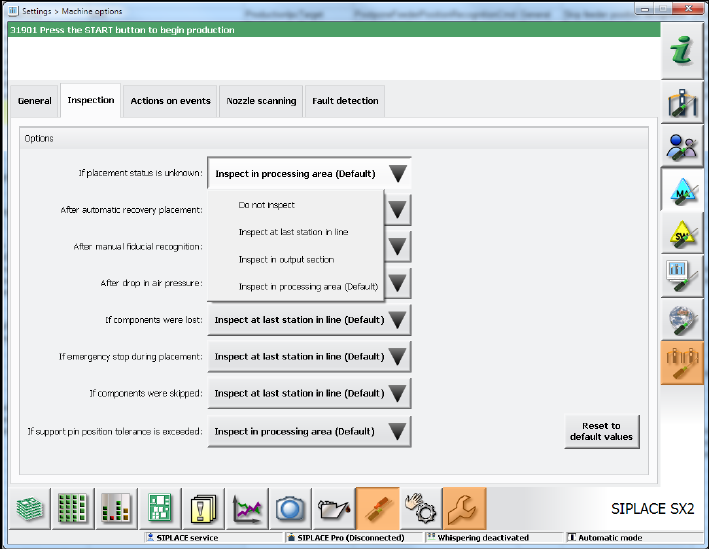
– When upgrading to the 708.x station software the inspection options will be reset to the
respective default values. If necessary, the inspection options have to be adjusted under
Settings – Machine options – Inspection.
Figure 3-1: Adjust inspection options
Station Software 708.1 / Installation Manual Ausgabe 05/2015 Edition
9
– The 708.x station software version runs with Windows Embedded Standard 7 (WES7) only.
The station computer has to be equipped with at least 2 GB memory with WES7, 32-bit and 4
GB memory with WES7, 64-bit respectively. If necessary, station computers in the field have to
be exchanged or upgraded with a memory extension. Please refer to the Technical Information
TI2014-09E04.
– When upgrading from a previous station software version to the 708.x version, C&P head
segments with the Deactivated or Not used state will be reset to the Activated state
automatically! If required, the status for such segments has to be changed manually again.
3.1 Upgrading from the 707.x Software Version
No further steps required.
3.2 Upgrading from the 706.xx Software Version
No further steps required.
3.3 Upgrading from the 705.xx Software Version
► SX1/SX2 and DX1/DX2 placement machines in the field with an FC camera at Location 1:
Due to an error correction in the configuration, the FC camera position has been moved and
thus the calibration values for the camera and the segment offset are invalid.
Recalibrate the camera and the segment offset.
3.4 Upgrading from the 704.xx Software Version
► SX1/SX2 placement machines in the field with an FC camera at Location 1:
Due to an error correction in the configuration, the FC camera position has been moved and
thus the calibration values for the camera and the segment offset are invalid.
Recalibrate the camera and the segment offset.
► Recalibrate the travel ranges.
► Recalibrate the external cameras.
This is required, as the z height has been adapted for the dp calibration.
► Save the calibration data for the placement heads (except Twin Head) in the EEPROM
(see section 7.10).
► Perform a component sensor calibration if a CPP placement head is used for 0201/01005
placement.
► Perform the closed vacuum calibration if Twin Heads are used.