00197624-02_IM_708.1_DE_EN.pdf - 第48页
Station Software 708.1 / Installation Manual Ausgabe 05/2015 E dition 48 7.10 S toring C alibration D ata in the EEPROM In order to use the fast head exchange f eature, the h ead specific calibratio n data has to be stor…
Station Software 708.1 / Installation Manual Ausgabe 05/2015 Edition
47
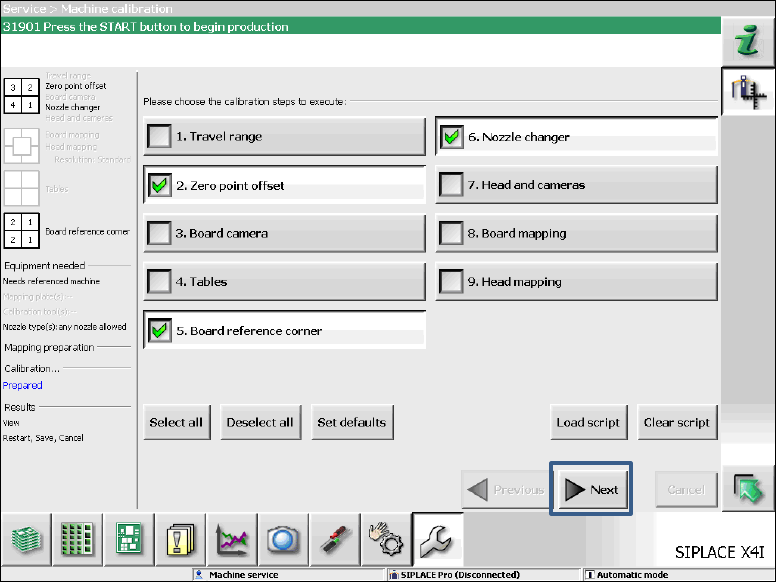
7.9 Necessary Calibration Steps
After upgrading from station software 70x and first booting of the station software, some calibration
steps are required. Please also refer to chapter 3.
Requirements:
– The eSW versions have been updated.
– The reference run has been successfully performed.
– A calibration nozzle (1235) has to be available on every C&P20A placement head at
segment 1.
Figure 7-11: Required calibration steps
► Select the calibration steps that are highlighted in the figure and click on Next.
► Select all possible components in the following input masks (all conveyor lanes, all gantries, all
nozzle changers).
Station Software 708.1 / Installation Manual Ausgabe 05/2015 Edition
48
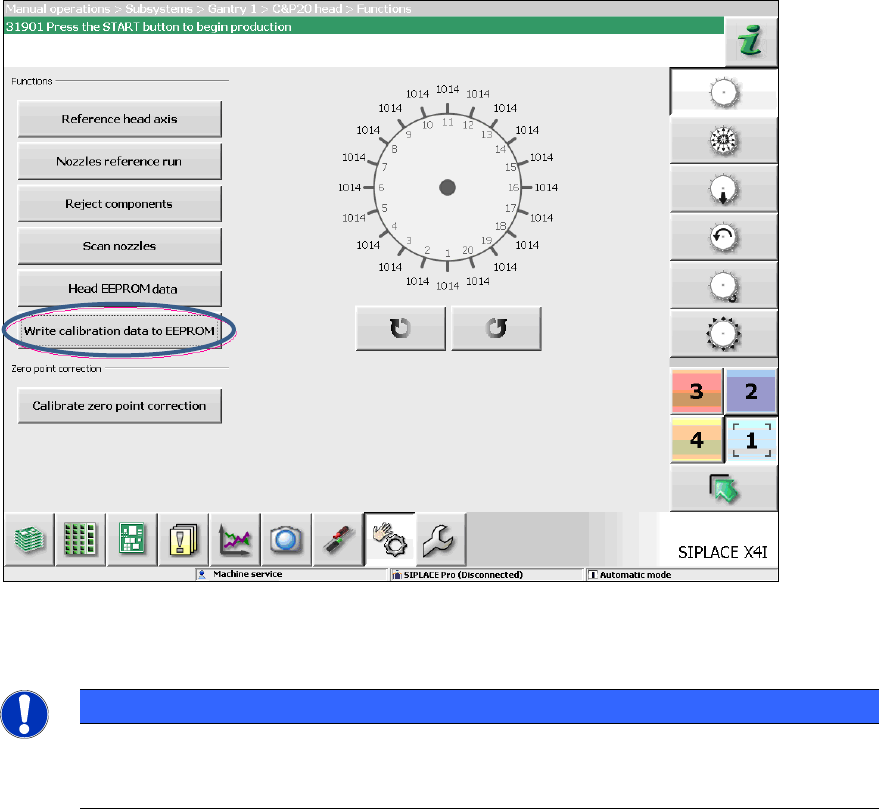
7.10 Storing Calibration Data in the EEPROM
In order to use the fast head exchange feature, the head specific calibration data has to be stored
in the EEPROM after upgrading from station software 70x. For placement heads with no head
specific calibration data stored within the EEPROM, the available data on the station computer will
be stored in the EEPROM of the respective placement head as follows.
Requirement:
The eSW versions have been updated.
Figure 7-12: Storing calibration data in the EEPROM
► Perform the highlighted function for each placement head.
NOTICE
After the storing calibration data step, the message 37200 Changed heads
detected should disappear. Otherwise you will have to reboot the machine. If the
message still is displayed after rebooting, please inform the SIPLACE Service.
Station Software 708.1 / Installation Manual Ausgabe 05/2015 Edition
49