Micron Technical Reference V9 Volume 4.pdf - 第35页
STINGER ADJUSTMENTS AND SETTINGS Chapter Issue 2, Aug 14 Technical Reference Manual 38.11 NOTE The following procedure is continued fro m the ‘Contact Height’ procedure . 21. Select Stinger Jog Mode set the mode to Coars…
STINGER
ADJUSTMENTS AND SETTINGS
38.10 Technical Reference Manual Chapter Issue 2, Aug 14
For non-automatic calibration options, the user must set the idle height next. For
automatic calibration options, the idle height parameter has been programmed
in Setup Product\Options\Stinger Dispenser and the unit can track this value
above contact height. Stinger can track the rises and falls on the product surface
within the range check limits.
Locating the
Correct Point for
Height Settings
Product is not always rectangular in shape and completely plane surfaced.
There are often features such as protruding edges and gaps in various places
across the product. Users must be aware of where to place the height setting
points. The unit performs two distinct checks in one action, they are:
• Contact Height
• Range Checking (manual mode only)
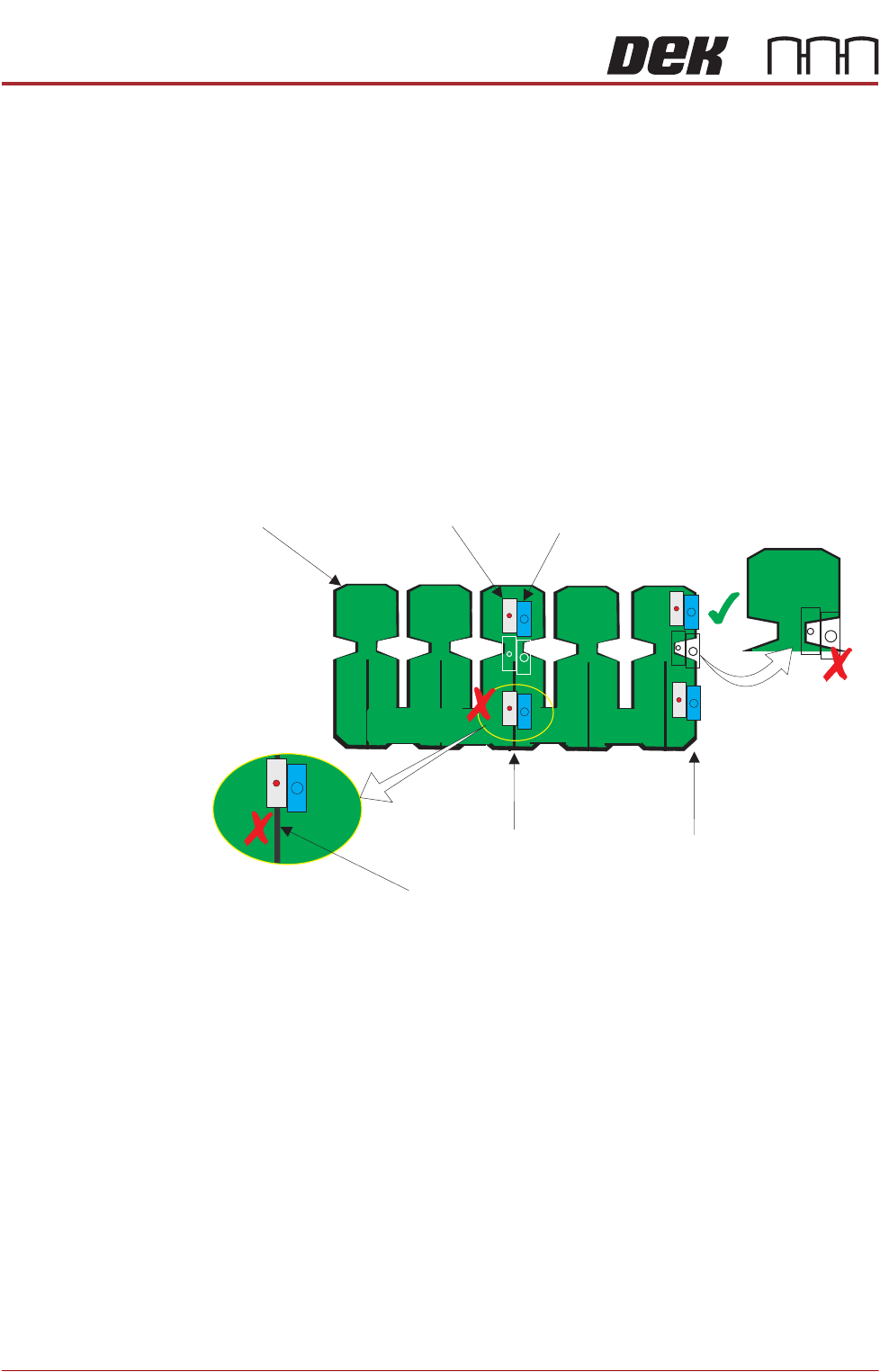
The unit defaults to the centre of the board for its height setting coordinates
(shown in white outline below). This may not be an appropriate location as the
product may have features that do not allow for both the nozzle, and the laser
beam to be accommodated simultaneously.
In the diagram, the unit is shown as two rectangles representing the laser (grey)
and the nozzle (blue). These representations are shown at three possible
locations: default (centre); upper and lower. At the centre, the unit can make a
good height check because both the laser, and the nozzle, are located where
the surface of the board is available for a reading and a deposit. However, when
the unit moves away from the height position to the range position, the board
edge is not straight, therefore the laser may not ‘see’ the upper surface of the
product. Similarly, a feature under the laser on the bottom location is centred
over a slot in the board where the laser beam passes through. The contact
height cannot be set. The user must choose a location similar to that of the top
track, where both the range and height checks can be carried out successfully.
Setting Idle Height
(Manual)
Idle height is the position to which the nozzle tip is set, between dispensing
actions. The dispenser moves to its dispense site, after dispensing it is moved
to the idle position; before moving on to the next dispense location. This height
must be set so that as the nozzle is moved between locations, it is able to clear
any surface irregularities or obstructions (pads/tracks/connectors etc.)
Laser
Nozzle
Incorrect
Location
Height Positions
Range Positions
Product
Incorrect
Location
Gap

STINGER
ADJUSTMENTS AND SETTINGS
Chapter Issue 2, Aug 14 Technical Reference Manual 38.11
NOTE
The following procedure is continued from the ‘Contact Height’ procedure.
21.
Select Stinger Jog Mode set the mode to Coarse (1 step = 0.5mm).
22. Select Step Up to move the nozzle into position above the surface of any
obstructions.
23. Select Save Idle.
24. Close the printhead cover.
25. Press the System button to restore system power.
26. Select Back.
If the contact height has been changed, the laser unit performs its calibration.
Calibrating
Stinger Heights
(Automatic)
This procedure relates to units that do have the automatic calibration option.
NOTE
If the product is changed, or if the equipment has been replaced, or it is being
set up for the first time, performing a manual height calibration first improves
system accuracy as the contact height is set up accurately.
1. Select Product Changeover.
2. Select Stinger Dispenser.
3. Select Auto Calibrate.
The camera axis is driven to the calibration location and the Z axis motor
automatically jogs down until the nozzle reaches the top surface of the product.
At this point, the correct contact height is set. Because the idle height is set in
a parameter Setup Product\Options\Stinger Dispenser, there is no need to
set the idle height as the difference (between contact height and the set value
for idle height), is maintained by the laser tracking the surface of the product
during printing.
NOTE
Range checks are only carried out after setting contact height in manual mode.
STINGER
ADJUSTMENTS AND SETTINGS
38.12 Technical Reference Manual Chapter Issue 2, Aug 14
Setting the
Regulator
Pressure
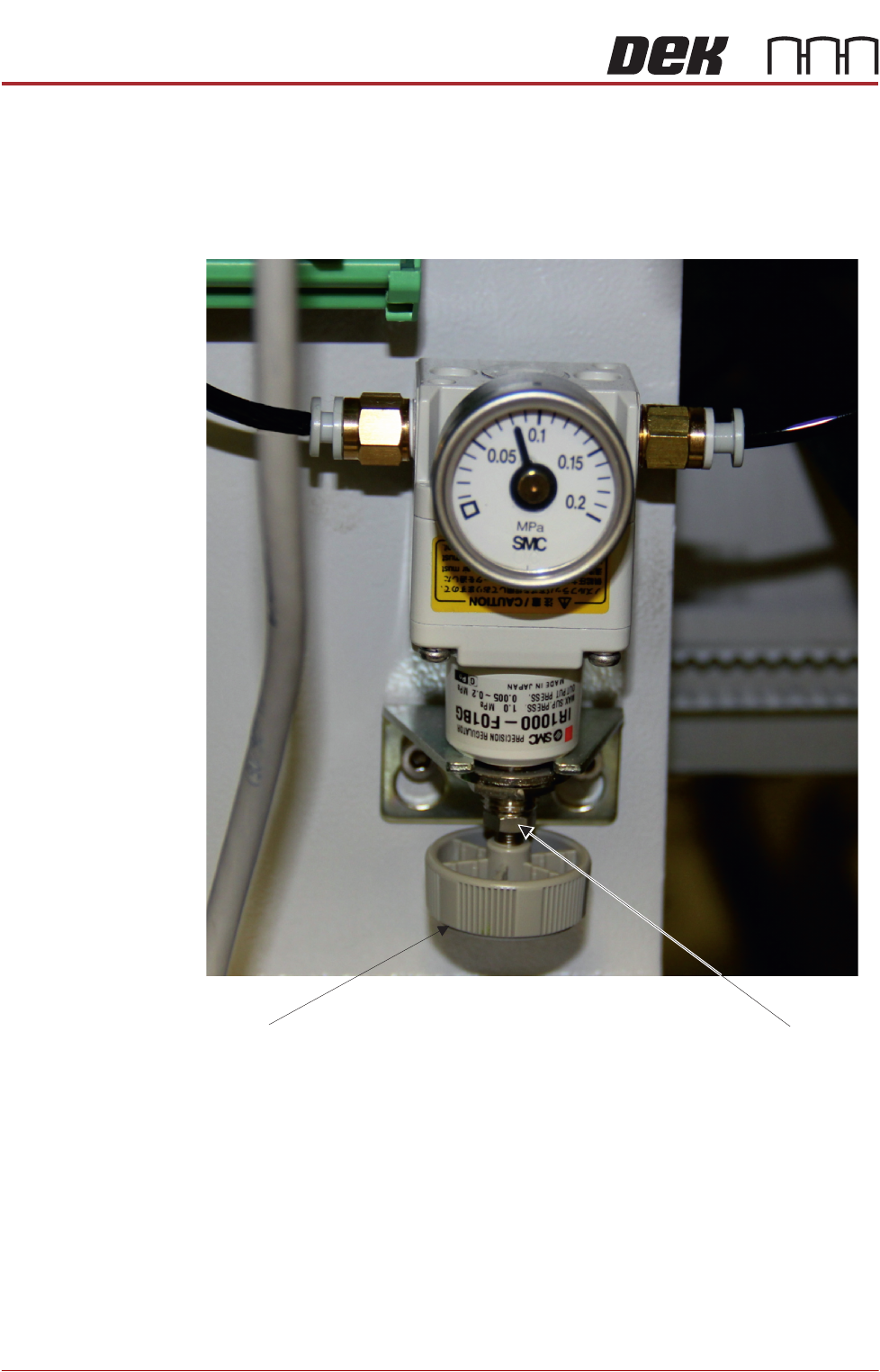
The pneumatic regulator should be set to 0.8 Bar (0.08 MPa).
1. Remove the printer’s rear cover.
2. Check the dial indicator setting; if it is as shown above the unit does not
require adjustment.
3. If adjustment is required, using a 8mm open-ended spanner release the lock
nut.
4. Turn the adjuster on the bottom of the regulator to increase or to decrease
the pressure until the reading is set to 0.8 Bar (0.08MPa).
5. Tighten the lock nut.
6. Refit the printer’s rear cover.
Lock nut
Adjuster