Micron Technical Reference V9 Volume 4.pdf - 第37页
STINGER REPLACEMENT PROCEDURES Chapter Issue 2, Aug 14 Technical Reference Manual 38.13 REPLACEMENT PROCEDURES WARNING BOARD CLAMPS. EXTREME CA RE MUST BE EXERCIS ED WHEN WORKING IN THE TOOLING AREA OF THE MACHINE TO AVO…
STINGER
ADJUSTMENTS AND SETTINGS
38.12 Technical Reference Manual Chapter Issue 2, Aug 14
Setting the
Regulator
Pressure
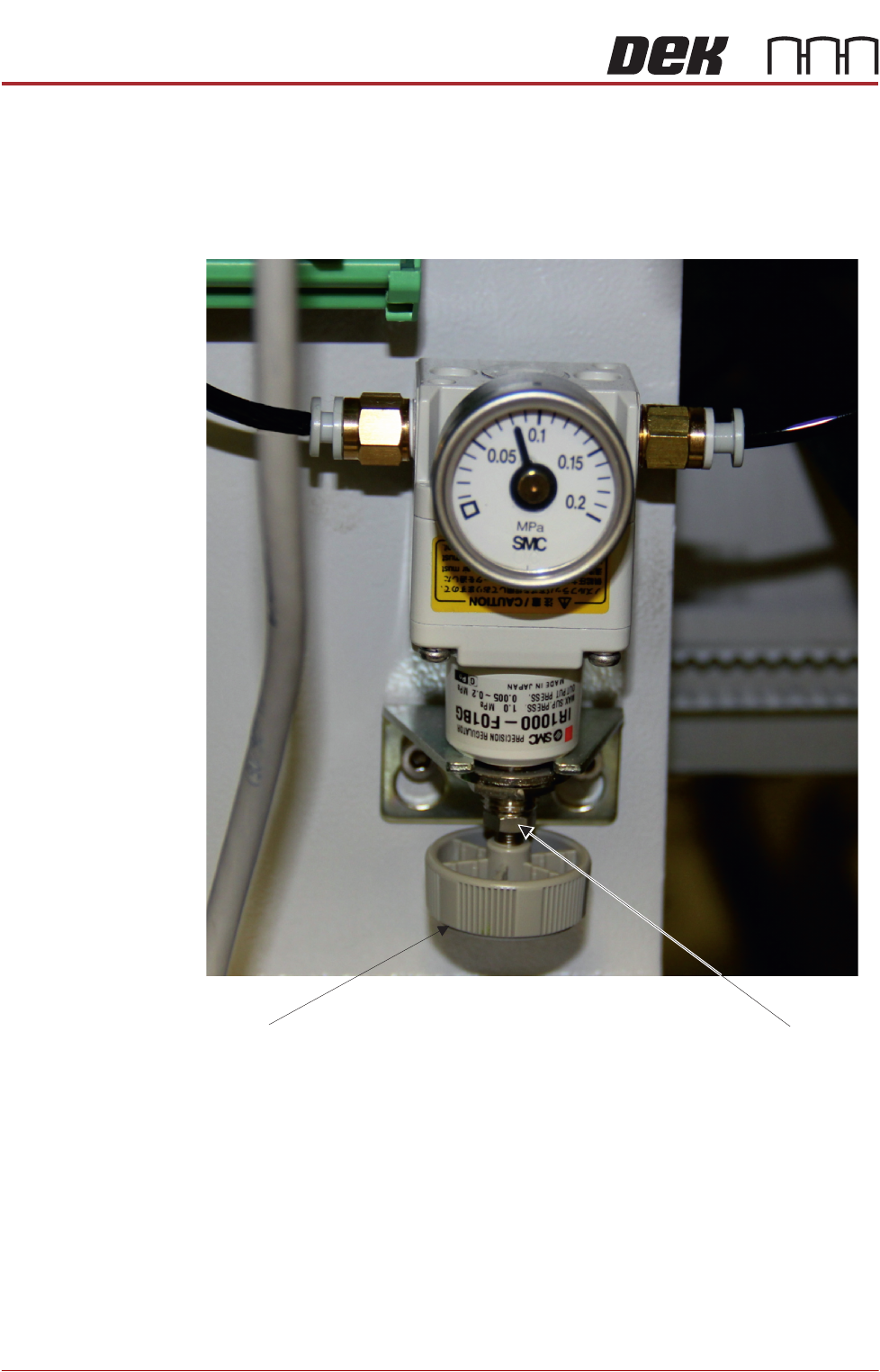
The pneumatic regulator should be set to 0.8 Bar (0.08 MPa).
1. Remove the printer’s rear cover.
2. Check the dial indicator setting; if it is as shown above the unit does not
require adjustment.
3. If adjustment is required, using a 8mm open-ended spanner release the lock
nut.
4. Turn the adjuster on the bottom of the regulator to increase or to decrease
the pressure until the reading is set to 0.8 Bar (0.08MPa).
5. Tighten the lock nut.
6. Refit the printer’s rear cover.
Lock nut
Adjuster
STINGER
REPLACEMENT PROCEDURES
Chapter Issue 2, Aug 14 Technical Reference Manual 38.13
REPLACEMENT PROCEDURES
WARNING
BOARD CLAMPS. EXTREME CARE MUST BE EXERCISED WHEN WORKING IN
THE TOOLING AREA OF THE MACHINE TO AVOID INJURY. THE FOILS ON THE
FRONT AND REAR BOARD CLAMPS ARE VERY SHARP.
WARNING
COMPRESSED AIR. COMPRESSED AIR SHOULD NEVER IMPINGE UPON THE
BODY. PORTS, PIPES, ETC MUST NEVER BE BLOCKED BY HAND. BEFORE
CONNECTING OR DISCONNECTING ANY PNEUMATIC COMPONENTS, ENSURE
THE COMPRESSED AIR SUPPLY HAS BEEN DISSIPATED AND DISCONNECTED
FROM THE MACHINE.
CAUTION
EQUIPMENT SERVICING. THE LASER DOES NOT CONTAIN USER
SERVICEABLE PARTS. OPENING THE UNIT COULD CAUSE MIS-ALIGNMENT
OF THE LASER, THIS MAY MAKE THE EQUIPMENT DANGEROUS TO OPERATE.
CAUTION
RADIATION. RISK OF INJURY TO THE EYES DUE TO LASER LIGHT BEING
PRESENT IN THE VICINITY OF THE LABEL. DO NOT LOOK AT THE LIGHT
SOURCE OR REFLECTIONS FROM A SURFACE.
WARNING
HARMFUL SUBSTANCES. CLEANING WIPES AND CLEANING SOLUTIONS MAY
CONTAIN SUBSTANCES HAZARDOUS TO HEALTH. WHEN USING CLEANING
WIPES AND CLEANING SOLUTIONS THE MANUFACTURERS’ SAFETY DATA
SHEETS MUST BE STRICTLY ADHERED TO.
MANDATORY
TOXIC CHEMICALS MAY BE PRESENT. SAFETY GLOVES MUST BE WORN.
MANDATORY
TOXIC CHEMICALS MAY BE PRESENT. EYE PROTECTION MUST BE WORN.
Auger Assembly
Replacement
1. Remove the replacement syringe assembly from refrigeration and allow the
temperature to rise in accordance with the manufacturers’ recommenda-
tions. Remove the end dust cap.
2. Isolate the printer from the pneumatic supply and lockout the mains electri-
cal isolator.
3. Open the printhead front cover.
4. If fitted, remove the screen.
STINGER
REPLACEMENT PROCEDURES
38.14 Technical Reference Manual Chapter Issue 2, Aug 14
5. Pull the camera carriage to the front of the printer.
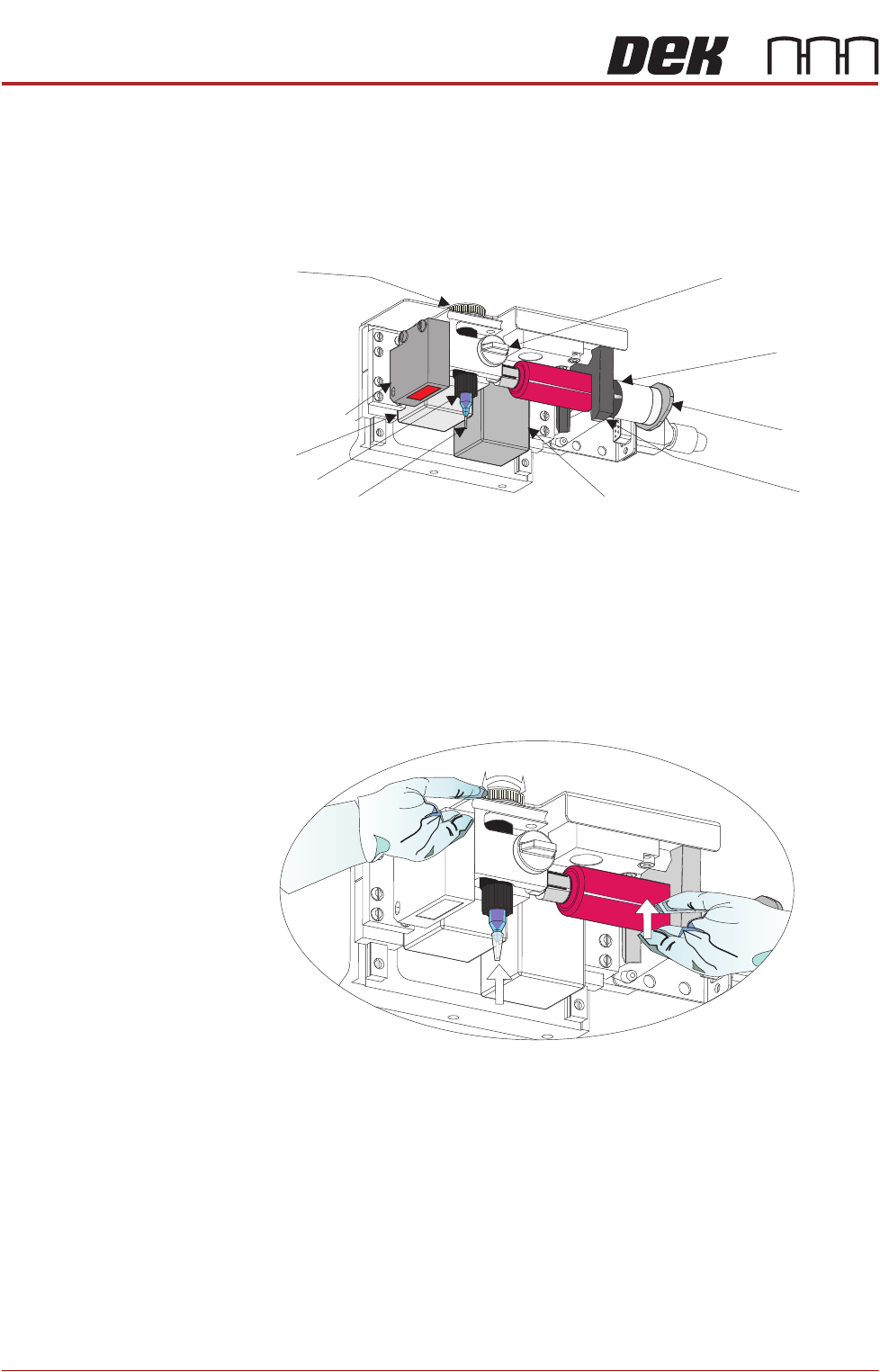
6. Slacken off the auger clamp screw.
7. Release the auger, nozzle and syringe as one assembly from the drive gear
and the ‘C’ clamp.
8. Remove the pneumatic air connector from the rear of the syringe assembly.
9. Dispose of the syringe and nozzle components in accordance with any
national, federal or local disposal regulations.
10. Fit a replacement nozzle to the auger.
11. Fit the pneumatic air connector to the rear of the syringe assembly.
12. Lift the complete assembly up toward the auger drive gear. The auger valve
screw engages with the square shaft of the drive motor, rotate the exposed
portion of the drive belt at the same time pushing the assembly upward
ensuring that it is in the fully up position.
13. Refit the assembly into the ‘C’ clamp.
14. Refit the in-line air connection to the pneumatic air connector.
15. Tighten the plastic auger clamp screw. Do not over tighten.
16. Remove the nozzle dust cap. Ensure that the nozzle assembly is in line with
auger valve and not bent or at an angle.
17. Close the printhead front cover.
18. Reconnect the printer to the pneumatic supply and unlock the mains elec-
trical isolator.
19. Switch the mains isolator ON.
20. When requested, press the System button.
Auger Clamp Screw
Auger Drive
Gear
‘C’ Clamp
Z Axis Motor
Pneumatic
Connection
10cc Syringe
Nozzle
Auger
Auger Motor
Laser Light Sensor