00196062-03_SM_LDU-X_EN.pdf - 第15页
3 Installation 3.1 Station Computer Service Manual SIPLACE LDU-X Linear Dipping Unit 11/2017 15 3 Installation Condition and restrictions The LDU‑X can be used on the following machine types. ● SIPLACE X-Series ● SIPLACE…
2 Overview
2.5 Serial number of module
14 Service Manual SIPLACE LDU-X Linear Dipping Unit 11/2017
2.5 Serial number of module
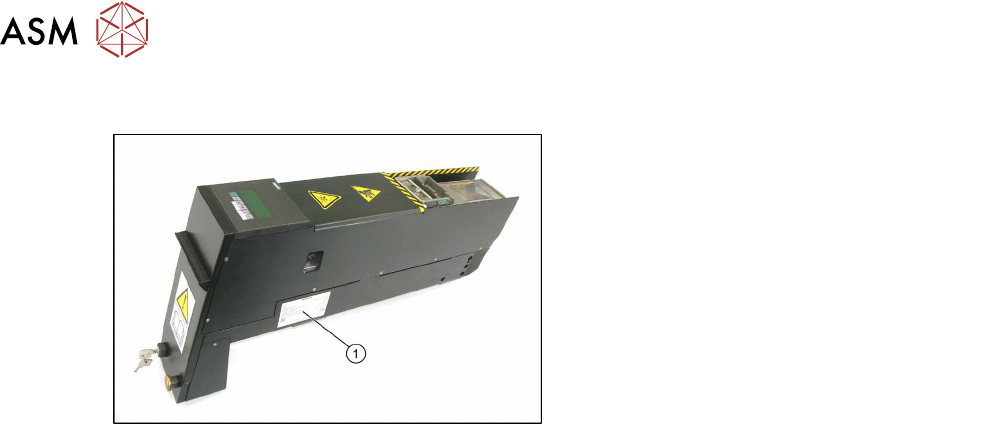
The serial number of the LDU-X can be found
on the typeplate (1).

3 Installation
3.1 Station Computer
Service Manual SIPLACE LDU-X Linear Dipping Unit 11/2017 15
3 Installation
Condition and restrictions
The LDU‑X can be used on the following machine types.
●
SIPLACE X-Series
●
SIPLACE SX-Series
●
SIPLACE CA-Series
The LDU‑X can only be set up on X tables. You can not configure the LDU-X on S tables.
To operate on SIPLACE placement machines, the LDU‑X requires:
●
Station software 604.01 with service pack 01 or higher
●
Until August 2008: SIPLACE Pro 5.0 Hotfix 01 (SIPLACE PRO Build V 5.0.1.33) and higher
●
From August 2008: SIPLACE Pro 5.2
The following placement heads can be used together with the LDU-X:
●
C&P6
●
C&P12
●
CPP
●
TwinHead
●
C&P20
The LDU‑X can be operated outside the machine with the help of an SSE (Single Slot EDIF) or a
pre-setup location.
The placement performance of the machine is limited by the DIP module.
3.1 Station Computer
The LDU-X is only supported from station software 604.01.
The user interface and the functionality of the station software for the LDU-X are largely the same
as those for the old DIP module with rotary plate.

3 Installation
3.2 Line Computer
16 Service Manual SIPLACE LDU-X Linear Dipping Unit 11/2017
3.2 Line Computer
It is possible that the flux in the LDU-X could dry out quickly or that a film could form on the surface.
To avoid this problem, an application run (coating with a squeegee) can be started after a pre-
defined time. This application run is independent of the component placement. The parameter for it
is the cicatrization time.
If this function is required, observe the following additional steps:
In addition to SIPLACE PRO 5.0, you also need to import the SIPLACE Pro 5.0 Hotfix 01 or Hotfix
03 and the SIPLACEProDipModule2Parameters.XML file.
Copying the XML file onto the line computer
Copy the SIPLACEProDipModule2Parameters.XML file into the SIPLACE PRO installation folder:
C:\Programs\SIEMENS Siplace\SIPLACE PRO\
Check: this folder must also contain the LCSR.exe file (use search function).
Importing hotfix
The "SIPLACE Pro 5.0 Hotfix 01/03" must be imported onto the line computer on which the Line
Control Server is installed.
After this, you should have the following build on that computer: SIPLACE PRO V 5.0.1.33 (and
higher)
The required hotfix can be found in the SDC (Siplace Download Center) at www.siplace.com.
SIPLACEProDipModule2Parameters.XML
The XML file contains:
a) Geometric data (parameters 1-4), which depict the size of the dipping area (cavity - hollow).
b) Times for the additional applications.
The parameters for the XML file are read in by SIPLACE PRO and used for all LDU-X which are
addressed through this SIPLACE PRO line computer.
Example: a line computer is connected to 2 lines, each with 5 machines. The lines have, for ex-
ample, 6 LDU-X set up across them. The parameters for the XML file therefore apply to all 6 LDU-
X.
Separate parameterization for individual LDU-X units on the different machines and locations is not
possible with this hotfix.
Parameters
The SIPLACEProDipModule2Parameters.XML file contains the following lines which describe the
LDU-X parameters:
<?xml version="1.0" encoding="utf-8" ?>
<DipParameters
FluxAreaParameter1="-24500"
FluxAreaParameter2="-34500"
FluxAreaParameter3="24500"
FluxAreaParameter4="19500"
Thickness="100"
CicatrizationTime="2"
CuringTime="10"
PreparationTime="2000"
/>
CicatrizationTime = "2" → cicatrization time = 2 minutes