00196062-03_SM_LDU-X_EN.pdf - 第45页
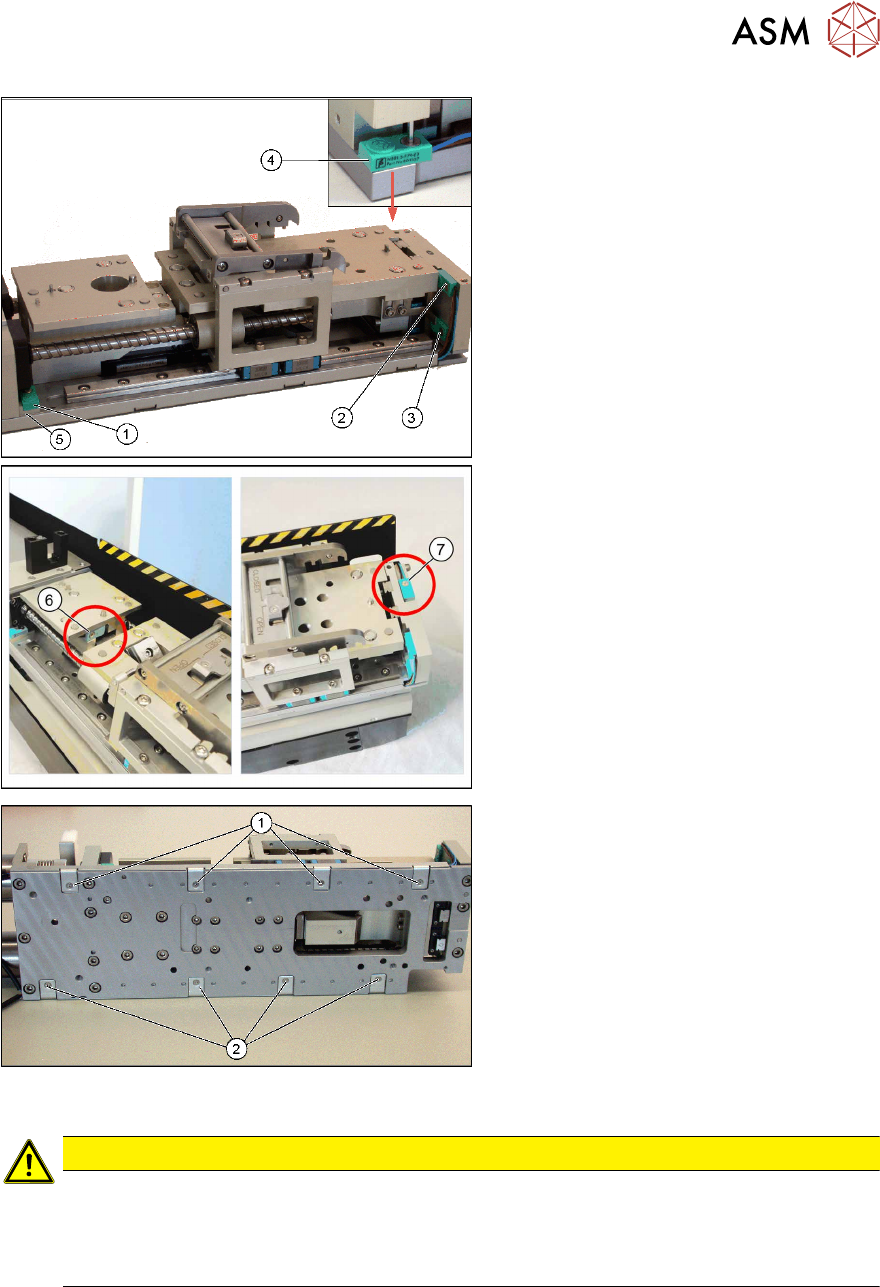
4 Service Work 4.2 Replacing Spare Parts Service Manual SIPLACE LDU-X Linear Dipping Unit 11/2017 45 1. Proximity switch RLIM1 (fitted to mounting plate (5) ) 2. Proximity switch LLIM2 (Z axis up) 3. Proximity switch RLI…
4 Service Work
4.2 Replacing Spare Parts
44 Service Manual SIPLACE LDU-X Linear Dipping Unit 11/2017
4.2.20 Replacing the proximity switch
Overview
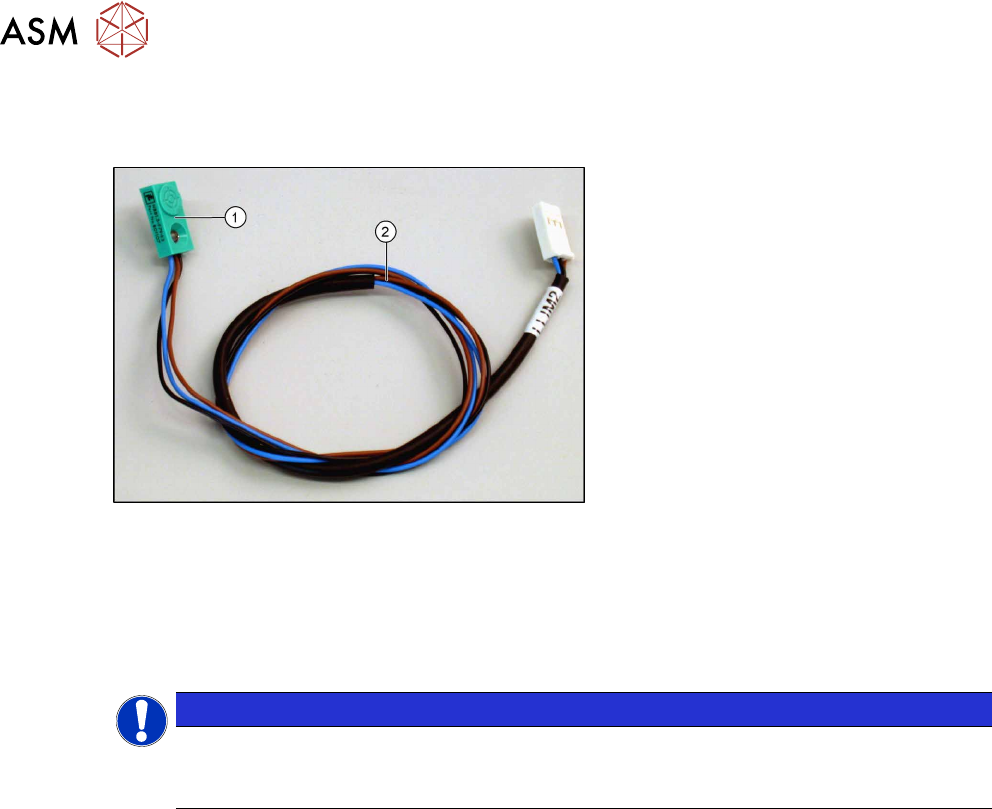
Proximity switch assembly [03068930-xx]
1. Proximity switch
2. Cable to LDU-X controller
Equipment required
●
Standard tools
●
Allen key, sizes 5, 3 , 2 and 1.3
●
Spare part: proximity switch assembly [03068930-xx] with 4 adhesive labels
NOTICE
Adhesive label
There is only one model that is used for all 4 proximity switches in the LDU-X. The switch
can be clearly marked with the labels provided.
Removal
► Remove the side covers (see 4.2.29.1 "Removing the Side Covers" [}57]).
► Remove and dismantle the base unit, separating it into top and bottom sections and unplug all
press-fit connections to the LDU-X control board (see 4.2.29.3 "Removing and Dismantling the
LDU Basis" [}58]).
► Dismantle the base plate of the upper section of the base unit (see 4.2.29.4 "Removing the
Base Plate" [}60]).
4 Service Work
4.2 Replacing Spare Parts
Service Manual SIPLACE LDU-X Linear Dipping Unit 11/2017 45
1. Proximity switch RLIM1 (fitted to
mounting plate (5))
2. Proximity switch LLIM2 (Z axis up)
3. Proximity switch RLIM2 (Z axis down)
4. Proximity switch LLIM1
5. Mounting plate for proximity switch (1)
6. Proximity switch dip plate
7. Proximity switch tray
To replace (1):
► Loosen the screw fastening the
mounting plate (5), on which the prox-
imity switch is fitted.
► Loosen the screw fastening the prox-
imity switch and remove the switch
from the plate.
To replace (2), (3), (4), (6) or (7):
► Loosen the screw fastening the prox-
imity switch to be replaced.
► Make sure you know in which cable
duct the cable for the defective prox-
imity switch is run.
► Now loosen the relevant fastening
screws (1) or (2).
► Carefully pull the cable of the defect-
ive proximity switch out of the cable
duct and remove the proximity switch
concerned.
Installation
CAUTION
Important installation instructions
► Before fitting, mark the sensor cable with the relevant label (see old cable), so that this
can be clearly identified.
► When fitting the sensor, make sure that this lies flush against the respective edges.
► Installation is performed by following the above instructions in the reverse order.
See also
2 4.2.19 "Replacing the Motor with Gearing and Encoder" [}41]
4 Service Work
4.2 Replacing Spare Parts
46 Service Manual SIPLACE LDU-X Linear Dipping Unit 11/2017
4.2.21 Replacing the downholder assembly
Overview
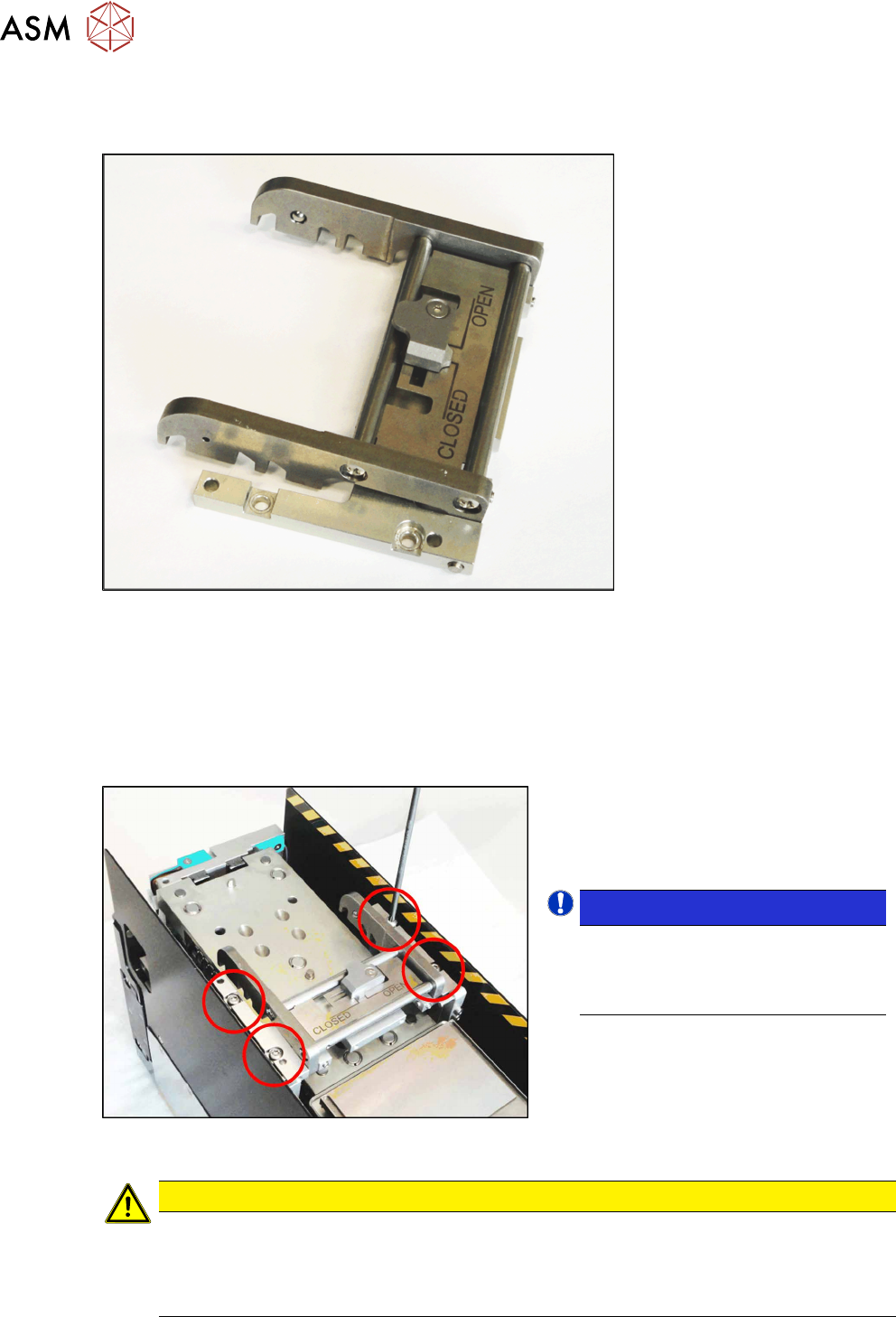
Downholder assembly [03071772-xx]
Equipment required
●
Standard tools
●
Torx key size T8
●
Spare part: downholder assembly [03071772-xx]
Removal
► Loosen the 4 screws fastening the
downholder, as marked in the dia-
gram.
► Remove the downholder.
NOTICE!
Pay attention to the two pins on
the left downholder. If needed, use
a thin screwdriver to release the
downholder from these pins.
.
Installation
CAUTION
Important installation instructions
► Make sure that the pins on the downholder engage correctly.
► First tighten the fastening screws on the side with pins (on the left, when viewed from
the display).
► Installation is performed by following the above instructions in the reverse order.