00196062-03_SM_LDU-X_EN.pdf - 第75页
4 Service Work 4.5 Errors Service Manual SIPLACE LDU-X Linear Dipping Unit 11/2017 75 Errors: A significant amount of flux is leaking from the dip plate, on the left and /or right. Display: normal Status display: normal …
4 Service Work
4.5 Errors
74 Service Manual SIPLACE LDU-X Linear Dipping Unit 11/2017
The following values will need to be reset after transferring the new firmware.
●
Z zero position
●
X zero position
Adjusting the production parameters:
After transferring a new firmware, the production parameters are replaced with the default values.
See the parameters table for details: if you want to run the LDU-X with other parameters, you will
need to re-enter these.
●
Application speed
●
Language
●
Password, if required
List of general parameters with default values
Language: English
Password: 1234
4.5 Errors
4.5.1 Unable to Communicate with the Placement Machine
Errors: The LDU-X shows no reaction during placement operations.
Display:
Status display: Red LED lights up
Cause: There is no communication between the LDU-X and the placement machine.
Solution: Check whether the LDU-X is in "S feeder mode":
Service menu / SYST INFORMATION / INTERFACE MODE X-TA
if not: change password with >ENTER
Check whether the LDU-X has been enabled in the station software for the
placement machine.
4.5.2 Leaking Flux
Errors: A significant amount of flux is leaking from the reverse position of the LDU-X.
Display: Normal
Status display: Normal
Cause: The flux tank is not sealed properly where it meets the plate. There may be un-
evenness, scratches, components on the plate or in the tank.
Solution: Check the zero position of the dip plate.
Check the contact pressure for the flux tank.
Errors: A significant amount of flux is leaking from the interface of the LDU-X.
Display: normal
Status display: normal
Cause: The flux tank is not sealed properly where it meets the plate. There may be un-
evenness, scratches, components on the plate or in the tank.
Solution: Check the zero position of the dip plate.
Check the contact pressure for the flux tank.
4 Service Work
4.5 Errors
Service Manual SIPLACE LDU-X Linear Dipping Unit 11/2017 75
Errors: A significant amount of flux is leaking from the dip plate, on the left and /or
right.
Display: normal
Status display: normal
Cause: The flux tank is not sealed properly where it meets the plate. There may be un-
evenness, scratches, components on the plate or in the tank.
Solution: Check the zero position of the dip plate.
Check the contact pressure for the flux tank.
4.5.3 Insufficient Flux Layer
Errors: A significant amount of flux is leaking from the reverse position of the LDU-X.
Display: normal
Status display: normal
Cause: The flux tank is not sealed properly where it meets the plate. There may be un-
evenness, scratches, components on the plate or in the tank.
Solution: Check the zero position of the dip plate.
Check the contact pressure for the flux tank.
4.5.4 Flux Tank Blocked
Errors: The flux tank collides with the dip plate (rubbing marks, sounds)
Display: Normal
Status display: Normal
Cause: The dip plate is not standing level with the home plate and forms a difference in
height as the interface. The flux tank scrapes over this "step" or hits in when
moving.
Solution: Check the Z height.
Check the gap at the interface.
Check whether there are contaminants (components) at the interface.
4.5.5 Initialization not Successful
Errors: The initialization run was not completed successfully. A significant amount of
flux is leaking from the reverse position of the LDU-X.
Display:
Status display: Red LED lights up
Cause: The flux tank is not sealed properly where it meets the plate. There may be un-
evenness, scratches, components on the plate or in the tank.
Solution: Check the sensors for the axes.
Check whether the switching flags for the axes still cover the sensors after the
initialization run.
Check the communication with the placement machine.
Check the USB port address.
Check whether the end position switch in the Z direction is reached during X
direction movement (green LED on the LDU control board). If needed, increase
the distance from the end position switch to the zero position.
4 Service Work
4.6 Maintenance: greasing the spindle and guidance
76 Service Manual SIPLACE LDU-X Linear Dipping Unit 11/2017
4.5.6 The axes won't move
Errors: The axes suddenly stop while moving.
Display: X axis or Y axis error
Status display: Red LED lights up
Cause: The control circuit for positioning is overloaded and the control system stops
the movement.
Solution: Reduce the speed of the axis concerned (see "Parameters").
Increase the "tracking error" parameters.
4.5.7 Position Error
Errors: The axes suddenly stop while moving.
Display: Position error
Status display: Red LED lights up
Cause: The control circuit for positioning is overloaded and the control system stops
the movement.
Solution: Reduce the speed of the axis concerned (see "Parameters").
Increase the "tracking error" parameters.
4.5.8 Step Loss
Errors: The axes suddenly stop while moving.
Display:
Status display: Red LED lights up
Cause: The control circuit for positioning is overloaded and the control system stops
the movement.
Solution: Reduce the speed of the axis concerned (see "Parameters").
Increase the "tracking error" parameters.
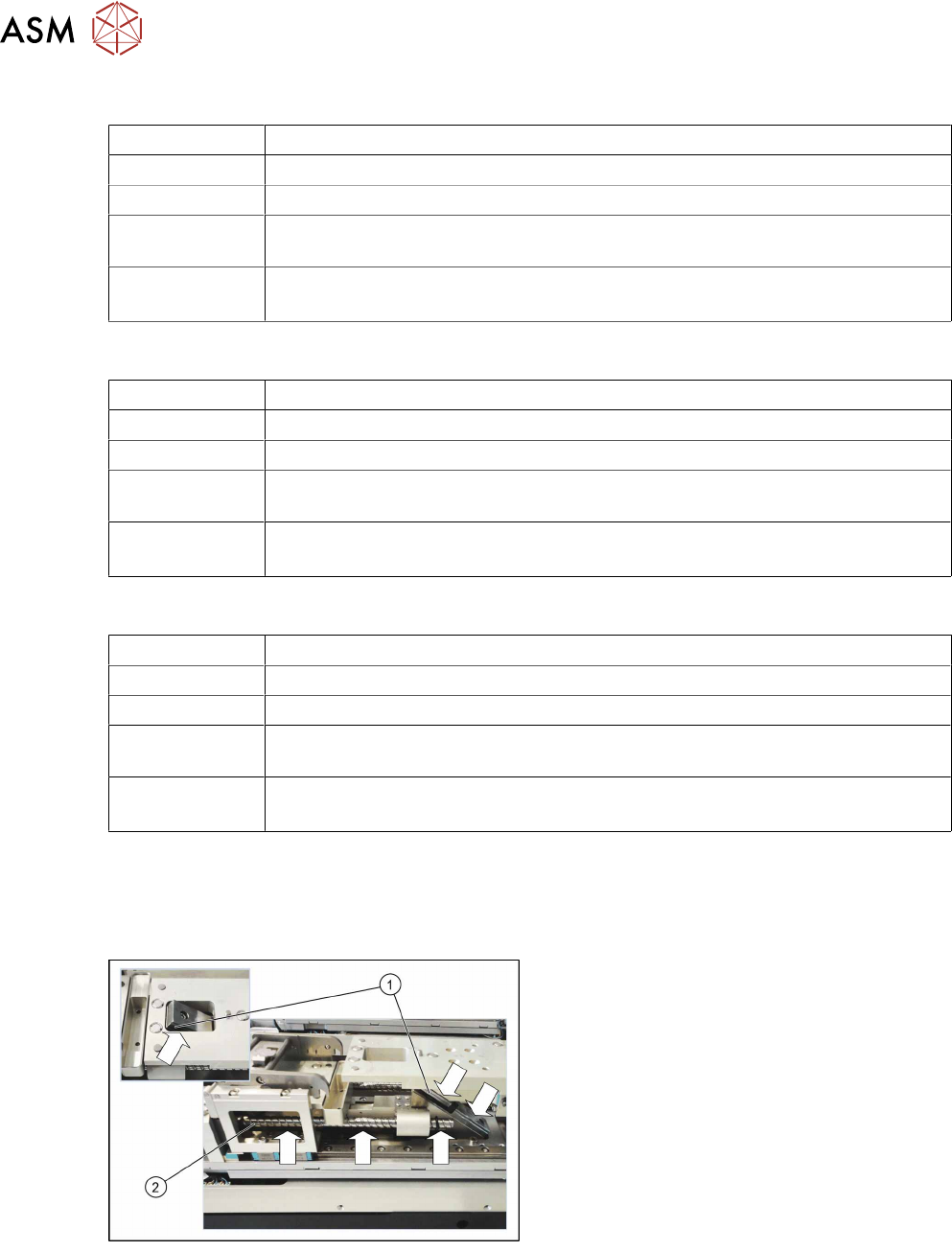
4.6 Maintenance: greasing the spindle and guidance
All LDU-X guides and spindles must be greased every 6 months or more often if required.
Grease with ISOFLEX Topas 5051 (03078517-04).
► Grease the guidance(1) and the
spindle(2) evenly and along the whole
length.
► Also grease the spindle and guidance on
the other side of the LDU-X.