00196062-03_SM_LDU-X_EN.pdf - 第71页
4 Service Work 4.4 Importing the LDU-X Firmware Service Manual SIPLACE LDU-X Linear Dipping Unit 11/2017 71 General settings ► In the WSD, click on the Configura- tion button . ► The adjacent menu will be shown. Set the …
4 Service Work
4.4 Importing the LDU-X Firmware
70 Service Manual SIPLACE LDU-X Linear Dipping Unit 11/2017
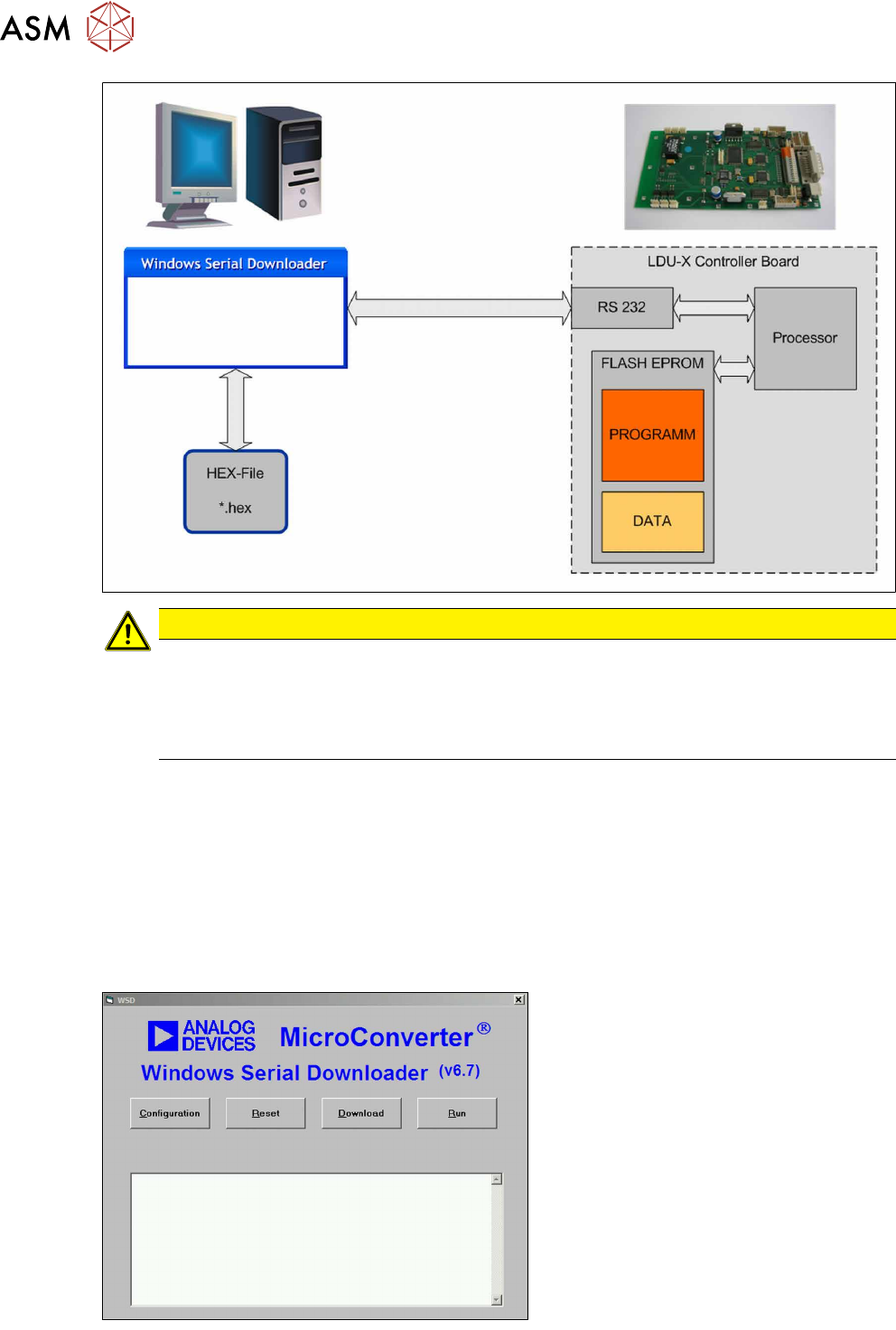
CAUTION
Old data will be deleted!
When you import the download, the existing program in the LDU-X memory will be overwrit-
ten.
The stored settings (axis positions) will also be overwritten. These values will have to be re-
taught after the download.
Where to get the download software
●
The download software can be found in the SIPLACE service download center.
●
Alternatively, you can find this download software on the internet, at www.analog.com.
ftp://ftp.analog.com/pub/www/technology/dataConverters/microconverter/wsd_v6_7.exe
Where to get the LDU-X firmware
●
The LDU-X firmware can be found in the SIPLACE service download center.
Installation
► Copy the wsd_v6_7.exe file to your
PC.
► Install the program WSD on your PC,
by executing the wsd_v6_7.exe file.
Follow the installation instructions.
► Copy the LDU-X firmware to your PC.
The LDU-X firmware is in a HEX file,
marked with its version date
e.g.: LDU-X_10.12.2007.hex
► Start the download software WSD.
The adjacent menu will be shown.
4 Service Work
4.4 Importing the LDU-X Firmware
Service Manual SIPLACE LDU-X Linear Dipping Unit 11/2017 71
General settings
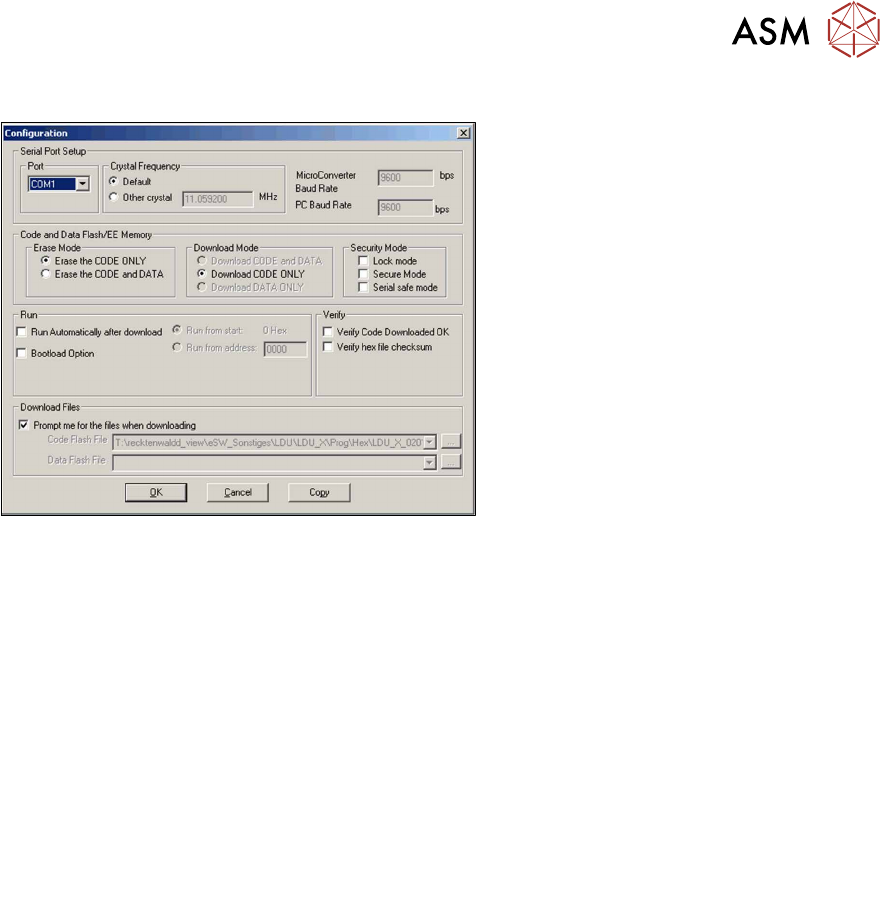
► In the WSD, click on the Configura-
tionbutton .
► The adjacent menu will be shown.
Set the following values as described below.
Port Com1
Crystal Frequency 11.059200 MHz
Micro Converter Baud
Rate
9600 bps
PC Baud Rate 9600 bps
Erase Mode Erase the CODE ONLY
Attention:
Select this setting, otherwise all user settings will be deleted.
Download Mode Download CODE ONLY
Security Mode none
Run Run from start
COM port setting
The COM port can be set in the configuration menu. This defines the serial connection to your PC,
which you want to use for transferring data to the LDU-X. If you want to use a different COM port,
select it from the list.
If your PC does not have a serial port, you can use a USB serial adapter. The number of the COM
port for the USB port is shown in the Windows devices manager.
4 Service Work
4.4 Importing the LDU-X Firmware
72 Service Manual SIPLACE LDU-X Linear Dipping Unit 11/2017
Preparing the LDU-X
NOTICE
The LDU-X can be programmed either on a changeover table in the placement machine (as
described below) or with the help of a Single Slot EDIF outside the placement machine.
► Remove the flux tank, the dip plate
and the park plate.
► Unlock the LDU-X from the
changeover table. This disconnects
the LDU-X from the voltage supply.
The service cable is already installed in the
LDU-X.
► Open the back flap on the LDU-X.
You may need to cut the cable tie on
the cable reel.
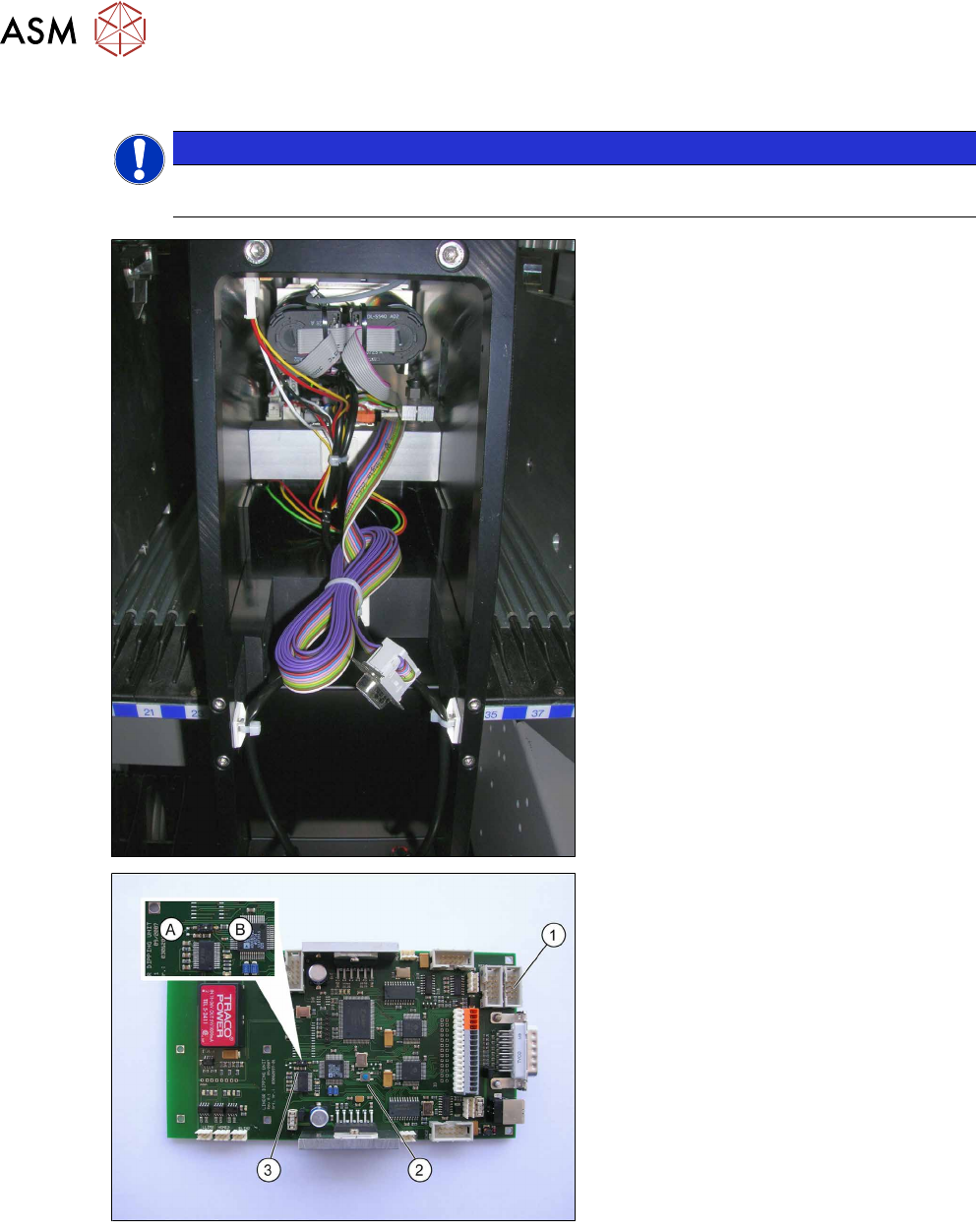
Control board
1. Connector strip, 10 pin (RS232)
2. RESET button (RST)
3. Programming switch (PRO)
A = programming mode
B = operating mode
To transfer the new firmware to the control
board, you need to adjust the programming
switch to set the microprocessor to pro-
gramming mode. This switch is located on
the control board. When installed, the
switch can be accessed through a hole in
the intermediate metal sheet.