COU2000 PRO计数器英文说明书 Operaton Manual-en(1).pdf - 第11页
VERSION: .1.01 E 11 / 52 MODE2 T ransparent T ape Mode:“MODE 2 T ransp arent T ape” *In each setting interface, if i t remains still for 3 seconds, the screen wi ll flash o nce and return to the main i nterface *When i n…
VERSION: .1.01 E
10 / 52
DATA PITCH PRESET
000000 4mm
Pocket Check(PC) :Only applicable to the COUP2000EX Pro model, used to detect missing
parts in tape reel
There are‘Speed Adjustment’function and 3 work modes for COU2000ex pro,the setting
method is as below:
Press and hold the Function key for 3 seconds to enter the function settings screen. At this
time, press and hold the Function key briefly to enter the next screen, which is as follows:
Speed Adjustment
Mode 0
Mode 1
Mode 2
Speed Adjustment Interface:
The "Speed Adjustment" method is as follows:
Press "START" or "REWIND" to select S1/S2/S3 speeds. When held still for 3 seconds, the
screen will flash once and return to the main interface
Mode setting:
MODE0 Standard counting mode:“MODE 0 Standard”
MODE1 Pocket Check mode:“MODE 1 Pocket Check”
SPEED ADJUSTMENT
S1 S2 S3
MODE 1
Pocket Check
MODE 0
Standard

VERSION: .1.01 E
11 / 52
MODE2 Transparent Tape Mode:“MODE 2 Transparent Tape”
*In each setting interface, if it remains still for 3 seconds, the screen will flash once and
return to the main interface
*When in MODE1 interface,keep still for 3 seconds to save as “Transparent Tape” status
and return to the main interface
At this time, the words’TT’and' speed S' alternate for three seconds to display
*When in MODE 2 interface,Keep still for 3 seconds to save as "Pocket Check" status and
jump back to the below screen:
At this time, the words' PC 'and' speed S' alternate for three seconds to display
Note:
if you are using the COUP2000ADV Pro model, please don’t set the mode to PC mode,
otherwise it will affect the motor rotation.
PRINT :Print the quantity and corresponding time, and if connected to a barcode reader,
the product specification barcode can also be printed on the label. After selecting the label
printing function option and barcode copying function option, this function is effective for
the COUP2000ADV Pro and COUP2000EX Pro。
Note : printing is still valid when DATA is a non positive number.
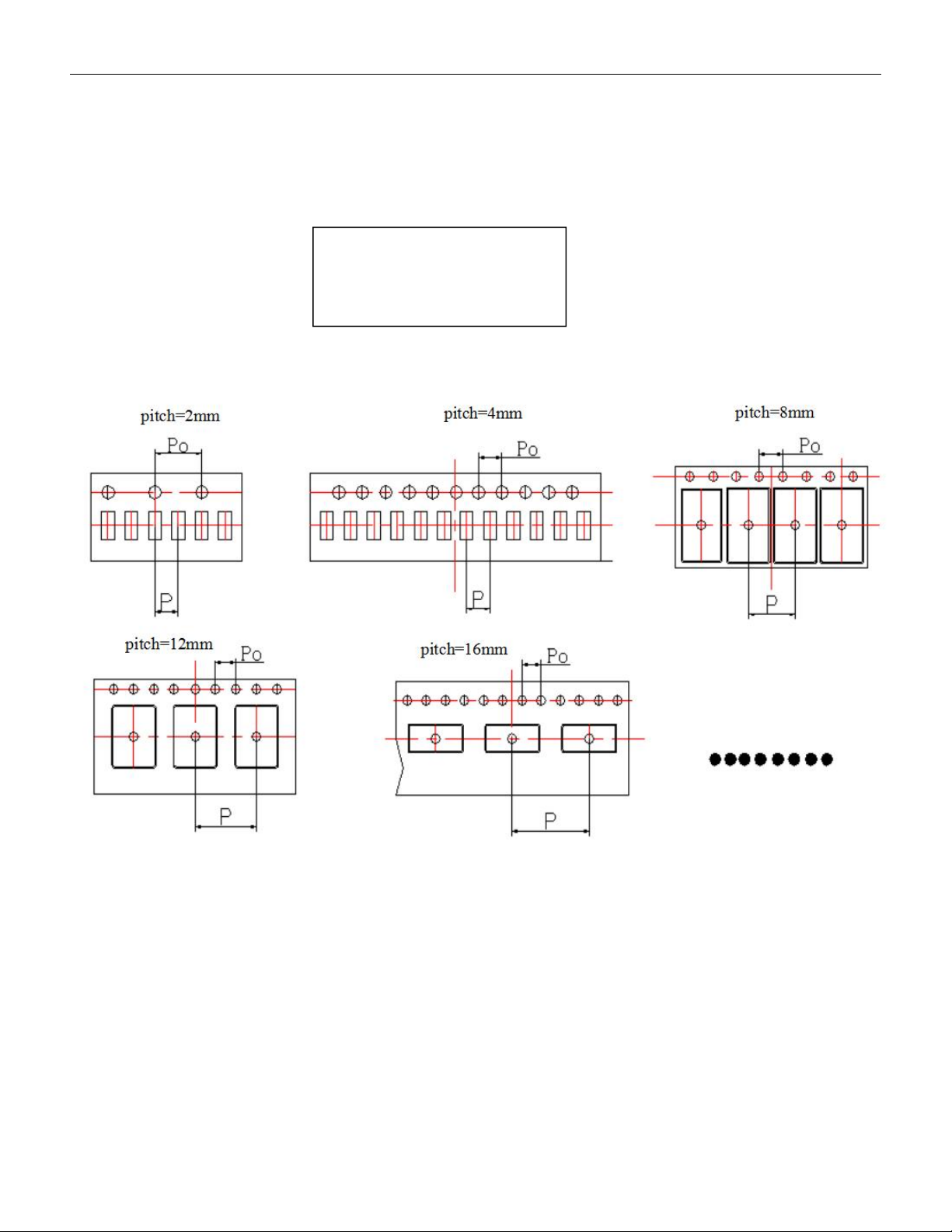
PITCH :According to the EIA-481 standard, the P-value of the spacing component pitch in
a reel is always:
MODE 2
Transparent Tape
PC DATA PITCH PRESET
000000 04mm
VERSION: .1.01 E
12 / 52
2mm;4mm;8mm;12mm;16mm;20mm;24mm;28mm;32mm;36mm;40mm;44mm;
48mm;52mm;56mm;
Press the PITCH key continuously to set the correct pitch value
When long pressing PITCH, the pitch will flash, and you can quickly modify the pitch value
as shown in the following figure
The value of pitch is equal to P, which is the distance between adjacent components on the
carrier tape, and the value of P. (EIA-481 has standardized that the P0 of all material strips is
4mm)
When the pitch value is greater than 4mm and it is inconvenient to confirm, counting gear
can be used to assist in confirming the material spacing: adjust the pitch value to 4mm, let
the arrow on the guide pulley randomly point to the center point of a material, press the
"reset" button, and then manually pull to the center point of an adjacent material. At this
S2 DATA PITCH PRESET
000000 **mm