COU2000 PRO计数器英文说明书 Operaton Manual-en(1).pdf - 第23页
VERSION: .1.01 E 23 / 52 5、Option fun ctions(Label print & Barcode c opy) 5.1 Label Print 5.1.1 Over vi ew The labe l prin ting o ption provided by the COUP2000 Pro series produc ts i s used to pri nt the results of …

VERSION: .1.01 E
22 / 52
button again. If the setting is allowed, the light input amount on the display screen will flash
for about 1 second and then display the intermediate value between the two settings (i.e.
the threshold value). If the amplifier determines that it can detect stably, it will flash and
display "good" for about three seconds before stabilizing, and the machine can detect
normally.
Note:
When the threshold value is set incorrectly or deviates significantly, it may cause the
machine to give an error alarm and stop or not stop when there is empty material.
4.2.4.5 Fine tuning of threshold values
When the machine makes incorrect judgments during use, it may be due to uneven material
strip, resulting in inappropriate threshold values. Please adjust the threshold values
according to the following methods:
Press the SET button to point the yellow cursor to ADJ. When pressing UP/DOWN to display
the desired reference value, confirm the reference value setting with the SET switch once,
and then press the SET button to point the yellow cursor to RUN mode.
Notes:
The appropriate threshold value should be greater than the minimum light input when
there is no component in slot and less than the maximum light input when there is
component in slot. The closer it is to the maximum light input when there is component in
slot, the higher the sensitivity and the faster the pocket check response. However, if it is too
close, it may cause misjudgment when there is material, resulting in alarm and stop
counting.
4.2.4.6 When using the COUP2000EX Pro, if there is an empty material in the material belt,
the buzzer will sound a warning and the motor will stop. Please confirm if there is a
shortage of material, which will be displayed in the icon below. If there is indeed an empty
material, the final inventory quantity should be reduced by the amount of empty material; if
there is no empty material and an alarm is triggered, the reference value of the fiber
amplifier needs to be reset
Pocket check alarm screen
XXX PCS CHIP LOST
CHECK IT PLEASE!
VERSION: .1.01 E
23 / 52
5、Option functions(Label print & Barcode copy)
5.1 Label Print
5.1.1 Overview
The label printing option provided by the COUP2000 Pro series products is used to print the
results of SMD material inventory on standard specification labels, replacing manual
copying
This printer is only used as an output terminal for the SMD counter COUP2000 Pro series.
The communication method, character format, ribbon, and label paper specifications have
been debugged and set, as shown in the table below:
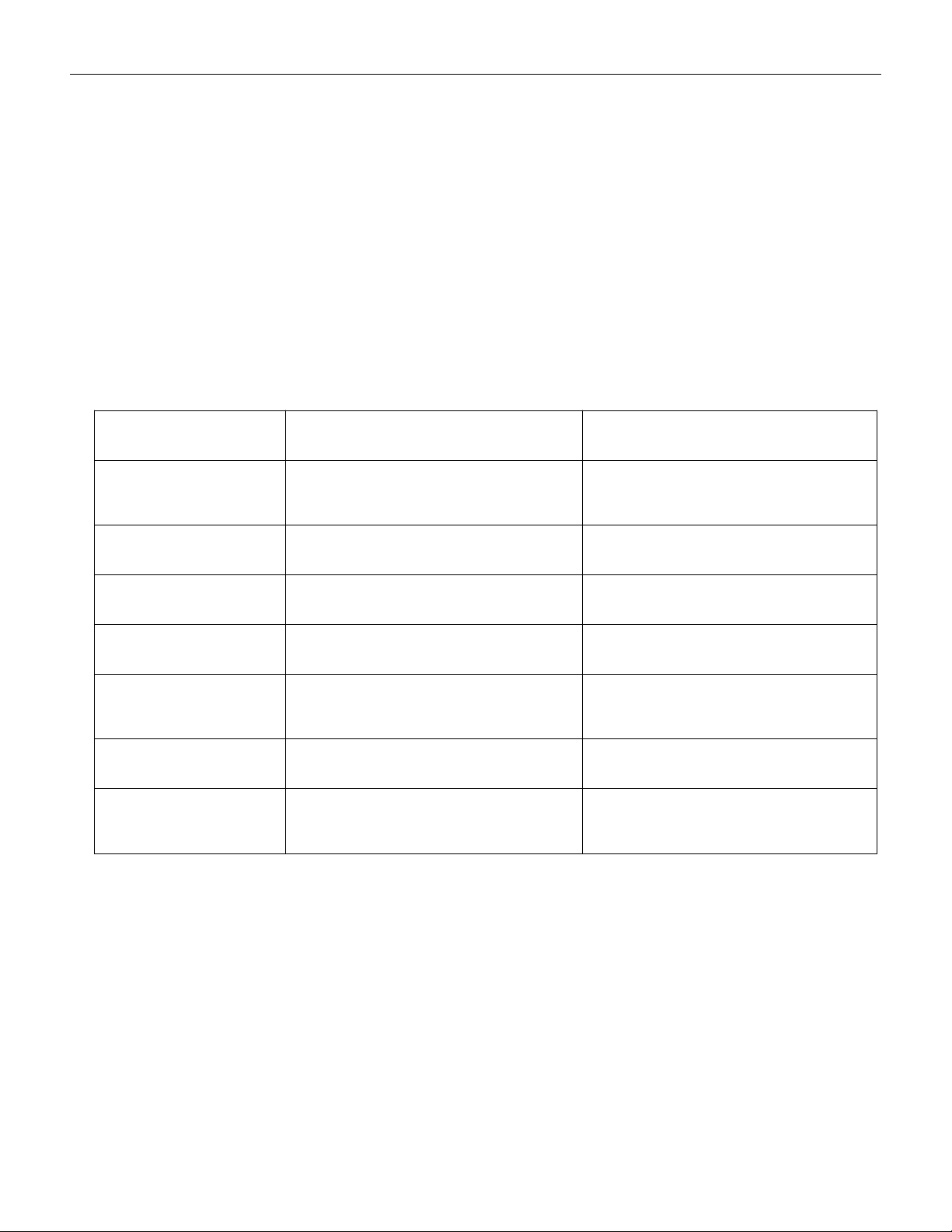
Printer model
ARGOS:OS-214Plus(U)
Zebra: ZD888
Programming
Language
PPLA, PPLB, PPLZ
ZPL、EPL、PPLB
Print method
Thermal transfer
Thermal transfer
Barcode type
Code 128、Code 49
Code 128、Code 49
Resolution
203DPI
203DPI
Communication
interface
USB,type B
USB, type B
Ribbon
110mm ×100m
110mm ×100m
Label paper
65mm × 26mm 1000pcs/roll
gap:2mm
65mm × 26mm 1000pcs/roll
gap:2mm
Note:
Please do not attempt to modify the printer settings and confirm that the consumables
carbon ribbon and label paper are consistent with the requirements; Label paper and
carbon ribbon can be purchased from printing consumables suppliers. If there are special
requirements, please contact us or our distributors
*The communication cable of the printer is a USB interface, which is a special cable of our
VERSION: .1.01 E
24 / 52
company. If you need it, please contact us or our distributor to purchase it. The printing
cable purchased by yourself will damage the machine or device and cannot be driven
.
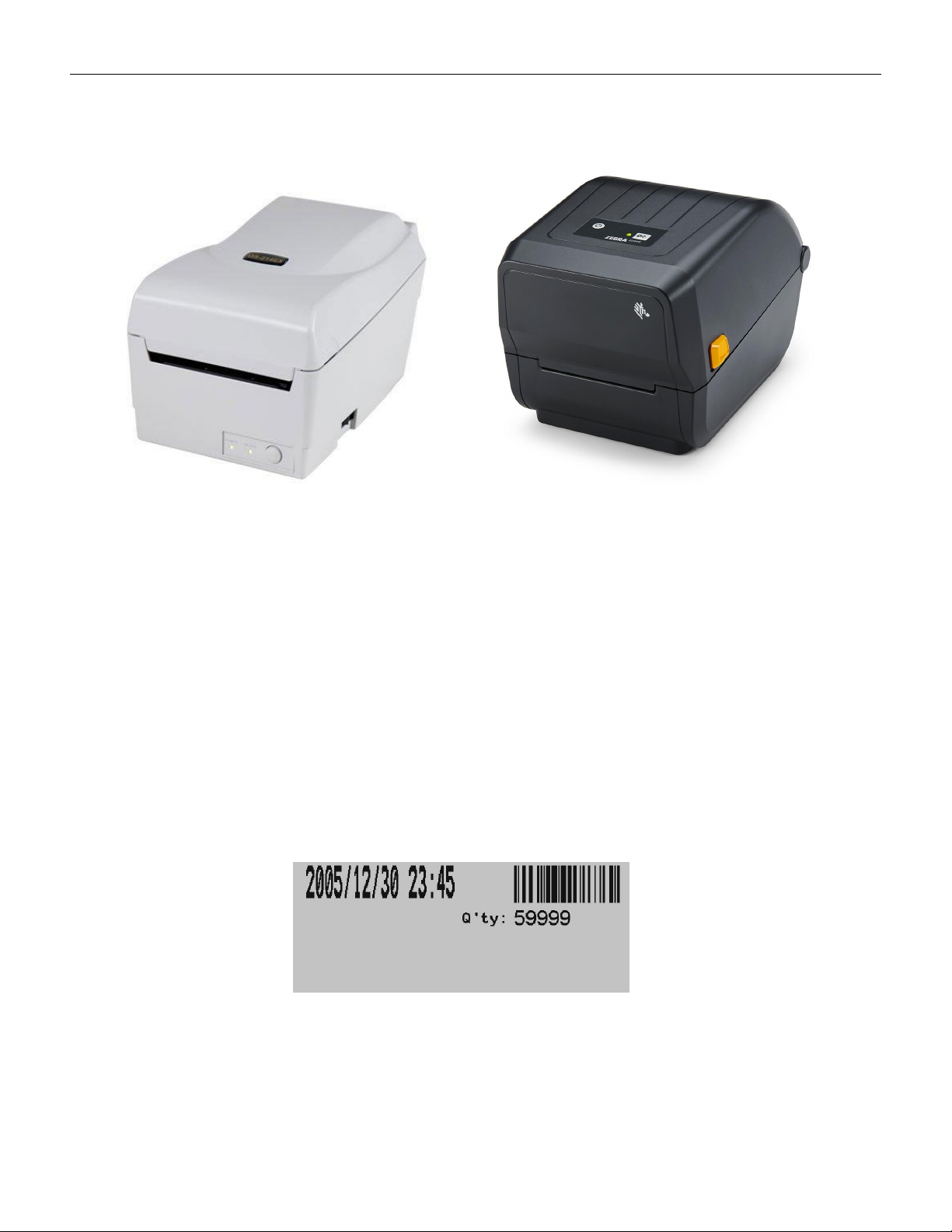
ARGOS:OS-214Plus(U) Zebra: ZD888
5.1.2 Label Printing
The COUP2000 Pro series that has selected the label printing function option can print
labels.
When the counting is complete and the number of parts is displayed on the screen, press
the PRINT key on the control panel, and the printer will print labels indicating the time and
number of parts. As shown in the following figure:
Label(not includes p/n of component)