COU2000 PRO计数器英文说明书 Operaton Manual-en(1).pdf - 第46页
VERSION: .1.01 E 46 / 52 6.Maintenance 6.1 ADV Pro Appropriat e cle anness of counting gear i s required for the COU2000ADV pro seri es products. Long time use of the device will result in locking loosening be twee…
VERSION: .1.01 E
45 / 52
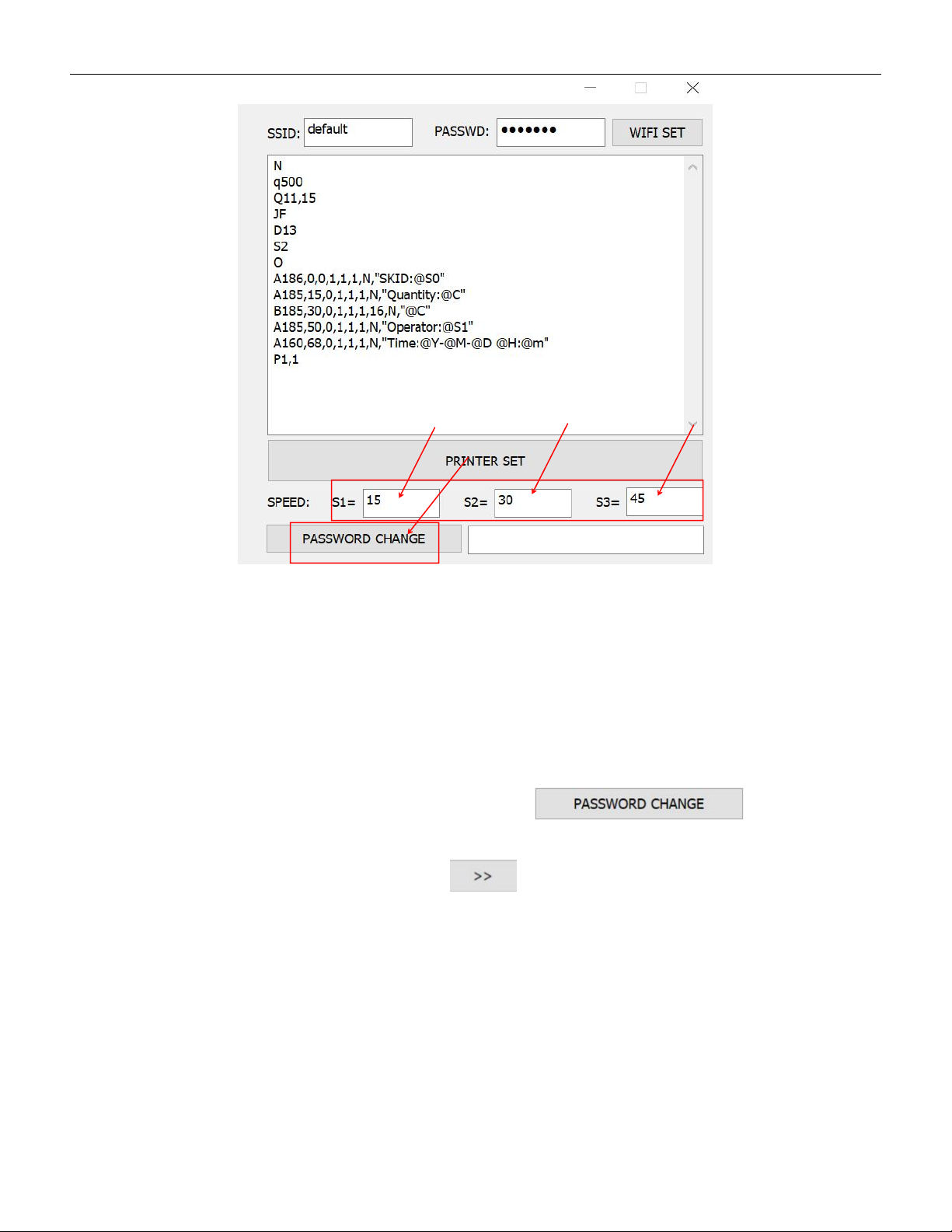
Our factory default set speeds are: low-speed S1=15, medium speed S2=30,
high-speed S3=45. If you have specific requirements for the set speeds, you
can directly change the corresponding speed values.
5.4.4 Change password
The factory-set password is:root,if you want to change the password,
just fill new password in the input column and click
to save the new password
If you forget your password, you can click 10 times and the left page
will appear.
VERSION: .1.01 E
46 / 52
6.Maintenance
6.1 ADV Pro
Appropriate cleanness of counting gear is required for the
COU2000ADV pro series products.
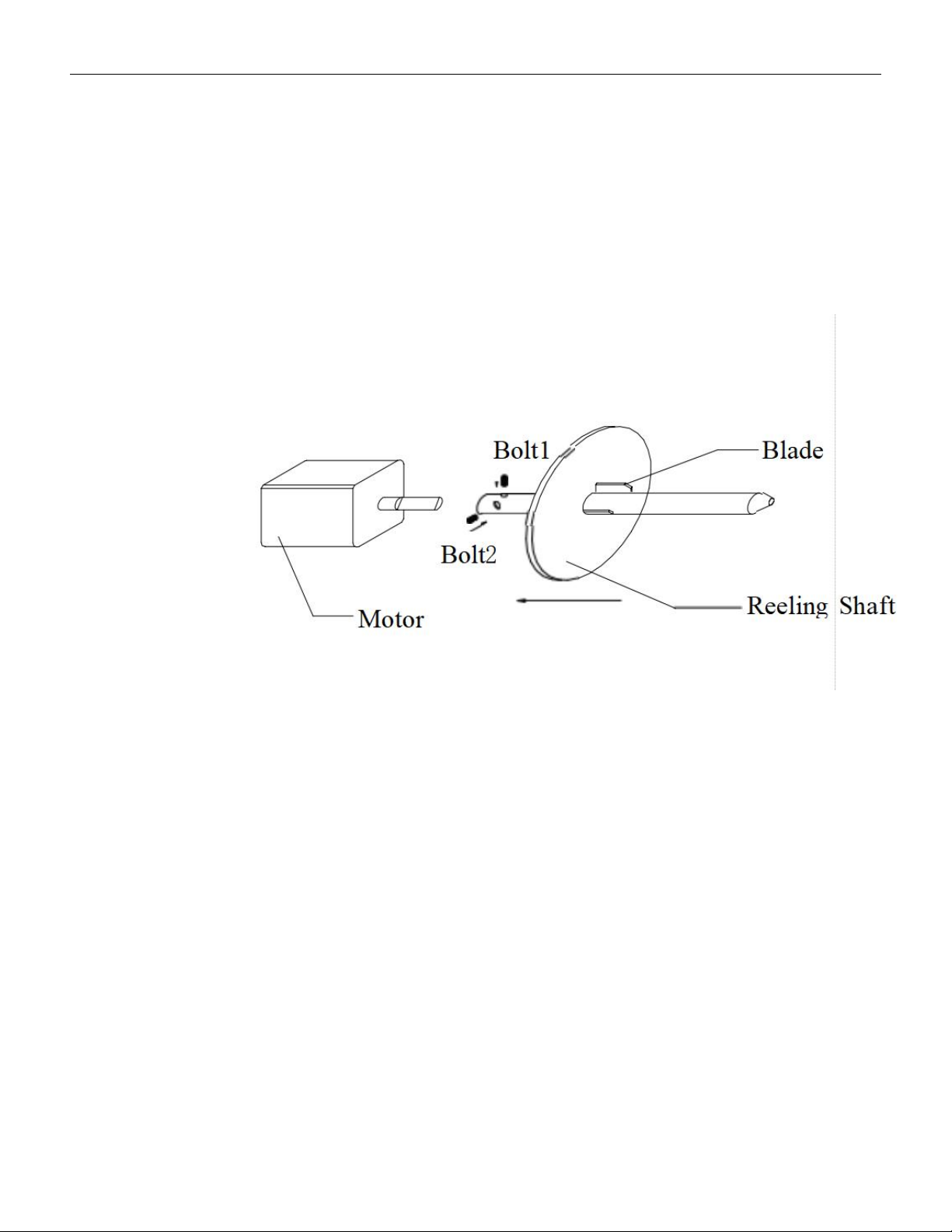
Long time use of the device will result in locking loosening between the reeling shaft
and motor shaft. In such a case, please use a hexagonal spanner to lock it fast.。
Every three months, please use a two millimeter hexagonal spanner to remove the
reeling shaft from the motor shaft, clean and reassemble it。
When guide spring deform,please replace a new one。
6.2 EX Pro
·Please see 6.1 for basic maintenance same as ADV Pro。
·
If empty material detection fails, please check if the fiber optic cable is broken。
·If empty material detection fails, check whether the screws at the fiber optic
transmitter and receiver are loose.

VERSION: .1.01 E
47 / 52
6.3 Printer and Scanner
6.3.1 Printer:
6.3.1.1 Cleaning of printing heads and sensors
6.3.1.1.1The cleaning of the printing head is the most important and regular maintenance.
First, dip a small amount of cotton (or cotton ball, which contains less cotton debris and is
not rough) in a small amount of alcohol, and wipe the heating wire on the printing head in a
"one-way" manner. The number of wiping times is mainly to wipe off the carbon powder
adhered to the printing head. Then, confirm and wipe twice repeatedly (about once after
printing a roll of paper).
6.3.1.1.2The main purpose of sensor cleaning is to enable the machine to operate normally,
correctly grasp the spacing of paper, and detect the safety of carbon tape. If not cleaned
and maintained for a long time, dust will accumulate on the sensor and spread in the air.
After a long time, when the light source of the sensor is covered to a certain extent, the
machine will malfunction. Therefore, please use an air pressure bottle that does not contain
any components, and the amount of spraying should be judged according to the working
environment of the machine (about once a month, maintenance should be done).
6.3.2 Scanner:
6.3.2.1The cleaning of the scanning head is the most important and regular maintenance.
Please use cotton (or cotton balls or other cleaning tools that contain less cotton debris and
are not rough) to wipe it, and do not use alcohol. (Period: once every 3 months)
6.3.2.2The handheld and switch parts of the scanner are prone to dirt and stains. Please use
cotton (or cotton balls or other cleaning tools that contain less cotton debris and are not
rough) to wipe them, and a small amount of alcohol can be used .(Period: once every 3
months)