COU2000 PRO计数器英文说明书 Operaton Manual-en(1).pdf - 第49页
VERSION: .1.01 E 49 / 52 7.2 FAQ: Q1: How can I im prove the situatio n where the printed par t leans to war ds on e side when printing labe ls? A: Re install the label paper and co nfirm that it is aligned to the left w…
VERSION: .1.01 E
48 / 52
7.Appendix
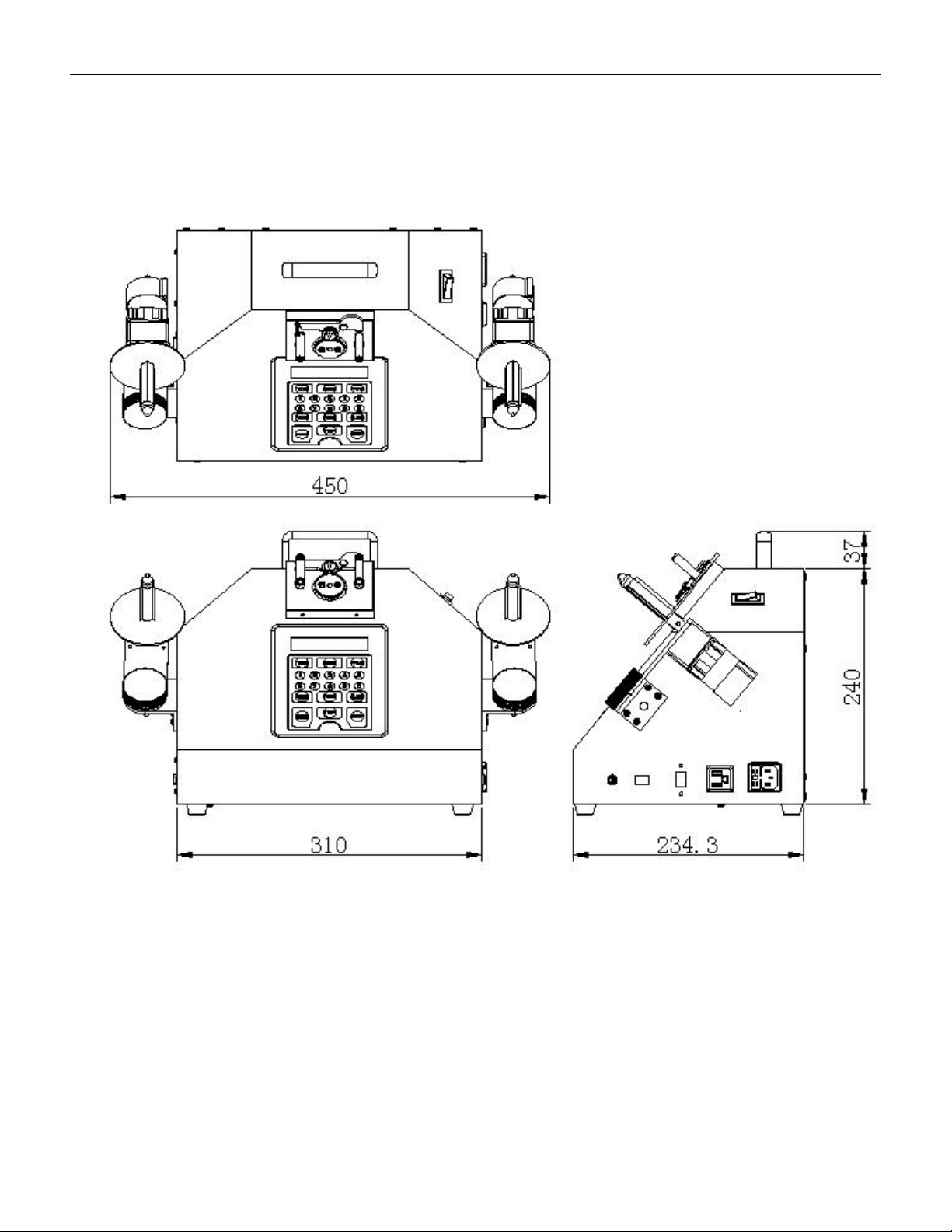
7.1 Outer dimensions

VERSION: .1.01 E
49 / 52
7.2 FAQ:
Q1: How can I improve the situation where the printed part leans towards one side when
printing labels?
A: Reinstall the label paper and confirm that it is aligned to the left with the baffle, and pass
through the paper width adjustment groove under the print head module.
Q2: one or more blank labels was skipped during printing?
A: Please perform CALIBRATION and re-detect the label size once more.
if the problem is still not solved. please troubleshoot the problem in the following order
1, The actual label size used does not match the required label size.
2,The transparency of the label is abnormal. Please use the right label reel
Q3: Barcode can not be printed?
A: 1,The barcode format is not accepted, please select the correct barcode
2, The barcode is not scanned. Under normal circumstances, the LED of the barcode reader
will light up and emit a BEEP sound when reading the barcode; Please note that barcode
reader always retains only one barcode in its memory, and the new one will automatically
overwrite the old one and be cleared after each print output to ensure the accuracy of
barcode replication.
Q4:Part of the barcode can not be printed?
A: The longest acceptable barcode currently designed is 24 digits. If it exceeds 24 digits, the
excess cannot be printed.
Q5: The printer doesn’t work when pressing the PRINT button?
A:1, The printer is not connected or powered on;
2, When counting quantity is a non positive number, printing is prohibited.
Q6: The printer doesn’t work when pressing the PRINT button, and POWER
LED flashed.
A:The communication between the printer and the counter has been interrupted,

VERSION: .1.01 E
50 / 52
please press the FEED button to recover
Q7: Why does the motor stop and the display count is greater than the preset value ?
A: Due to the inertia of the motor and the varying tension of different carrier tape, the count
value will be slightly higher than the preset value.
Q8: Why hasn't the carrier tape on the left side of reel been empty when the motor stops
after reaching the preset value ?
A: Because the PRESET value is less than the number of the total component number in the
reel.
Q9: Why is there a significant difference between the number of materials counted and the
actual number of material?
A: Please confirm if the pitch setting is correct. Setting the pitch incorrectly will
result in inaccurate counting.
Q10: Why is there empty material in the reel that the machine did not detect when using
Pocket check function for counting?
A: Please troubleshoot the problem in the following order
1. POCKET CHECK function not enabled
2. The fiber optic alignment mechanism is incorrect.
3. The amplifier reference value for empty material detection is not set correctly.
4,The carrier tape used is black with no hole in the center of the part groove.
This function is invalid for this type of strip!