DEK INFINITY USER MANUAL.pdf.pdf - 第179页
INFINITY ',$*12 67, &6 35,17&$ 55,$*( Soft ware Ver sion 7 User Manual 5.11 Drive Carri age to Fr ont Position Selecting this diagnostic function moves the print carriage to the front start position of the …
INFINITY
',$*1267,&6
35,17&$55,$*(
5.10 User Manual Software Version 7
PRINT CARRIAGE
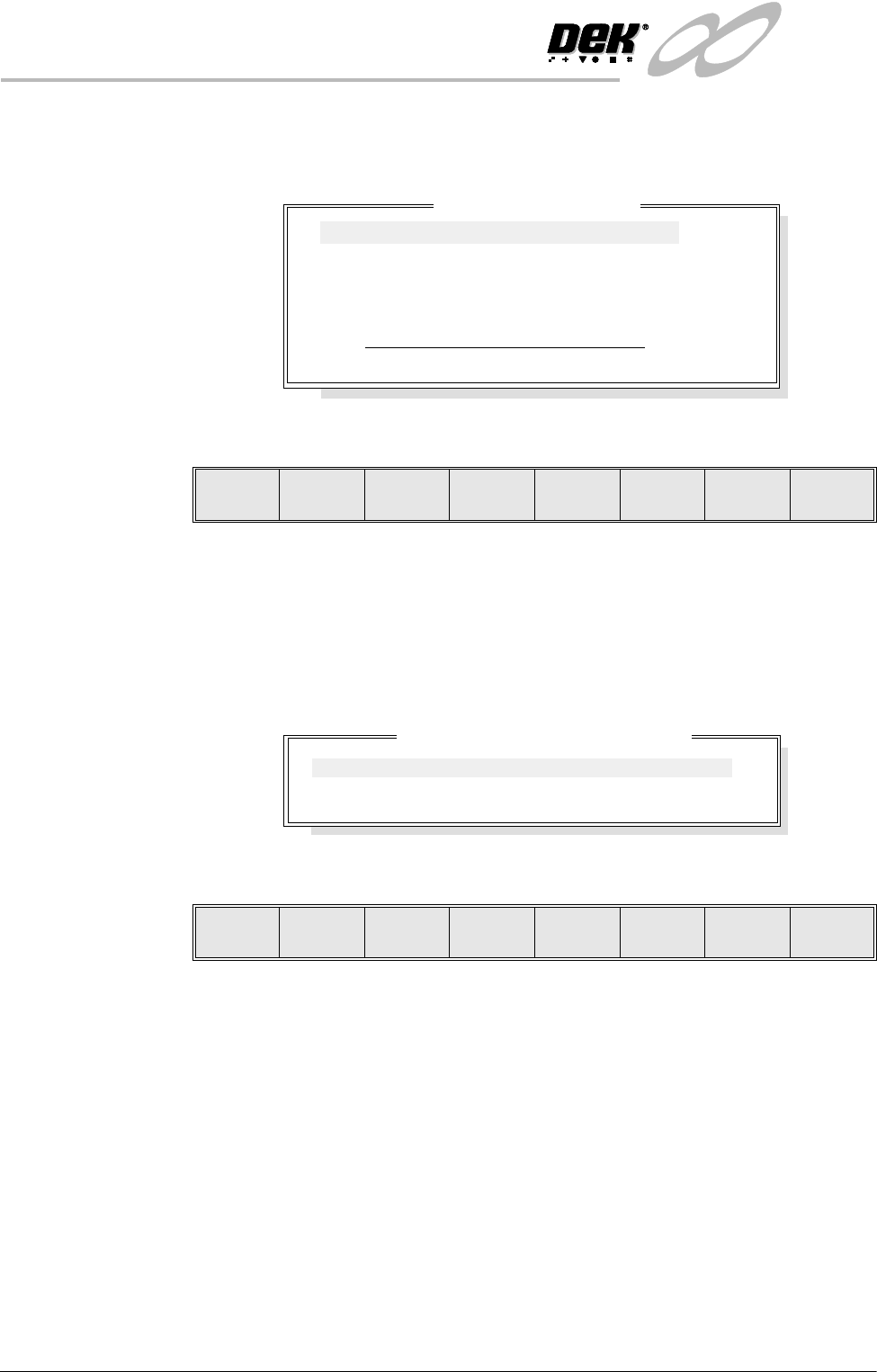
Selecting this diagnostics module opens the following window:
The menu bar changes to the following:
Next / Previous keys move the highlight bar up and down the list of selectable
diagnostic functions.
Run Diagnost activates the diagnostic function, as selected by the highlight bar.
Exit returns operation to the module diagnostics page.
Adjust opens the following window:
The menu bar changes displaying the following:
Next / Previous keys move the highlight bar up and down the list of diagnostic
parameters.
Incr. / Decr. keys change the value of the selected diagnostic parameter.
Exit returns operation to the print carriage diagnostics page.
NOTE
These parameters are used in diagnostics only and have no affect on the product
board file.
Home Print
Carriage
Selecting this diagnostic function homes the print carriage, as set by its home
sensor. ‘Homing Print Carriage’ is displayed in the prompt box. It is always
advisable to home the print carriage before attempting to position it.
Print Carriage Diagnostics
Cycle Count
Done :-
0, To go :-
50
Home Print Carriage
Drive Carriage To Front Position
Drive Carriage To Paste Position
Drive Carriage To Rear Position
Drive Carriage Using Jog Buttons
Cycle Print Carriage
Run
Diagnost
Adjust Next Previous Exit
Print Carriage Diagnostic Parameters
FRONT PRINT SPEED
REAR PRINT SPEED
CYCLE COUNT
25
25
50.0
mm/s
mm/s
Cycles
Next Previous Incr. Decr. Exit

INFINITY
',$*1267,&6
35,17&$55,$*(
Software Version 7 User Manual 5.11
Drive Carriage to
Front Position
Selecting this diagnostic function moves the print carriage to the front start
position of the print stroke. ‘Driving Print Carriage to Front Limit’ is
displayed in the prompt box.
Drive Carriage to
Paste Position
Selecting this diagnostic function moves the print carriage to a position that
clears the paste dispense unit if operated. ‘Driving Print Carriage to Paste
Position’ is displayed in the prompt box.
Drive Carriage to
Rear Position
Selecting this diagnostic function moves the print carriage to the end of the print
stroke. ‘Driving Print Carriage to Rear Limit’ is displayed in the prompt box.
Drive Carriage
Using Jog Buttons
Selecting this diagnostic function allows the user to position the print carriage
anywhere between the front and rear position using the two jog buttons. ‘Use
the Left Jog Button to move Print Carriage towards front and the Right Jog
Button to move it towards the rear’ is displayed in the prompt box.
Cycle Print
Carriage
Selecting this diagnostic function starts a continuous cycle of driving the print
carriage between its front and rear limits, pausing at each end for 2 seconds.
‘Print Carriage Cycling’ is displayed in the prompt box. The cycle is termi-
nated if the Stop key is used or the set cycle count is reached.
Cycle Count This diagnostic function displays the amount of cycles done and the amount of
cycles to go to complete the cycle count.
INFINITY
',$*1267,&6
352)/2:
5.12 User Manual Software Version 7
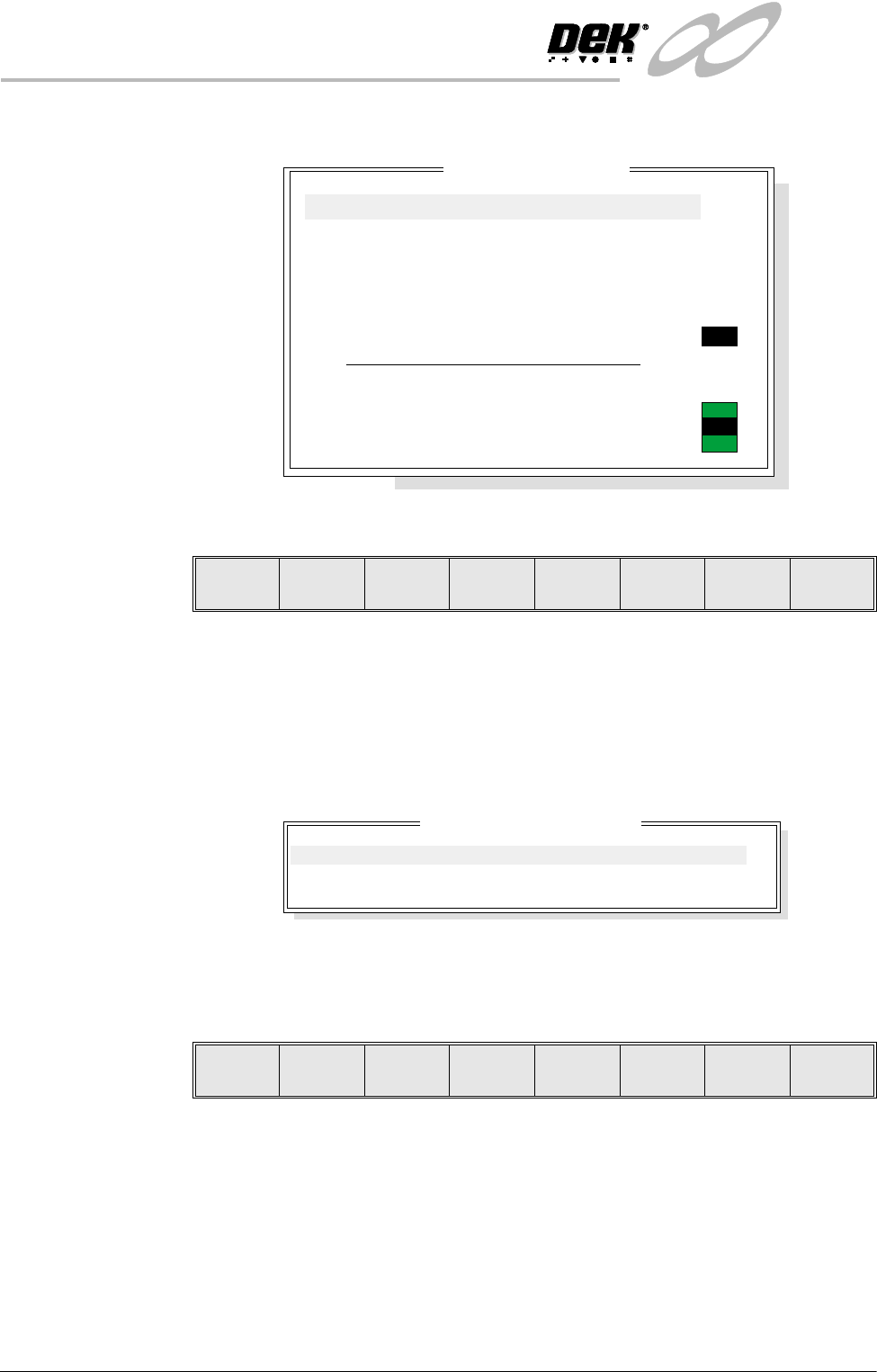
PROFLOW Selecting this diagnostics module opens the following window:
The menu bar changes to the following:
Next / Previous keys move the highlight bar up and down the list of selectable
diagnostic functions.
Run Diagnost activates the diagnostic function, as selected by the highlight bar.
Exit returns operation to the module diagnostics page.
Adjust opens the following window:
NOTE
Idle Pressure is only available while a software controlled air regulator is fitted.
The menu bar changes to the following:
Next / Previous keys move the highlight bar up and down the list of diagnostic
parameters.
Incr. / Decr. keys change the value of the selected diagnostic parameter.
Exit returns operation to the ProFlow diagnostics page.
ProFlow Diagnostics
System Pressure
ProFlow Fitted
Paste Cassette Low
Software Pressure Regulator Fitted
11.42Kg
ON
OFF
Home ProFlow
Drive System to Contact Height
Drive System to Print Height
Home Downstop
Drive Downstop to Position
Drive System Using Jog Buttons
Drive Downstop Using Jog Buttons
Toggle Paste Pressure
ON
OFF
Run
Diagnost
Adjust Next Previous Exit
ProFlow Adjust Parameters
PFLOW CONTACT POS.
DOWNSTOP POS.
IDLE PRESSUE
0.0
0.0
0.2
mm
mm
bar
Next Previous Incr. Decr. Exit