2OM-1751-003w_G5S.pdf - 第72页
2OM-1751 1-20 [2] "Start Mode" Selection Buttons Using the following buttons, the start mode is setup. [Auto] Button Select this button to start up the machine automatically. [Semi-Auto Step] Button When this b…
2OM-1751
1-191303-001
4.1 "Run Mode" Tab Sheet
[3]
[1]
[2]
F2A16
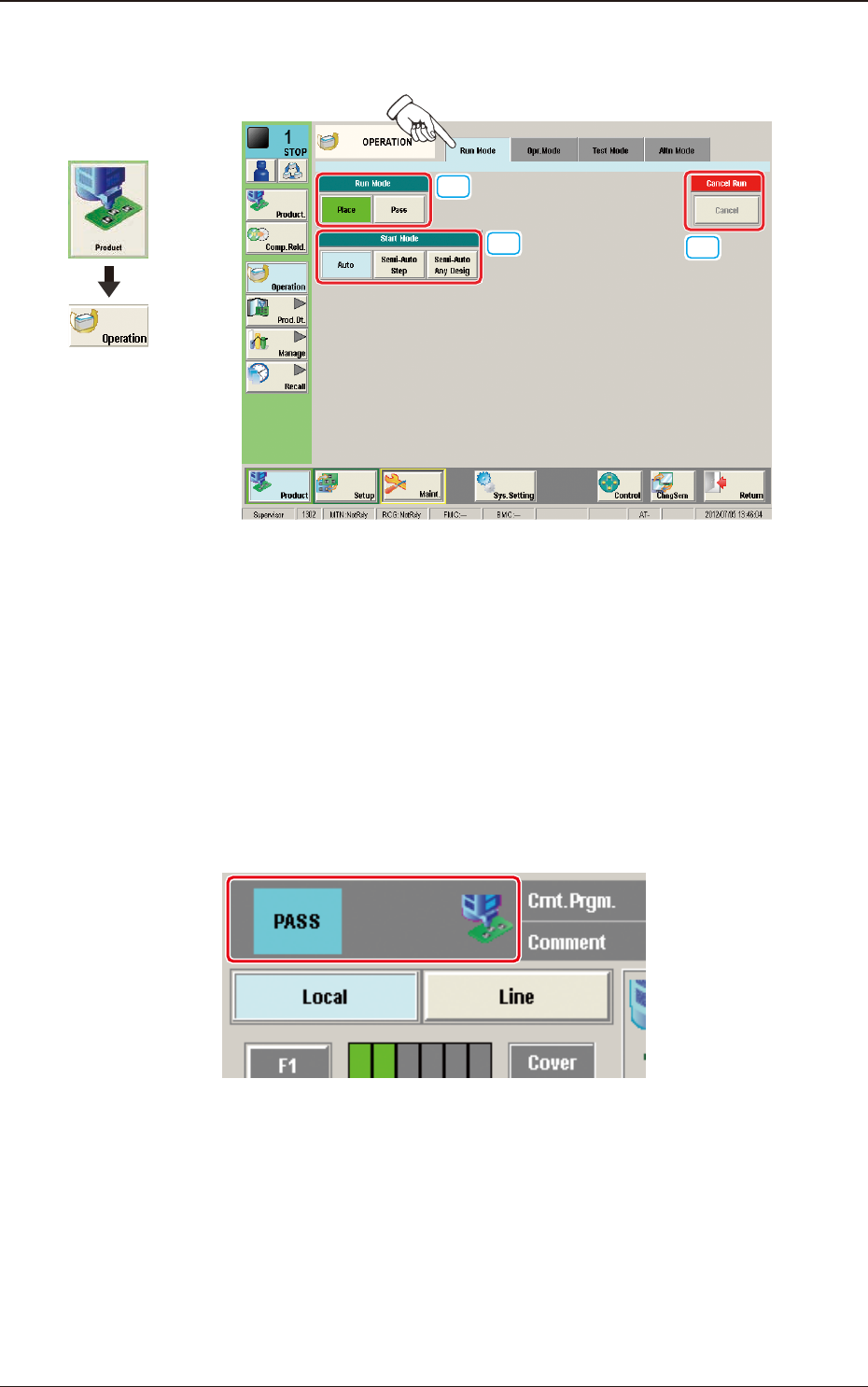
[1] "Run Mode" Selection Buttons
Press either one of the following buttons to select the desired run mode.
[Place] Button
: Select this button to set the machine in the "PLACE
(Automatic Operation)" mode.
[Pass] Button
: Select this button to set the machine in the "PASS" mode.
In the case that the pass operation has been setup, "PASS" is displayed in the
"Status Indicator" on the upper area of the "Product" window.
Status Indicator
F2A17
4.1 "Run Mode" Tab Sheet
Graphic
Development
2OM-1751
1-20
[2] "Start Mode" Selection Buttons
Using the following buttons, the start mode is setup.
[Auto] Button
Select this button to start up the machine automatically.
[Semi-Auto Step] Button
When this button is pressed, the designated step operation (one component/
point) is performed.
[Semi-Auto Any Desig] Button
When this button is pressed, the designated step operation (Designating two
or more steps is available) is performed.
[3] Cancel Run
When the [Cancel] button is pressed, the "Pause" condition is cancelled and
the machine is turned to the "STOP" mode.
Note
When the machine is set in the "PAUSE" mode by pressing the [STOP]
button on the operation panel during the automatic operation, etc., the
[Cancel] button becomes available.
1303-001
4.1 "Run Mode" Tab Sheet
2OM-1751
1-21
4.1.1 With the start of step described
This function is used when the step is designated in the component reload,
recovery or test PCB placement operation, etc.
There are two types of start with the step designated: Semi-Auto Step and Semi-
Auto Step Any Desig (free designation).
The display window and start procedure are described as follows.
•
Description of Semi-Auto Step
A single step operation (1 component/point) can be designated.
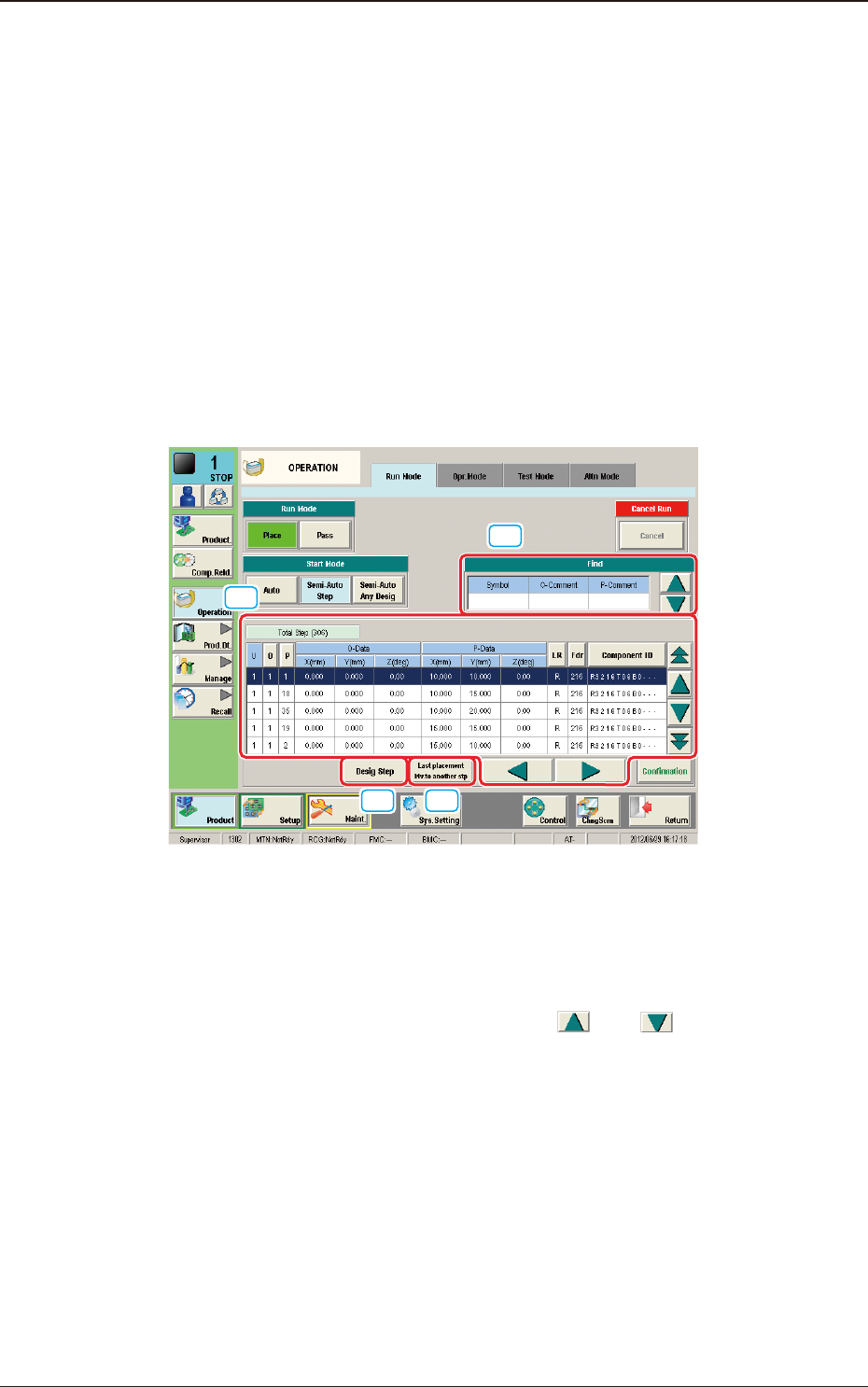
Description of "Semi-Auto Step" Window
When the [Semi-Auto Step] button is pressed in the "Start Mode" group box,
the following window appears.
[1]
[2]
[3] [4]
F2A18
[1] "Find" (Search) Section
The search can be performed with "Symbol", "O Comment" and "P
Comment" data. Entering the set parameters in "Symbol", "O Comment" and
"P Comment" data box and pressing the [
] or [ ] button designate
the entered step.
1303-001
4.1 "Run Mode" Tab Sheet