YRM20_Mainte_E.pdf - 第104页
4. 6-month maintenance 3-37 Chapter 3 Periodic maintenance items 4. 6-month maintenance This section describes 6-month maintenance items. 4.1 Cleaning of camera lighting unit T he camera lighting unit is require to be cl…
3. 3-month maintenance items
3-36
Chapter 3 Periodic maintenance items
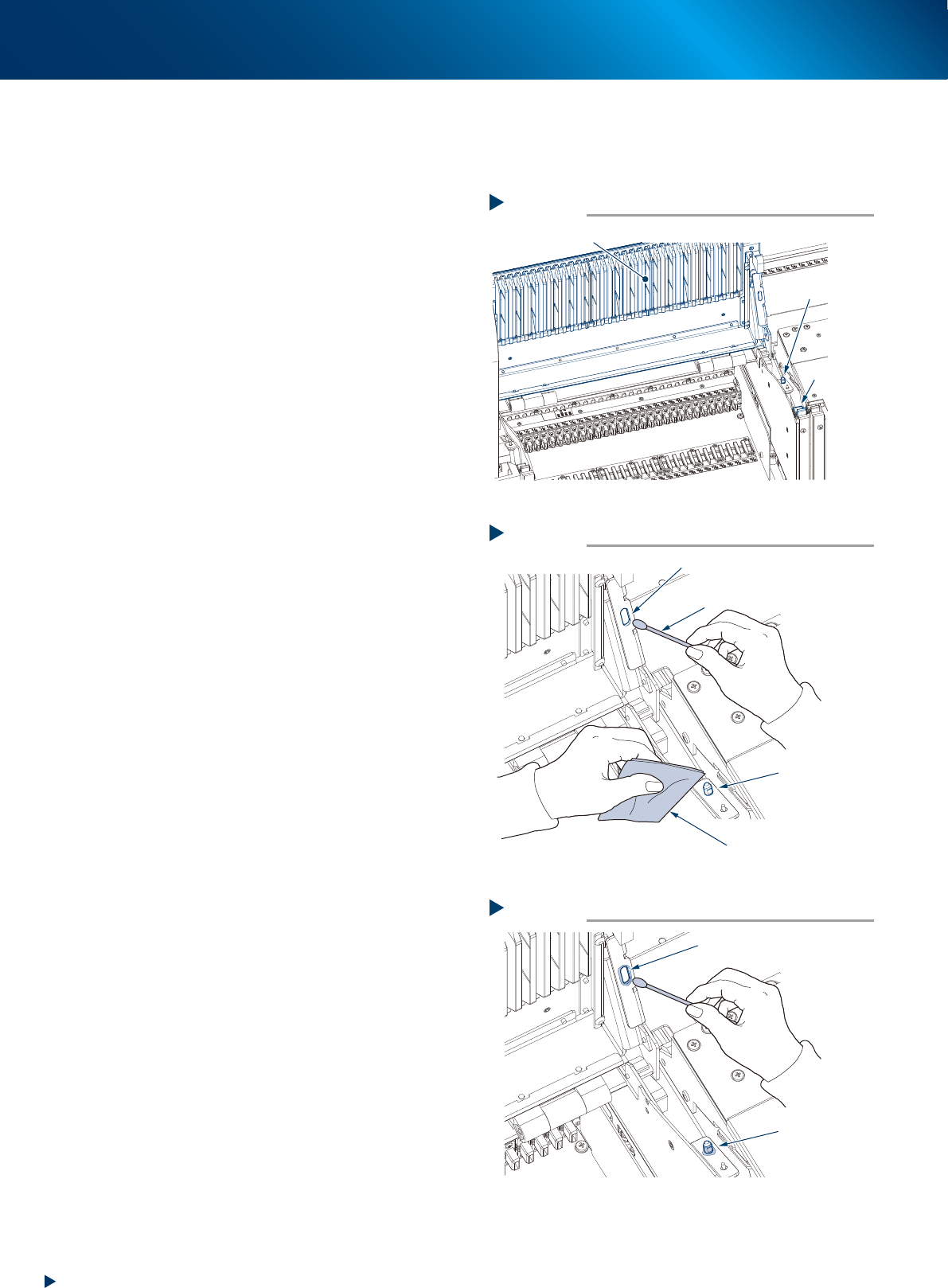
3.4.3 Cleaning/lubricating for the positioning unit of upper cover
The positioning pin of upper cover section requires to be cleaned/lubricated every 3 months.
Perform the following procedures.
e
1
Press the emergency stop button.
2
Open the upper cover by unlocking the
cover locks on both sides.
3
Clean the grease applied points, such as
the inside of positioning hole on the
upper cover and the positioning pin,
located each 1 on each cover, by wiping
away old grease or dirt using a cotton
swab or a lint-free cloth.
4
Apply the specified grease (NSL) using a
cotton swab or similar as shown in the
figure right.
Opening the upper cover
Step 2
Cover lock
Position pin
Upper cover
533H1-KMX-00
Cleaning the grease applying positions
Step 3
Wipe around
the positioning pin
Wipe the inside of positioning hole
Cotton swab
Lint-free cloth
533H2-KMX-00
Applying grease
Step 4
Apply around
the positioning pin
Apply inside of positioning hole
533H3-KMX-00
4. 6-month maintenance
3-37
Chapter 3 Periodic maintenance items
4. 6-month maintenance
This section describes 6-month maintenance items.
4.1 Cleaning of camera lighting unit
The camera lighting unit is require to be cleaned periodically, as it may be soiled by dust or dirt.
c
CAUTION
Do not apply strong force or shock to the camera unit and lighting unit during cleaning. Optical axis adjustment might
become unreliable.
c
CAUTION
When the trouble occurs with the lighting unit, contact YAMAHA sales representative. Disassembly and cleaning of the
lighting unit by the user will void the warranty.
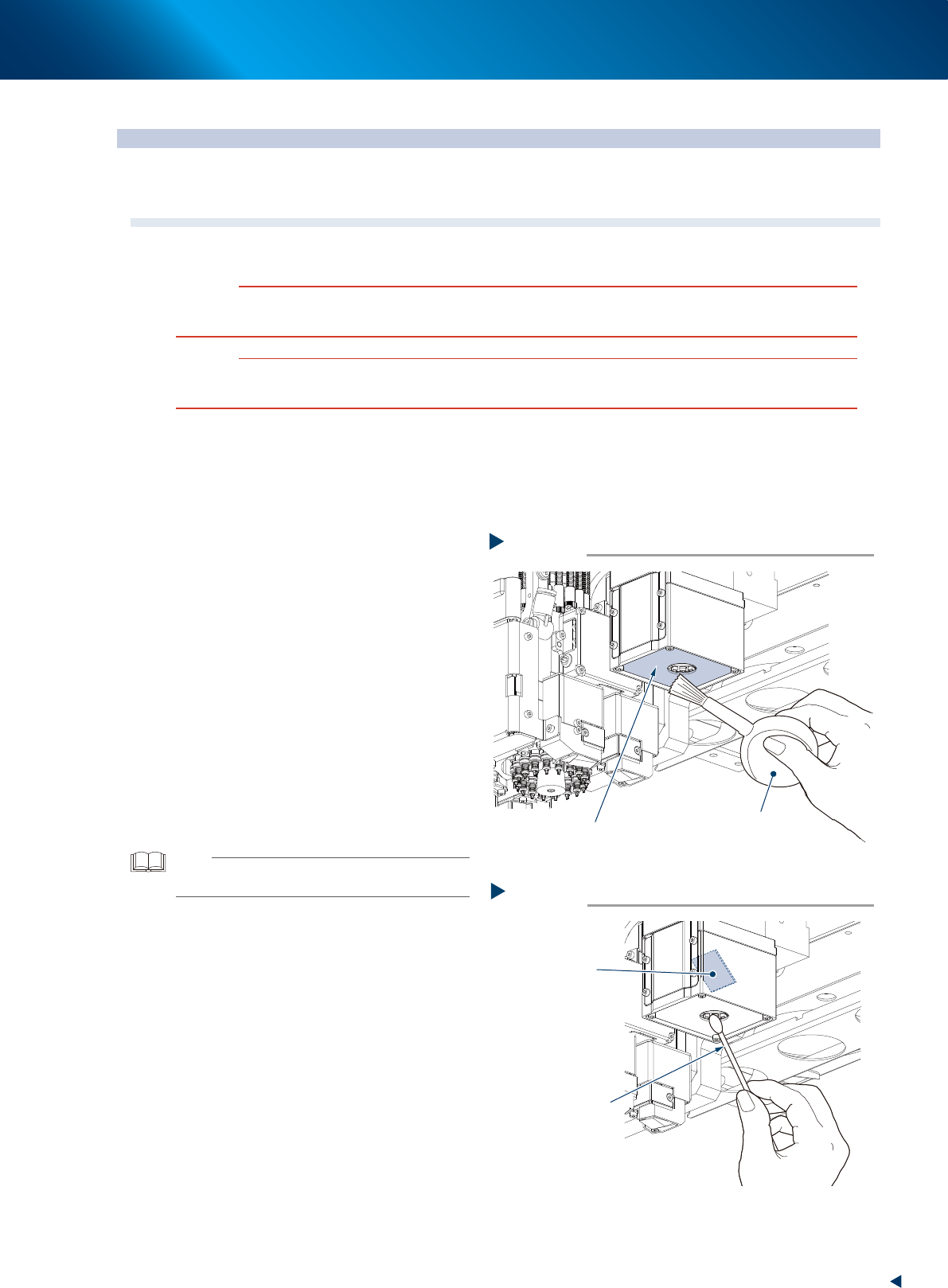
4.1.1 Fiducial camera
The fiducial camera is mounted near the head. The cleaning procedure for the camera's lighting unit is
described below.
1
Move the head unit.
e
1. Remove all items sensitive to magnetic fields
such as wristwatches and magnetic ID cards.
2. Press the emergency stop button and detach
the feeder exchange carriage.
3. Open the machine safety cover and move
the head unit to a convenient position for
maintenance work.
2
Clean the lighting unit using an optical
brush to remove the dust.
3
Clean the reflector plate using a cotton
swab slightly dampened with lens
cleaner to clean the reflector plate side
as shown in the figure right.
TIP
The optical brush and lens cleaner are optional purchase
items.
Fiducial camera lighting unit
Using an optical brush to remove dust
Step 2
Optical brush
53346-KMX-00
Cotton swab dampened
with lens cleaner
Cleaning the reflector plate
Step 3
Reflector plate
53347-KMX-00
4. 6-month maintenance
3-38
Chapter 3 Periodic maintenance items
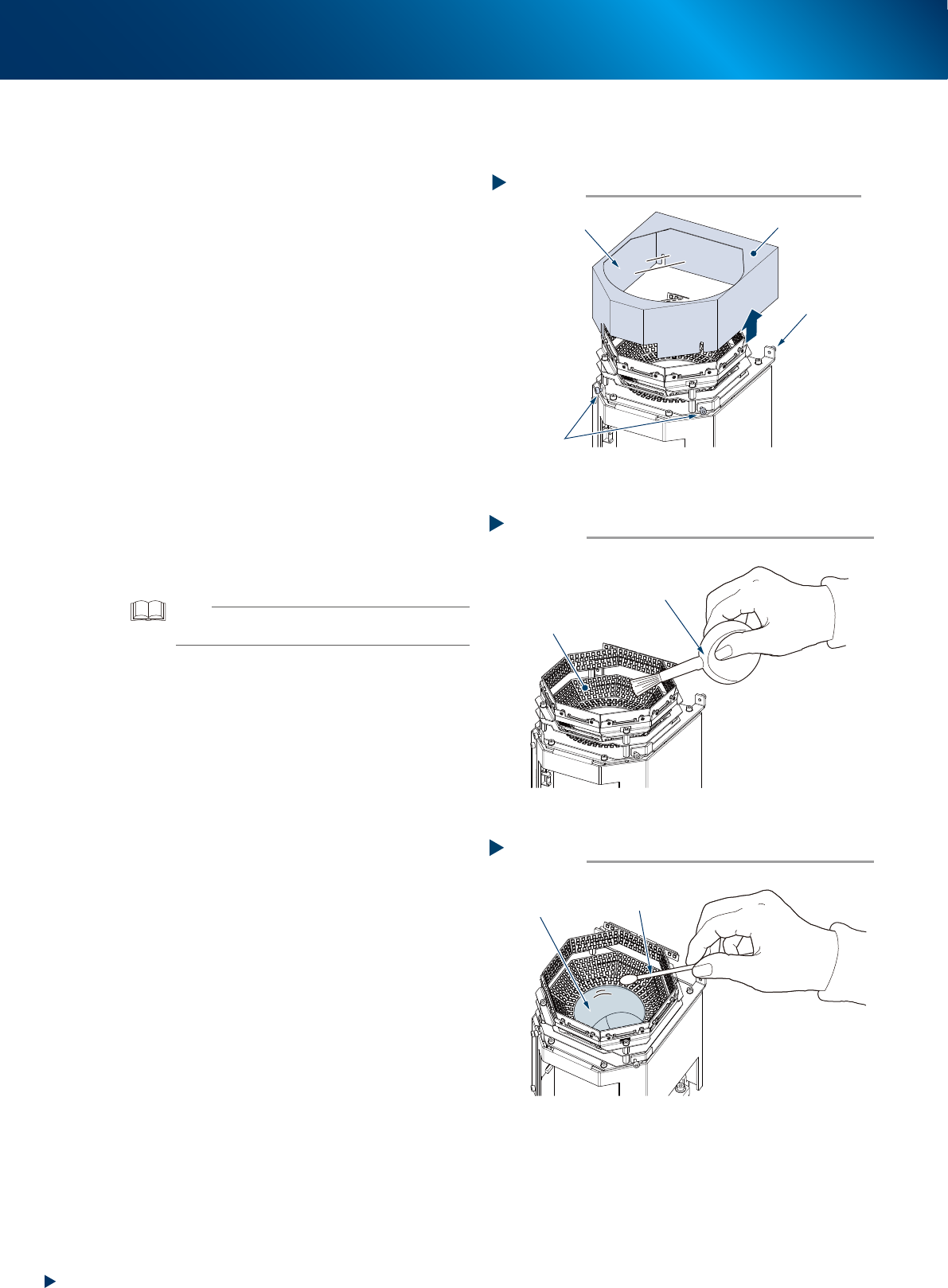
4.1.2 Multi-vision camera
This section describes the cleaning procedure for the multi-vision camera lighting unit.
e
1
Detach the camera cover.
1. Press the emergency stop button and detach
the feeder exchange carriage. Then open
the machine safety cover.
2. Loosen 4 mounting bolts using a hexagon
wrench (2.5) and pull out the lighting cover
(including protective glass) upward.
2
Wipe the front and back sides of
protective glass with a lint-free cloth
dampened with a few drops of lens
cleaner.
3
Clean the lighting using an optical
brush to remove the dust.
4
Clean the lens unit using a cotton swab
dampened with a small amount of lens
cleaner.
5
Return the camera cover to its original
place and tighten 4 mounting bolts.
TIP
The optical brush and lens cleaner are optional purchase
items.
Detaching camera cover (protective glass)
Step 1
Transparent glass
Camera cover
Mounting bolt
Mounting bolt
53348-KMX-00
Cleaning the lighting
Step 3
Lighting
Optical brush
53349-KMX-00
Cleaning the lens
Step 4
Lens
Cotton swab dampened
with lens cleaner
53350-KMX-00