Printer 710-810 v9 ProFlow ATX.pdf - 第13页
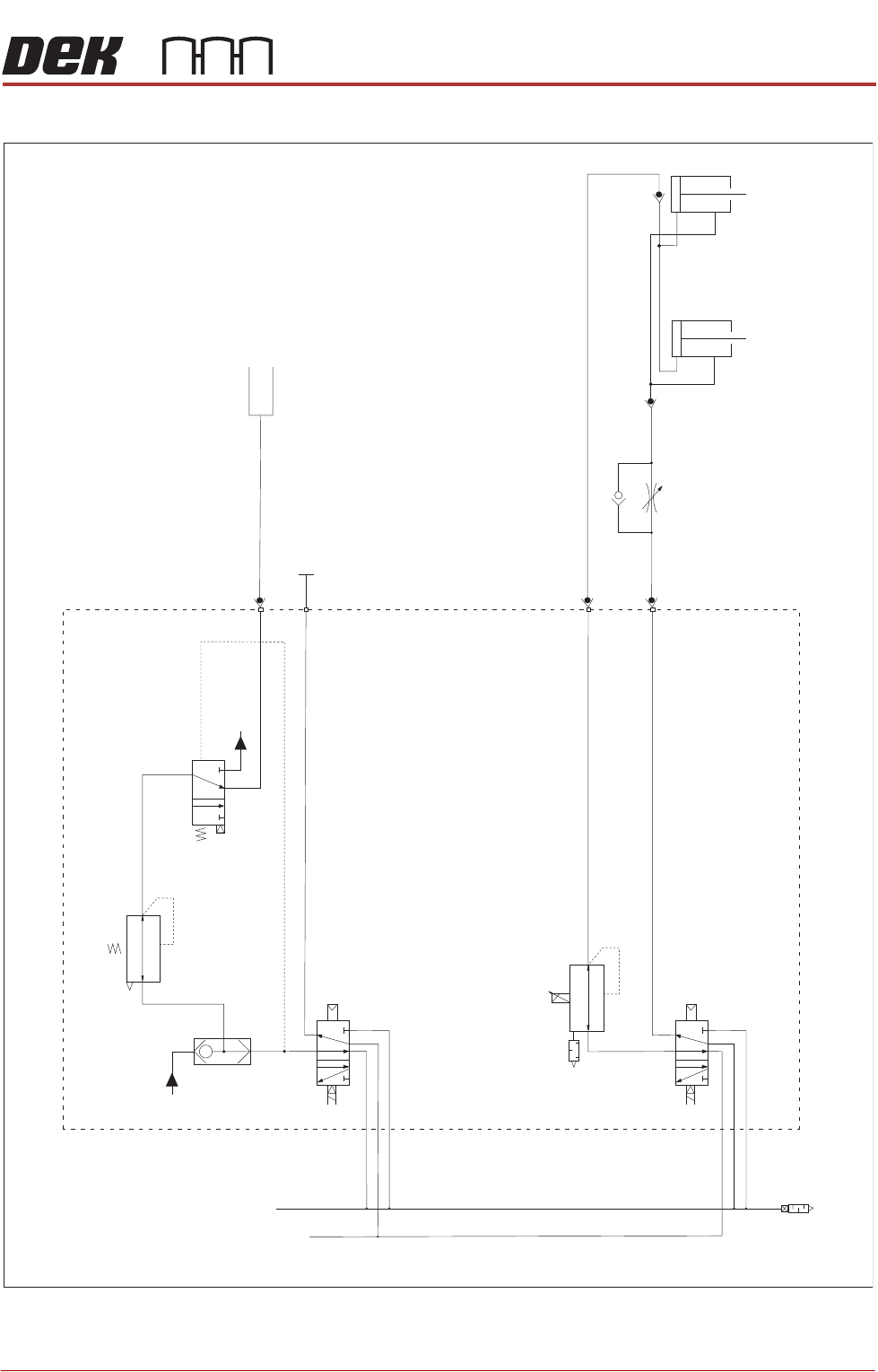
PROFLOW ATX PNEUMATIC SCHEMATIC Chapter Issue 6, Jan 16 Technical Reference Manual 12.13 PNEUMA TIC SCHEMA TIC P rint C arria g e 9S O L30 9S O L26 - 29 Air In 9S O L25 5 / 2 5 / 2 C artrid g e A A B B P roF l ow P a s t…
PROFLOW ATX
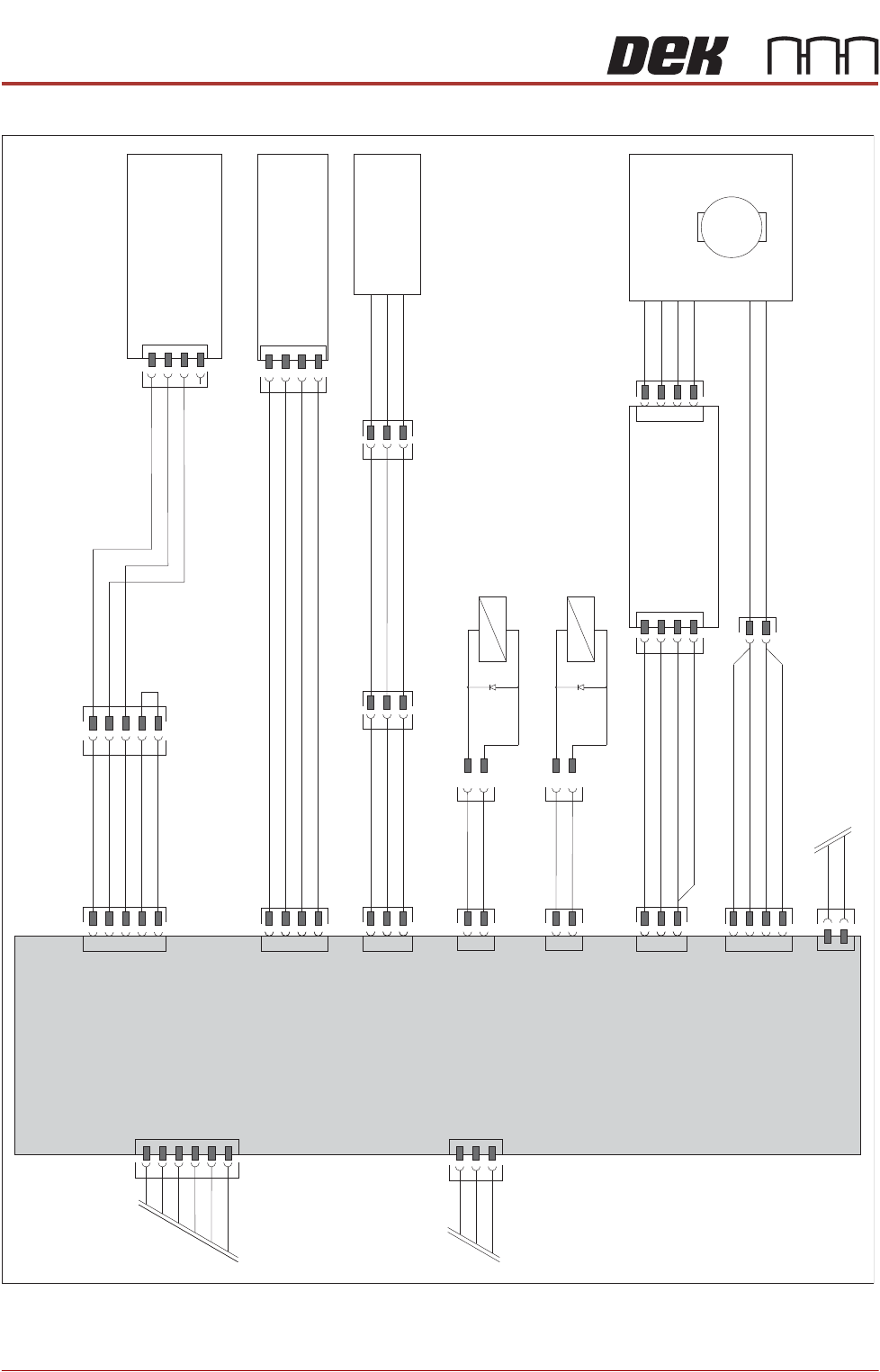
ELECTRICAL SCHEMATIC
12.12 Technical Reference Manual Chapter Issue 6, Jan 16
Figure 12-6 Sheet 2
Print Carriage
Input/Output Node 3
N3SK2A
CAN In From Conditioning
Grid Drive Motor
ProFlow Node 13 (Continued
from Page 1)
CAN Bus OUT
To Node 7
N3SK1
Archimedes
Screw Motor
Node Power
+24V US
0V Return
+24V SW
0V Return
+12V
0V Return
CAN_H
CAN_L
CAN_GND
N3SK3
CAN_H
CAN_L
12V
0V
DIG In 10
0V
M
N3SK01
PWR
GND
9SK100
N3SK12
DIG Out 1
DIG Out 1
0V
Divider
0V
Ch B
+12V
Ch A
9PL108
9SK104
+
-
DIG Out 2
0V
N3SK6
9SK30
Print Medium Refill
9SOL30
DIG Out 3
0V
N3SK8
9SK25
Print Medium
Pressure On / O
ff
9SOL25
12V
0V
DIG In 1
1
N3SK14
Chamber Empty
9SK106
9SK77
Solid State Switch
0V
N3SK13
Analogue Out
24V
Print Medium
Pressure Regulator
M18SK02
+
-
+12V
0V
0V
Analogue In 3
Dig In 0
Print Medium Low
Optical Sensor
9SK47
9SK61
ProFlow
Fitted Link
N3SK17
Analogue In
PROFLOW ATX
PNEUMATIC SCHEMATIC
Chapter Issue 6, Jan 16 Technical Reference Manual 12.13
PNEUMATIC SCHEMATIC
Print Carriage
9SOL30
9SOL26-29
Air In
9SOL25
5/2
5/2
Cartridge
A
A
B
B
ProFlow Paste
Pressure Regulator
Paste Pressure ON/OFF
Paste Refill
Paste
Dispense
To Paste
Dispenser
Flow Controller
Transfer Head Pistons
PROFLOW ATX
ADJUSTMENTS & SETTINGS
12.14 Technical Reference Manual Chapter Issue 6, Jan 16
ADJUSTMENTS & SETTINGS
Adjusting the
Transfer Head
Mount
The transfer head mount brackets can be adjusted to accommodate the differ-
ent widths of transfer head available (300mm and 400mm).
For more information on setting the transfer head size on the mount, refer to the
Replacement Procedures - Fitting the Transfer Head section of this manual.
Adjusting the
Stencil Support
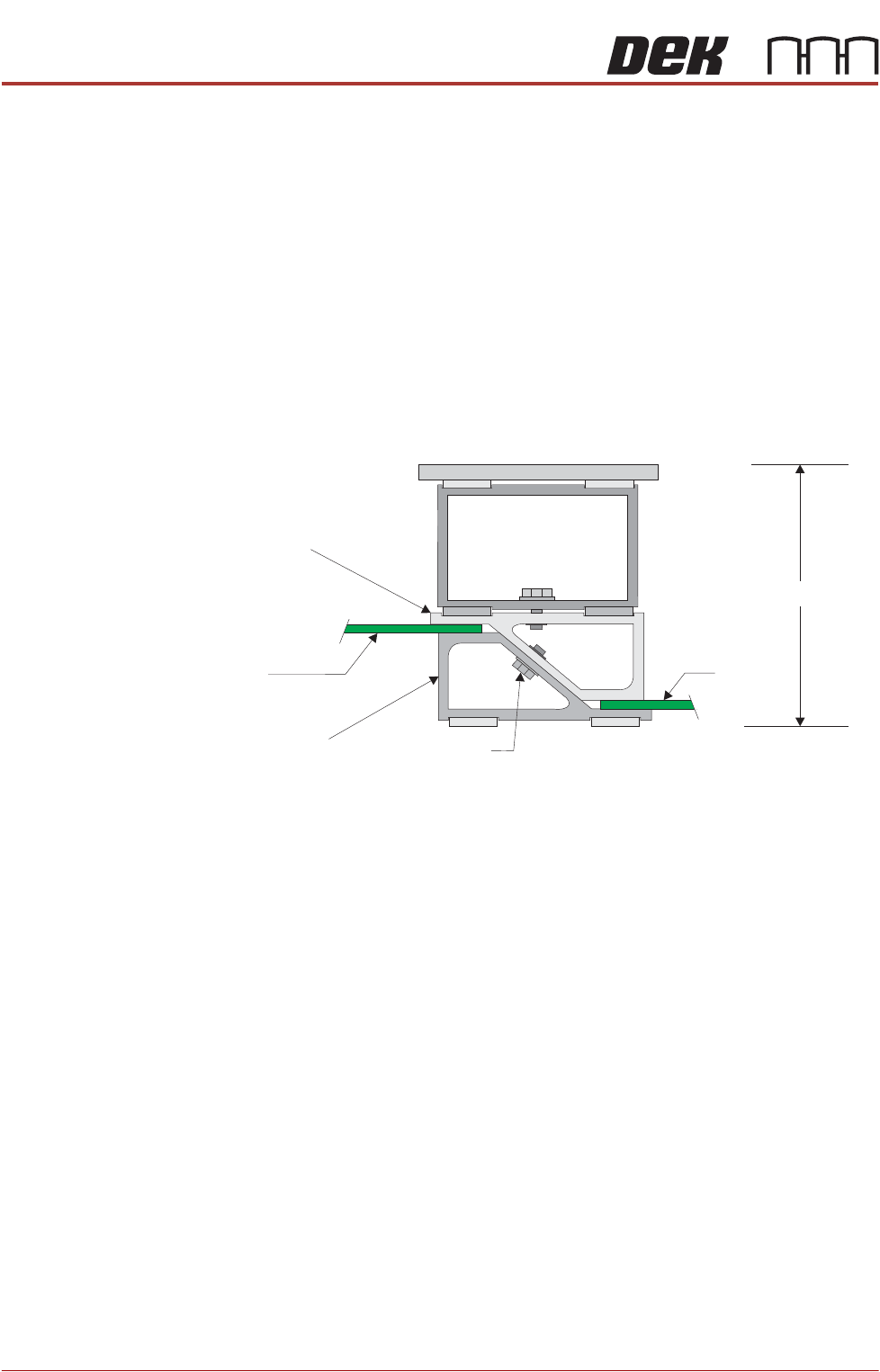
When the adjustable stencil support is in the closed position it is set to 81mm;
this dimension matches the height of the magnetic tooling pins. To provide
support for the stencil, the stencil support height must be increased by the
thickness of the circuit board.
To set the stencil support to the correct height, carry out the following:
1. Loosen the 7mm hexagonal securing nut.
2. Slide the adjustable tooling top upwards to separate the tooling top from the
tooling bottom.
3. Position two of the circuit boards to be printed between the top and bottom
faces of the stencil support.
4. Readjust the tooling stencil support.
5. Tighten the 7mm nut to secure the tooling top and bottom in position.
6. Remove the two circuit boards.
The support is now set to 81mm, plus the thickness of circuit board.
NOTE
For further information, refer to the Board Support Tooling chapter of the
printer’s Technical Reference Manual.
81mm + Board
Adjustable
Tooling Top
Adjustable
Tooling Bottom
Board
Board
7mm Securing Nut
View on Front of Stencil Support