OM-1461-001_w.pdf - 第26页
23 0712-001 8.3 Nozzle Stocker Offset 8.3 Nozzle Stocker Offset This procedure teaches the offset to secure the nozzle stocker position (machine coordinate reference). The inclination in direction X from the recognition …

220712-001
•
Rotation Angle
Z-axis Angle Deviation
Fig.7-3
8.2 Head Rotation Center Offset/Basis Mark Position Teaching
230712-001
8.3 Nozzle Stocker Offset
8.3 Nozzle Stocker Offset
This procedure teaches the offset to secure the nozzle stocker position
(machine coordinate reference). The inclination in direction X from the
recognition mark for the recognized nozzle stocker section, is calculated
andthevaluesarereectedautomaticallyonthenozzlestockeroffsetin
directions X and Y.
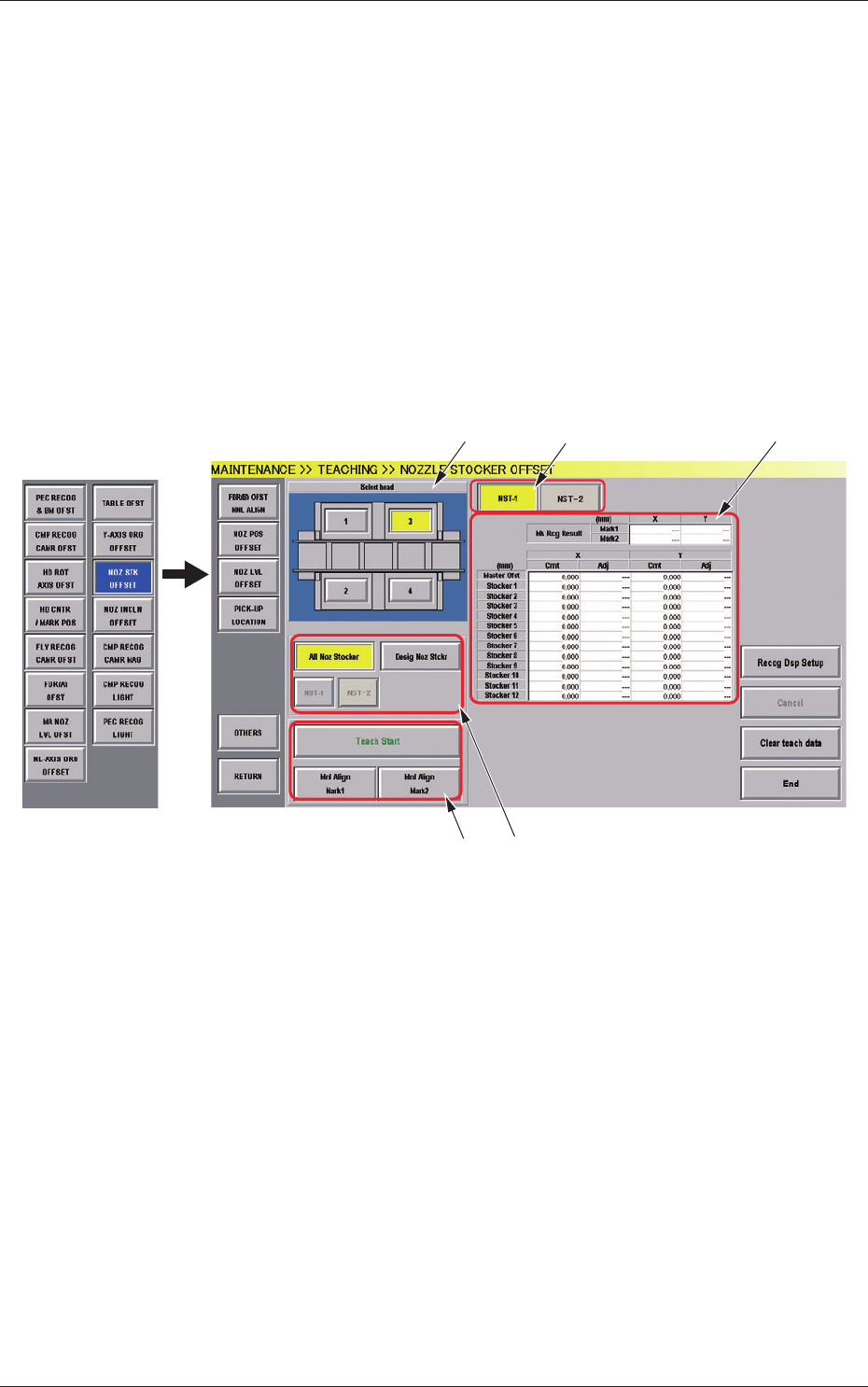
(1) When the [OTHERS] button is pressed on the "TEACHING"
submenu bar, the menu bar for the other teaching functions pops
up.
(2) Press the [NOZ STK OFFSET] button on the pop-up menu bar.
[5]
[1]
[2]
[3]
[4]
Fig.7-4 "NOZZLE STOCKER OFFSET" Window
[1] Select Head Button
The button images showing the head positions are displayed.
Using these images, the PEC recognition camera to be used in the
teaching, is selected.
[2] Nozzle Stocker Select Button
[NST-1], [NST-2] Button
Pressing the [NST-1] or [NST-2] selects the nozzle stocker for which
the offset is displayed.

240712-001
[3] "Offset" Display
The offset value (pulse value (mm)) for the selected nozzle stocker is
displayed.
Master Offset :
It shows the deviation from the nozzle stocker designed position
(machine coordinate reference).
The recognition mark (inside) on the nozzle stocker section
isrecognizedandthevaluesarereectedautomaticallyinthe
values in X and Y.
Stocker (1 to 9) :
This section shows the data for each stocker to correct the
deviation from the nozzle stocker designed position.
The recognition mark on the nozzle stocker section is recognized
and the inclination in direction X is calculated.
ThentheresultsarereectedautomaticallyonthevaluesinX
and Y of the nozzle stocker position.
Cmt
: Offset values before teaching
Adj
: Offset values obtained as the result of teaching
[4] Nozzle Stocker Selection Button
[All Noz Stocker] Button
Theteachingresultsarereectedonallthenozzlestockers.
[Desig Noz Stocker] Button
Theteachingresultsarereectedonthedesignatednozzle
stocker.
[NST-1], [NST-2] Button
Pressing the [NST-1] or [NST-2] selects the nozzle stocker to be
taught.
8.3 Nozzle Stocker Offset