LA 404-2 Pattern Controller Manual.pdf - 第37页
LA 404-2 Pattern Control System 31 P/N 7 1 1 9995A 2006 Nordson Corporation LA 4 04- 2 Is sued 12/06 Trigge r Setti ngs (1 - 4) This menu is used to set the product length, gun trigger offset (GTO) and masking. Masking i…
LA 404-2 Pattern Control System
30
P/N 7119995A
2006 Nordson Corporation
LA 404-2
Issued 12/06
Trigger (1 - 4) Configuration
After activating trigger’s 1 - 4 in the Trigger Assignment menu, this menu
serves to activate/deactivate the trigger and to define whether the product
or background should reflect. If the product is reflective, select the Light On
setting. Correspondingly, in the case of non−reflecting products, select the
Dark On setting.
If the jam detector is activated, a warning and signal are issued when the
photosensor is active for a period longer than the user-defined product
length plus the jam tolerance. In this case, the jam tolerance must be set for
each trigger.
Trigger 1 Config
Trigger Light On
JAM detection Off
JAMtolerance 5 mm
O667
1. Setting the Trigger Behavior
a. Press the or button for the cursor to appear beside Light On.
b. Press the or button to select Light On or Dark On.
2. To set JAM detection
a. Press the or button for the cursor to appear beside Off or On.
b. Press the or button to On or Off. If set to On, go to step 3 to
set the jam tolerance.
NOTE: The jam tolerance can only be set in Administrator mode. The jam
tolerance is only necessary when jam detection is activated. In addition, the
production length must be entered in Trigger # settings in the Setup menu
(refer to Page 31).
3. To set JAMtolerance
a. Press the or button for the cursor to appear beside the numeric
value.
b. Press the or button to select value from 0 - 9999 mm.
LA 404-2 Pattern Control System
31
P/N 7119995A
2006 Nordson Corporation
LA 404-2
Issued 12/06
Trigger Settings (1 - 4)
This menu is used to set the product length, gun trigger offset (GTO) and
masking.
Masking is a length used to lockout the photosensors for a predetermined
distance. This distance is programmed when the products contain holes or
cutouts.
Trigger 1 Settings
Prod.length 100 mm
GTO 50 mm
Masking 5 mm
O668
NOTE: The product length can only be set in Administrator mode when the
jam detection is switched on and is only then displayed. Jam detection is
activated in Trigger # Config in the Setup menu. Refer to page 30 for more
information.
1. To set product length
a. Press the or button for the cursor to appear beside the numeric
value.
b. Press the or button to select value from 0 - 9999 mm. Enter
the length of the product to be glued.
NOTE: If the value 0 is entered as the product length, jam detection is not
performed.
2. To set the GTO
a. Press the or button for the cursor to appear beside the numeric
value.
b. Press the or button to set the desired value from 2 - 9999 mm.
3. To set Masking:
a. Press the or button for the cursor to appear beside the numeric
value.
b. Press the or button to select value from 0 - 9999 mm.
LA 404-2 Pattern Control System
32
P/N 7119995A
2006 Nordson Corporation
LA 404-2
Issued 12/06
Pressure 1 and 2 Settings
The pattern controller accurately regulates the system pressure to maintain
proper adhesive volume during line speed changes. This menu is used to
set the two-point linear pressure profile for each runup.
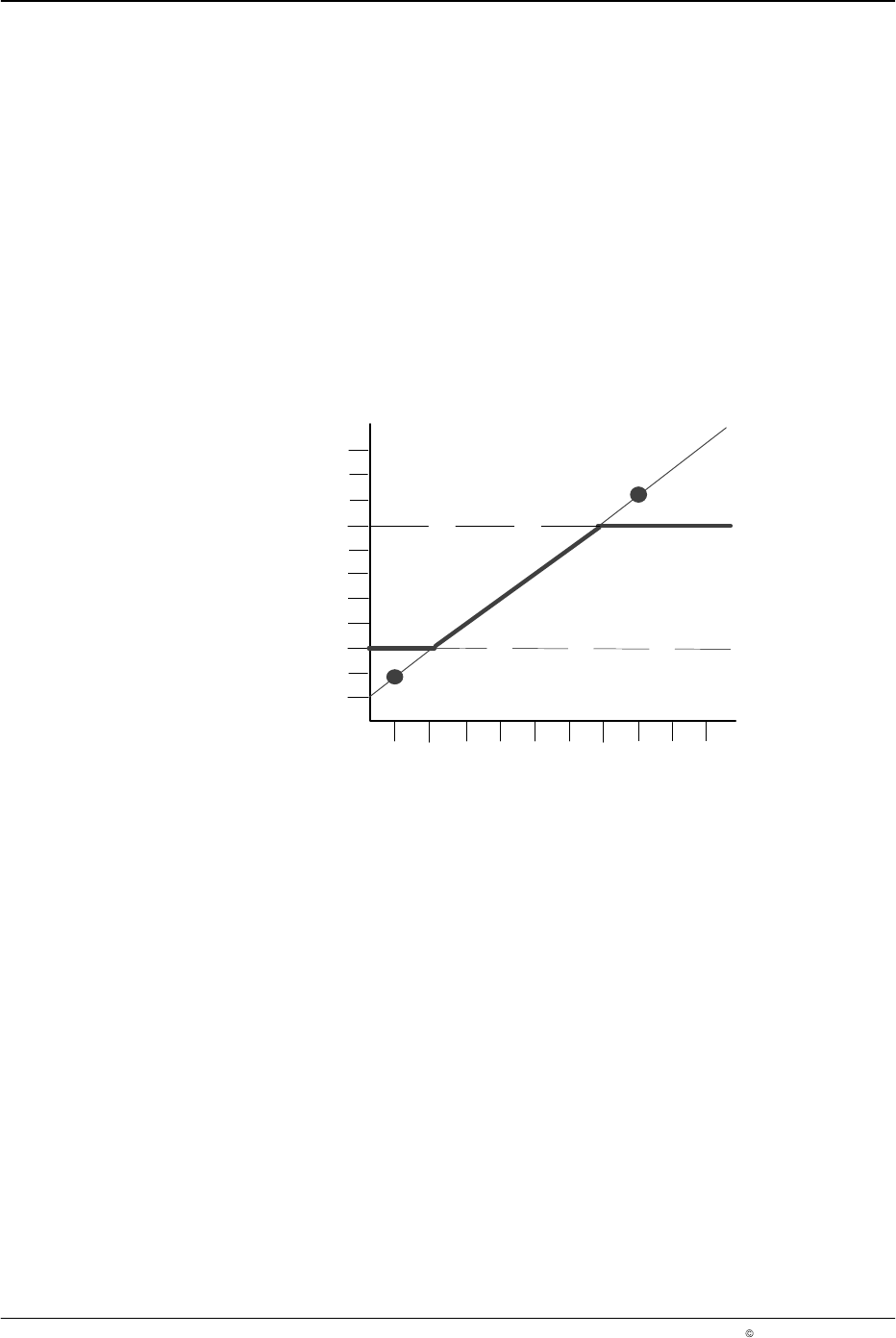
The linear pressure curve is defined by setting Speed 1 (S1) at Pressure 1
(P1), and Speed 2 (S2) at Pressure 2 (P2), see Figure 5.
Maximum and Minimum Line Pressure
The minimum line pressure is reached at the minimum cutoff limit, and the
maximum pressure is reached at the maximum cutoff limit. Pressure cannot
be set below the assigned minimum cutoff limit or above the assigned
maximum cutoff limit.
90 %
10 %
30 %
50 %
70 %
0
50
500
450
100 %
150 250
400
350
100 200
300
Maximum
S1, P1
S2, P2
Pressure Profile
Minimum
Minimum and maximum line pressure settings:
Minimum = 30 %
Maximum = 80 %
Speed 1 = 50 m/min, Pressure 1 = 20 %
Speed 2 = 400 m/min, Pressure 2 = 95 %
6640013A
Pressure
Speed (m/min)
Fig. 5 Pressure Curve Settings