LA 404-2 Pattern Controller Manual.pdf - 第48页
LA 404-2 Patt ern Control Sys tem 42 P/N 7 1 19995A 2006 Nordson Corporation LA 4 04- 2 Is sued 12/06 Random Beads The random-length bead mode provides a way to mix products of differing length on the production line dur…
LA 404-2 Pattern Control System
41
P/N 7119995A
2006 Nordson Corporation
LA 404-2
Issued 12/06
3. To set the activation speed (Normal)
a. Press the or button for the cursor to appear beside the numeric
value.
b. Press the or button to set the desired normal value from
0 - 600 m/min.
NOTE: The Normal setting is used to enter the activation speed. Below
this speed, the normal bead pattern is broken into dots.
4. After setting Time, Pitch and Normal, press the top SETUP button to
open the Normal Bead menu.
5. To set Dly
a. Press the or button for the cursor to appear beside the numeric
value.
b. Press the or button to set the desired Dly value from 00.0
- 9999 mm.
6. To set Dur
a. Press the or button for the cursor to appear beside the numeric
value.
b. Press the or button to enter the desired duration value from
0-9999 mm.
LA 404-2 Pattern Control System
42
P/N 7119995A
2006 Nordson Corporation
LA 404-2
Issued 12/06
Random Beads
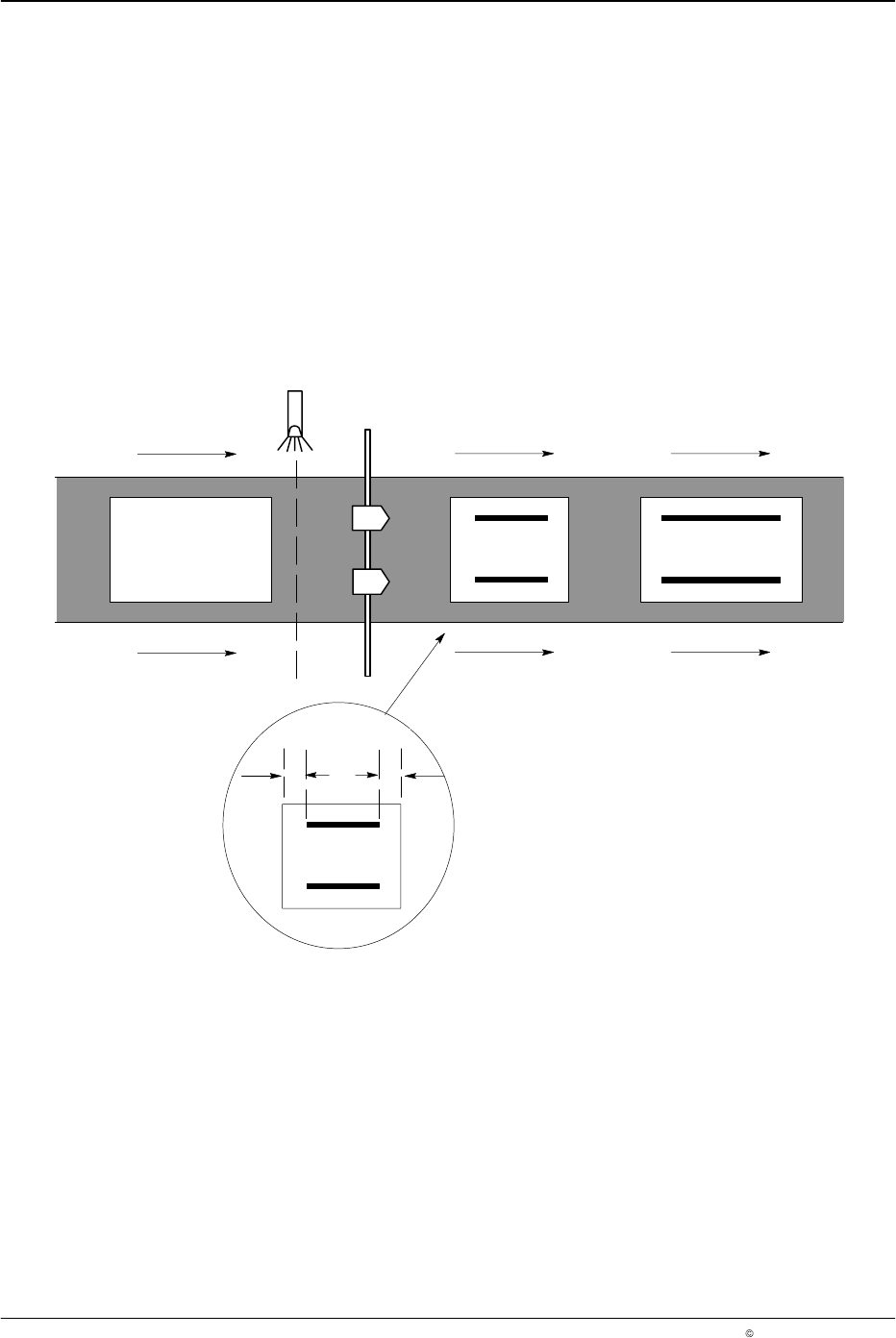
The random-length bead mode provides a way to mix products of differing
length on the production line during the same production run. For example,
when alternating between short and long products on the production line,
the pattern controller automatically produces continuous beads that fit each
product.
The pattern controller automatically determines the length of each product
as it passes the trigger and then sizes the beads to fit the product. Although
each bead is continuous, a bead margin can be specified at each end of the
product where adhesive will not be applied.
NOTE: When this mode is active, masking of the trigger has no effect (also
refer to Page 31).
5742045A
1
2
AB
Fig. 8 Random-Length Bead Pattern (A: Start Gap/B: Stop gap)
LA 404-2 Pattern Control System
43
P/N 7119995A
2006 Nordson Corporation
LA 404-2
Issued 12/06
Random Bead
Start Gap 0 mm
Stop Gap 0 mm
O676
1. To set Start Gap
a. Press the or button for the cursor to appear beside the numeric
value.
b. Press the or button to set the desired value from 0 - 9999 mm.
2. To set Stop Gap
a. Press the or button for the cursor to appear beside the numeric
value.
b. Press the or button to set the desired value from 0 - 9999 mm.