LA 404-2 Pattern Controller Manual.pdf - 第46页
LA 404-2 Patt ern Control Sys tem 40 P/N 7 1 19995A 2006 Nordson Corporation LA 4 04- 2 Is sued 12/06 Autospot Beads With this bead type the chan nel output operates in dot mode when the pattern controller is below the a…
LA 404-2 Pattern Control System
39
P/N 7119995A
2006 Nordson Corporation
LA 404-2
Issued 12/06
Continuous Beads
When this bead type is selected, the outputs are activated if the line speed
is above the start speed and deactivated if the line speed drops below the
stop speed. With continuous gluing, no pattern is programmed and no
trigger signal is required.
NOTE: Low speed settings will override the line speed settings for
continuous bead patterns.
Continuous Bead
Start 5 m/min
Stop 5 m/min
O674
1. To set Start:
a. Press the or button for the cursor to appear beside the numeric
value.
b. Press the or button to set the desired Start value from
0 - 600 m/min.
2. To set Stop
a. Press the or button for the cursor to appear beside the numeric
value.
b. Press the or button to set the desired Stop value from
0 - 600 m/min.
LA 404-2 Pattern Control System
40
P/N 7119995A
2006 Nordson Corporation
LA 404-2
Issued 12/06
Autospot Beads
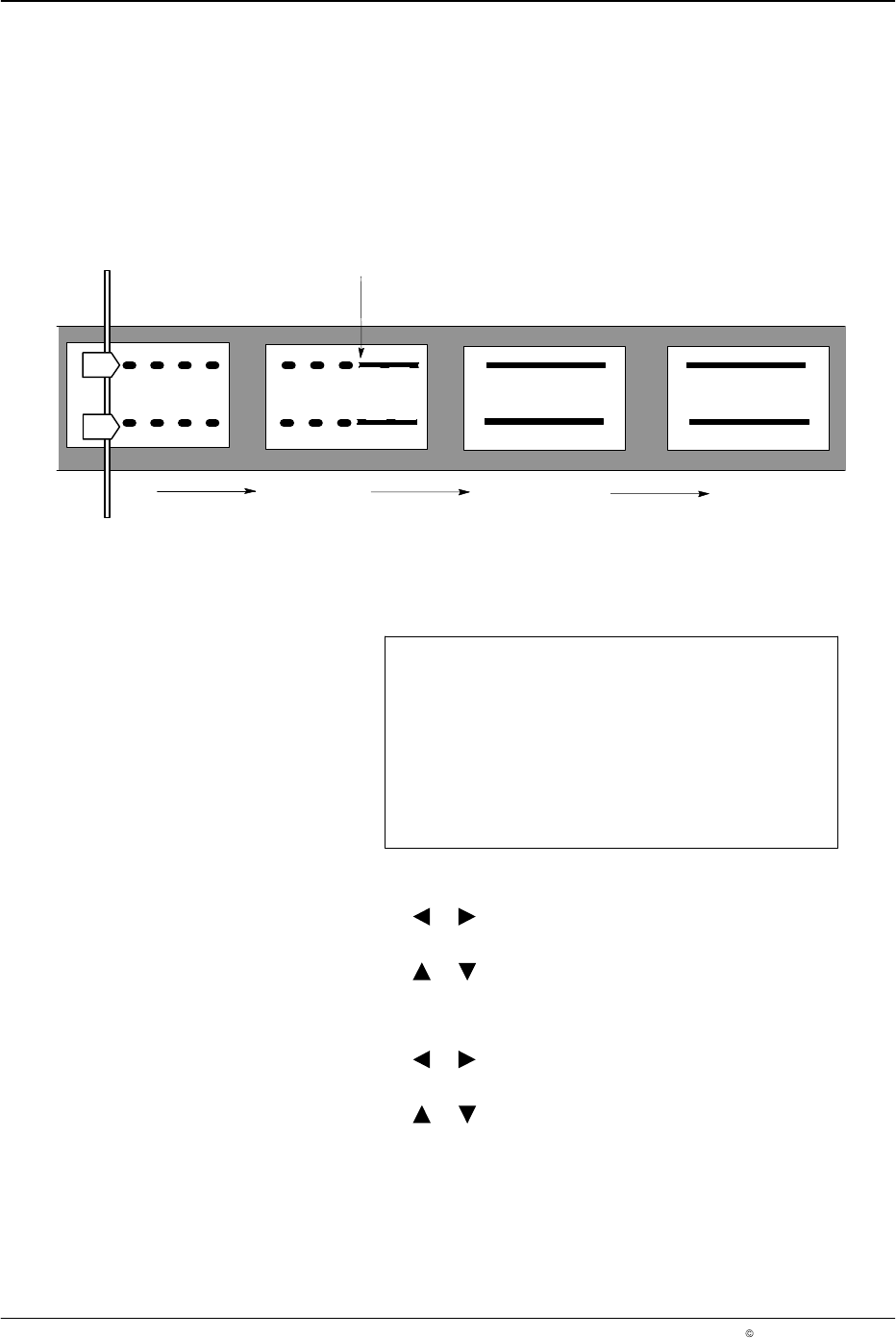
With this bead type the channel output operates in dot mode when the
pattern controller is below the activation speed and operates in normal
mode when above the activation speed. This bead type is used to relieve
residual pressure after a sudden machine stop.
NOTE: If the production machine speed is above the maximum dot speed
(Max Dot), the maximum dot speed is used (also refer to Page 51).
6640041A
2
1
Activation speed
Fig. 7 Autospot Bead Pattern for Decelerating Line Speed
Autospot Parameters
Time 0.1 ms
Pitch 5 mm
Normal 25 m/min
O675
1. To set the size of each dot (Time):
a. Press the or button for the cursor to appear beside the numeric
value.
b. Press the or button to enter the desired gun-on time value
from 0.1 - 50.0 ms.
2. To set the pitch between dots:
a. Press the or button for the cursor to appear beside the numeric
value.
b. Press the or button to enter the desired Pitch value from
2 - 9999 mm.
LA 404-2 Pattern Control System
41
P/N 7119995A
2006 Nordson Corporation
LA 404-2
Issued 12/06
3. To set the activation speed (Normal)
a. Press the or button for the cursor to appear beside the numeric
value.
b. Press the or button to set the desired normal value from
0 - 600 m/min.
NOTE: The Normal setting is used to enter the activation speed. Below
this speed, the normal bead pattern is broken into dots.
4. After setting Time, Pitch and Normal, press the top SETUP button to
open the Normal Bead menu.
5. To set Dly
a. Press the or button for the cursor to appear beside the numeric
value.
b. Press the or button to set the desired Dly value from 00.0
- 9999 mm.
6. To set Dur
a. Press the or button for the cursor to appear beside the numeric
value.
b. Press the or button to enter the desired duration value from
0-9999 mm.