KE2040Instruction Manual Ver2.01,REV04.2003.6.25.pdf - 第456页
5 − 93 ▼ W hen “Side Light s” is selected f rom the “Lig ht Type” combo box, and “ Blue side light eq uipped with a pop-up light ” is selected f rom t he "Light style" combo box - W hen you select “Red side lig…
5 − 92
5.2.6 Light
To change the light data, use the “Light Control” data-editing screen shown in Section
5.2.5 “Ctrl”.
- Split view settings on the “Light Control” screen: The available setting items vary
depending on the value set in the “Split Recognition” fields displayed on the
“Vision Control” screen.
- Light pattern on the “Light Control” screen: The available setting items vary
depending on selection of the “Light type” and "Light style" on the “Vision Control”
screen.
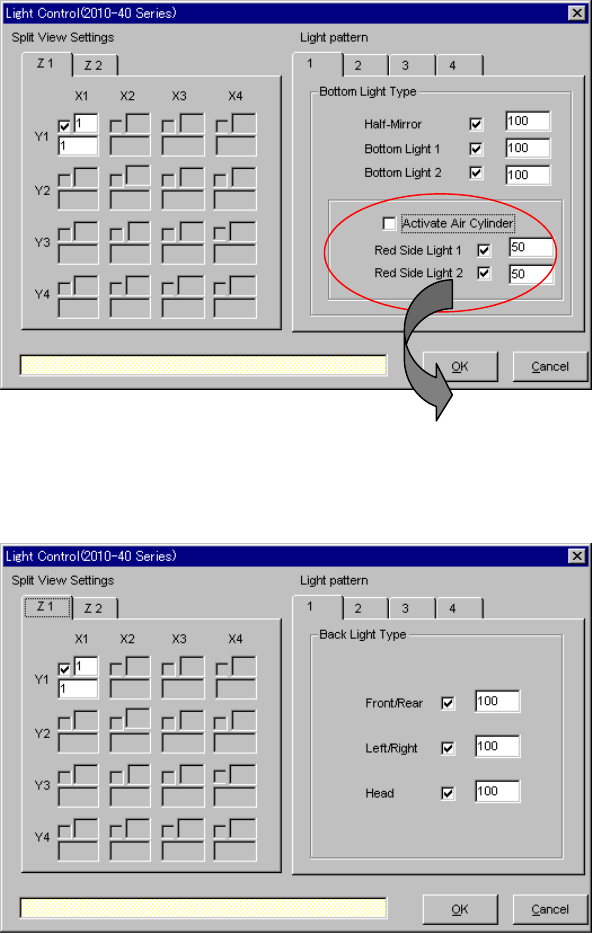
▼ When “Bottom Lights” is selected from the “Light Type” combo box and
“Standard” is selected as the "Light style"
▼ When “Back Lights” is selected from the “Light Type” combo box
* When you select “CBGA” or “LGA” in
the “Light Style” field, the check
boxes “Red Side Light 1” and “Red
Side Light 2” are not checked.
5 − 93
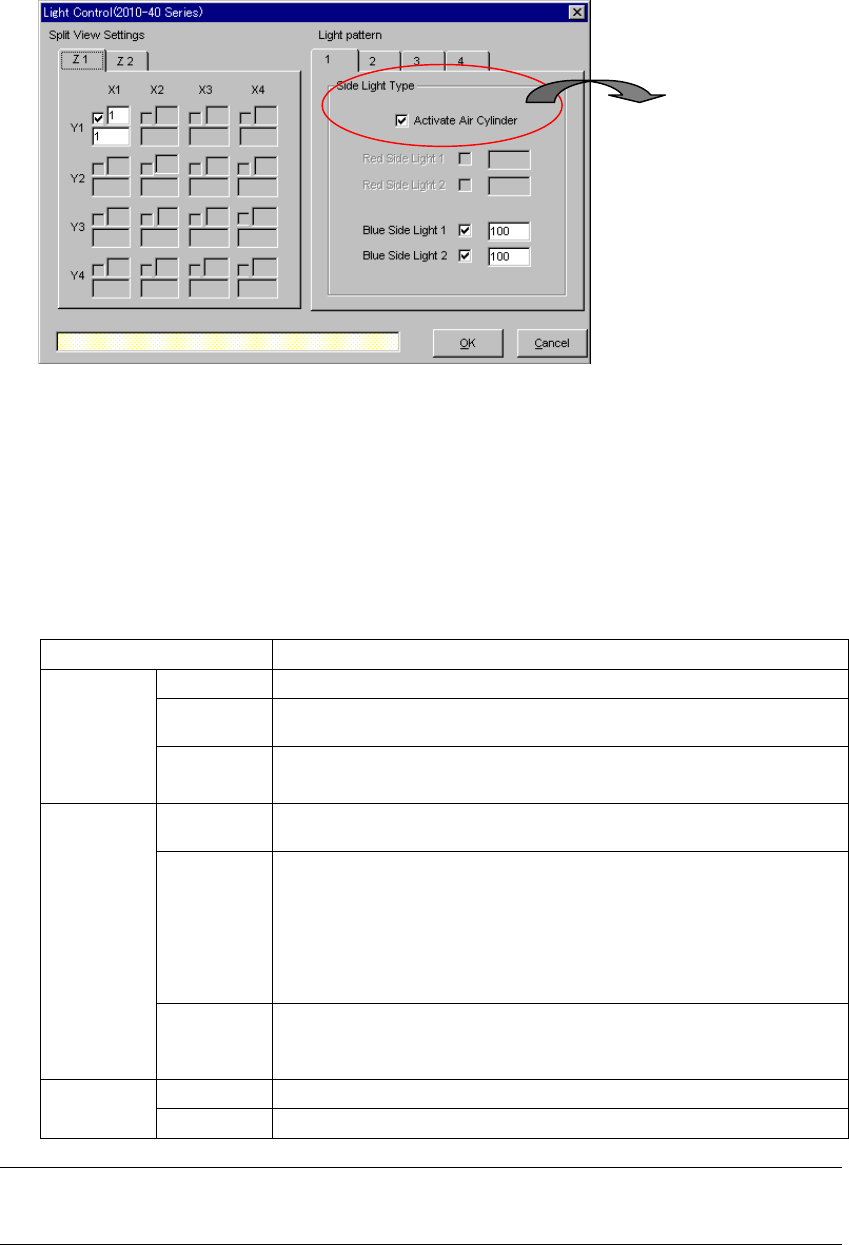
▼ When “Side Lights” is selected from the “Light Type” combo box, and “Blue
side light equipped with a pop-up light” is selected from the "Light style" combo
box
- When you select “Red side light” as the "Light style" on the “Vision Control”
screen, the setting items “Red Side Light 1 and 2” become available, and the
setting items “Blue Side Light 1 and 2” become unavailable.
♦ When you click the <OK> button, data is set. When you click the <Cancel>
button, data setting is canceled.
• Detailed description of each item
Item Description
Check box Check this check box to perform a specific division of image.
Pattern
name link
Enter the number of a light pattern to which a specific pattern is linked.
Split view
settings
Index Displays the order the specific division is illuminated with the light.
You cannot change this order.
Activate Air
Cylinder
Check this check box if you use a cylinder with turning it upward.
Light check
boxes
Check the light enabled by settings of the “Light Type” and "Light style" to
use it.
Bottom Light Type: Half-Mirror (coaxial light), Bottom Light 1 and 2, Red
Side Light 1 and 2
Back Light Type: Front/Rear, Left/Right, Red Side Light 1 and 2
Side Light Type: Red Side Light 1 and 2, Blue Side Light 1 and 2
Light
pattern
Control
level
Enter the control level of the light enabled by settings of the “Light Type” and
"Light style".
Input range: 10 % to 200 %
OK Sets the entered data.
Cancel Cancels the entered data.
Note:
When a lead or ball is not displayed clearly, change the default value of the light.
* When you do not select any light
equipped with a pop-up light in the
“Light Style” field, the check box
“Active Air Cylinder” is not
checked.
5 − 94
青サイド照明1
青サイド照明2
赤サイド照明1
赤サイド照明2
ハーフミラー
同軸照明
VCS下方照明1
VCS下方照明2
赤色デフューザ
QFP、SOP、CONN、PLCC....ETC
(エアシリンダダウン時の相対部品高さ)
エアシリンダ
UP
DOWN
PBGA、PBGA_ALL
(エアシリンダアップ時の相対部品高さ)
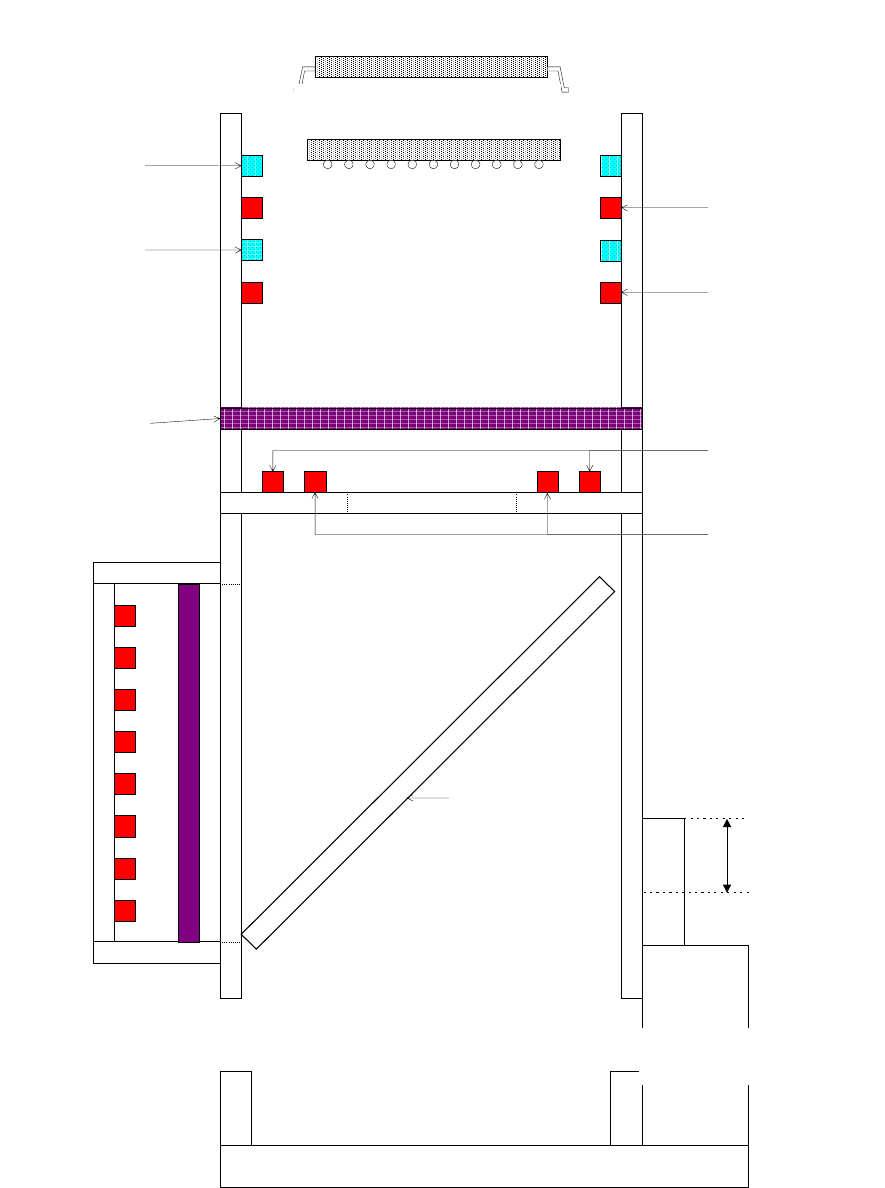
Figure 5.2.6.1 Bottom and side light units
(Relative component height when
the air c
y
linder is moved down
)
(Relative component height
when the air c
y
linder is moved
Blue side light 1
Blue side light 2
Red diffuse
r
Coaxial light
Air cylinder
Half mirror
Red side light 1
Red side light 2
VCS bottom light 1
VCS bottom light 2